I’m running Carbide Create Build 876 on Windows 11 with a laptop and three external monitors.
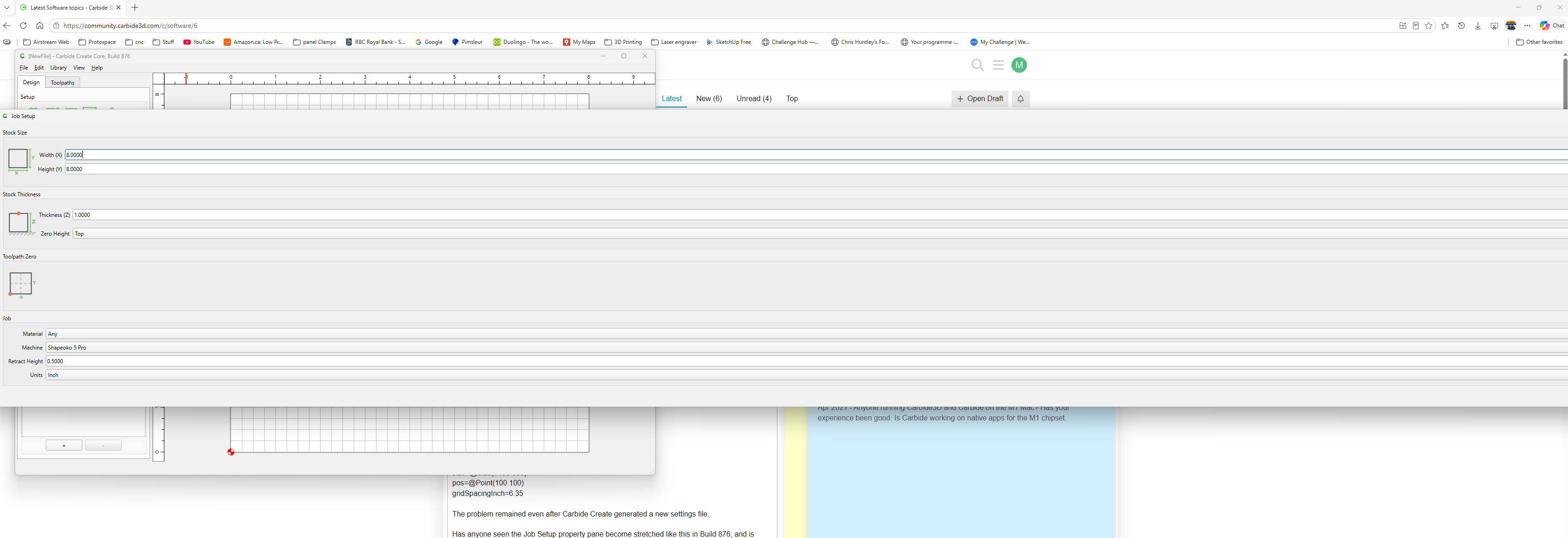
The Job Setup and Tool Database pane has become corrupted and is displaying incorrectly. The issue occurs with every file, including new files, not just a specific project.
Symptoms:
The Job Setup section at the bottom of the screen is stretched horizontally across the entire Carbide Create workspace. Width, Height, Thickness, Material, Machine, etc. fields are rendered as extremely long horizontal controls. The pane is several screens wide. The height appears normal. There is no visible divider or resize handle that allows me to restore the pane to a normal width. The problem persists even when Windows is switched to a single display. The problem occurs with both existing and newly created files.
Things I’ve already tried:
Closed and restarted Carbide Create.
Renamed/deleted settings.ini.
Started with a fresh settings.ini.
Tested with a new file.
Tried moving/resizing windows in Windows.
Tested with only one display active.
Current settings.ini:
[General]
recentFiles=@Invalid()
size=@Size(1400 900)
pos=@Point(100 100)
gridSpacingInch=6.35
The problem remained even after Carbide Create generated a new settings file.
Has anyone seen the Job Setup property pane become stretched like this in Build 876, and is there another layout or workspace file that needs to be reset?