Hello, I have a problem and maybe it has happnd here before and I can get it corrected.
My Pro5 looses connection during operation, and cannot get it reconnected without unplugging the usb from the computer, and when I do get it reconnected, I have to start from the beginning of the cut.
Please check in with the folks at support — they should be able to sort out the disconnection issue with you.
Note that current versions of Carbide Motion do have a restart facility, one just has to keep track of/determine what line number was last cut.
There are 2 possibilities (or more):
1st static electricity. Static is the most likely problem on a CNC for a disconnect. You have moving air, moving bit and wood flying. So make sure your dust collection is grounded. Some people plug their computer into a different outlet from their Shapeoko. It would need to be on a separate circuit. Also if using a router the brushes generate electrical noise when they get close to worn out. That works pretty much like static electricity.
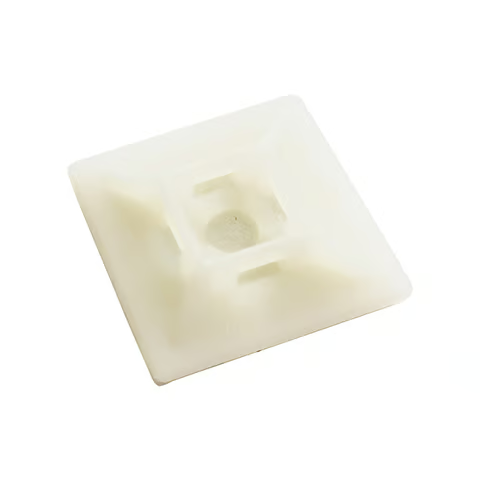
2nd is the USB cable. Maybe the cable is loose at either end. I used a wire tie anchor on my controller end and a wire tie to keep the stress off the USB connector. Not much you can do on the computer side but make sure the USB cable is not dangling and possibly getting disconnected. Along with the USB that is not a physical connection is your computer going to sleep. I have my laptop set to never sleep. If your computer goes to sleep you will lose connection.
3rd Bad Controller. This is unlikely because most electronic devices work or do not work. There is a remote possibility you have a controller problem. That is a remote possibility but possible.
So review your grounding on dust collection. Review your USB connections.
Wire Tie Anchor with adhesive back.
1 Like
Thans, I will look at that, as far as my laptop being plugged into a different outlet, I was on the Battery,
Thanks again
@Justtinkerin Another thing is to make sure your laptop power and sleep settings are turned to “never”.
4 Likes
Wow, 11 years later and I’m sad to see that this is STILL a problem…
Usually on an SO5 Pro, since it is optically isolated it turns out to be a loose USB cable, flaky USB connection on the computer (if it’s ever at the controller, we will of course replace it), or configuration issue as posited above.
Actual EMI/static-related disconnects have almost vanished from the support queue.
1 Like
almost…giggle…Thanks Will (you made me smile)
Another idea not yet discussed is that the computer is putting the USB to sleep in the power saving settings. Make sure that “feature” is turned off. That has happened to me.
2 Likes
Wow, Thanks everyone, as stated above my laptop settings was setup for sleep mode, I have reconfigured that to never, and I am also going to put a highly shielded usb cable in the connection between machine and computer.
WOW, I didnt expect such a great response. Thanks!!!
3 Likes
Make sure the vacuum hose is grounded. That’s priority #1.
4 Likes
Gotta like it when its an easy solution! 

I had the same issue when i got my pro5, Eugene West one of Carbide 3D support tech clued me in and felt it was am EMI issue, i put an EMI USB adapter on at first and still had it happen, but not as often, i added an EMI to my 110 line and the issue has gone away. Its been about a month since i did this.
2 Likes
Since this seems to be a fairly common problem, could the Windows version of CM use SetThreadExecutionState() to prevent the computer from sleeping?
We’ve had code in there to keep the machines awake since the start. Maybe Windows changed along the way (surprise, surprise). We’ll have to see whether we need to update the API we’re using.
2 Likes
I’ve posted about this in a different thread but worth reposting here.
I bought a new laptop (Apple) and started getting disconnects on almost every job. I changed dust collection separated all wires etc and still happened. I realized that the new laptop had a USB port on each side. I was using the one next to the power cord. I moved it to the other side away from power and haven’t had any issues at all since. Sometimes it’s the most innocuous solution.
1 Like
I had that problem my power switch cord was bad one of the progs on the was bad it was loose and made me lose connection
This topic was automatically closed after 30 days. New replies are no longer allowed.