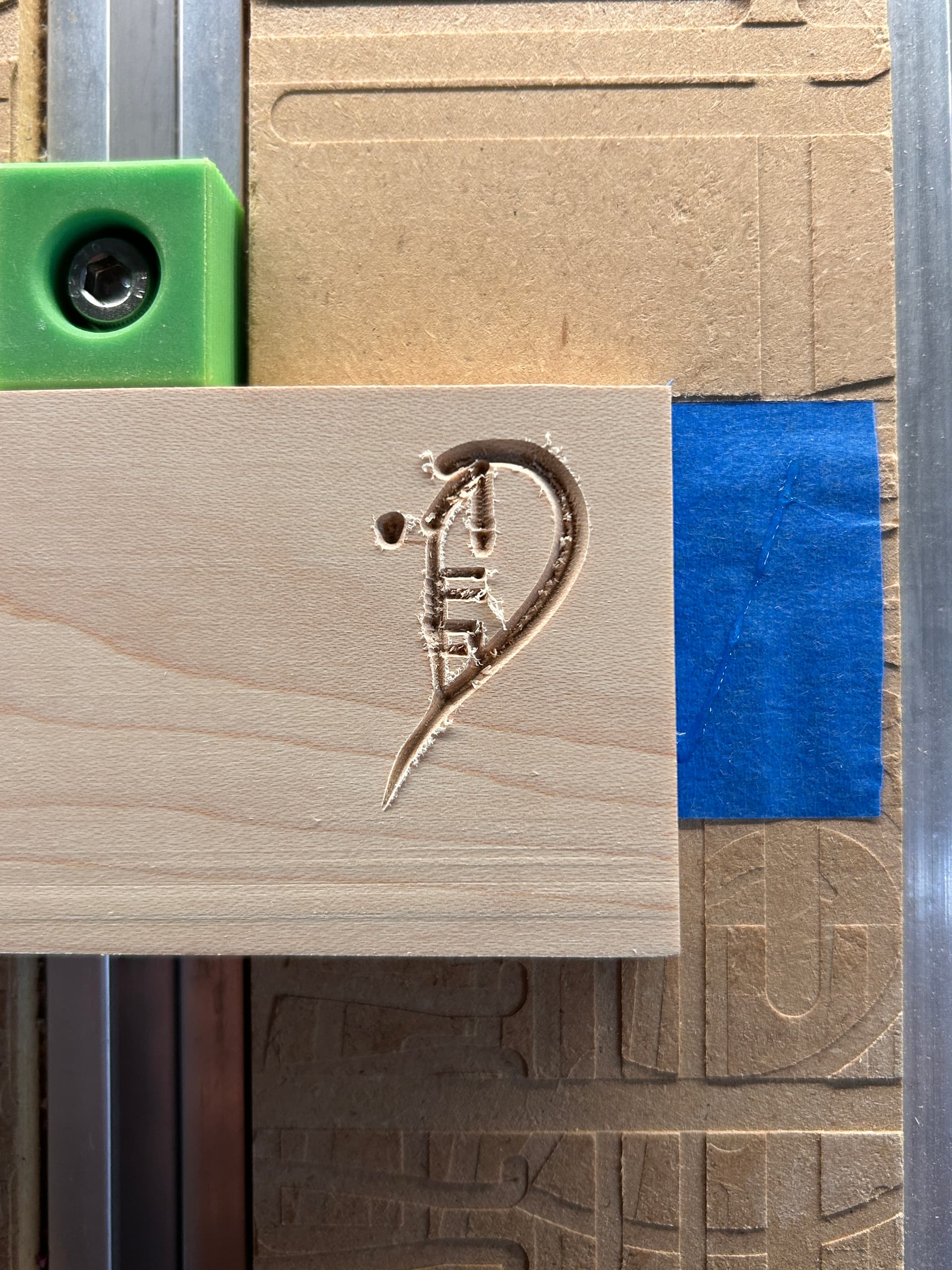
I have not done much VCarving. I’m trying to do a desk name plate with a relatively simple logo. It looks great in simulation but is not cutting correctly. I’ve attached the Carbide Create file and a photo of the resulting carve. Part of the logo is not cutting and there are extra cuts that I can’t explain. (Cutting in an area where the tool shouldn’t even be moving on the toolpath???) Any help is appreciated.
This usually indicates a mechanical problem of some kind. The two biggest problem areas are usually:
The machine is having difficulty cutting the material, so it bogs down and ‘loses steps’. Everything after that is offset by how much travel was lost
Mechanical problems on the machine causing ‘lost steps’, such as
- Loose belts or pulleys, if the machine is belt driven
- loose wiring causing intermittent contact problems
- Running into something, with the carriage OR hose, so steps are lost
I agree with @mhotchin… you have the DOC set to .1" but that cut is much deeper than that. You might want to run the machine setup again and make sure you have the correct Z axis selected.
Or, the program zero got set wrong, so it’s cutting too deep, and/or the rapids are actually below the surface, so it’s cutting when it should be moving above the stock.
I’m also curious about if the material shifted. in your photo, i can see the blue tape and super glue method was used, but did you plan to have the tape and glue that far out from the edge of the material?
Looking at the actual wood, it looks like the horizontal cuts for the cityscape are all stacked in a line vertically instead of being spread over like they should be. that makes me think that the material shifted with the cutter somehow.
Interesting point. My photo is from a second attempt with just the logo. I had previously tried the entire file. The text (also set to .1" DOC VCarve) was the correct depth, but the logo did cut deeper. I reinitialized after that first attempt, reset the zero point, and tried just the logo. Still deeper than .1. When you say “make sure you have the correct Z axis selected” do you just mean the z-zero setting in Motion? Or is there something else I’m missing? (I’m pretty new to this.)
No shifting. I was watching the cut. Wood didn’t move and was still securely glued down after I turned off the cutter. I’m thinking the first comment must be right that the cutter get jammed somehow and didn’t move left when it was supposed to.
Thanks for the reply. I think this must be it. Seems like the cutter was supposed to move left to continue the cut but somehow got stuck. I check the machine as best I can and give it another try tomorrow.
No, not the Z zero. When you power up the machine do not click “Connect” look at the bottom of the screen and run the machine setup again and make sure you select your Z axis. There have been a few times where users have found that for some unknown reason the machine settings have changed. https://carbide3d.com/hub/docs/shapeoko-setup/