It took some playing (and I’m not sure how likely this is) - but I was able to reproduce it on the current beta:
- Create a rectangle
- Choose something other than Square
- Put in an invalid value into the Radius field (or delete it)
- You will receive an error message
- Click OK, then click off of the rectangle to deselect it:
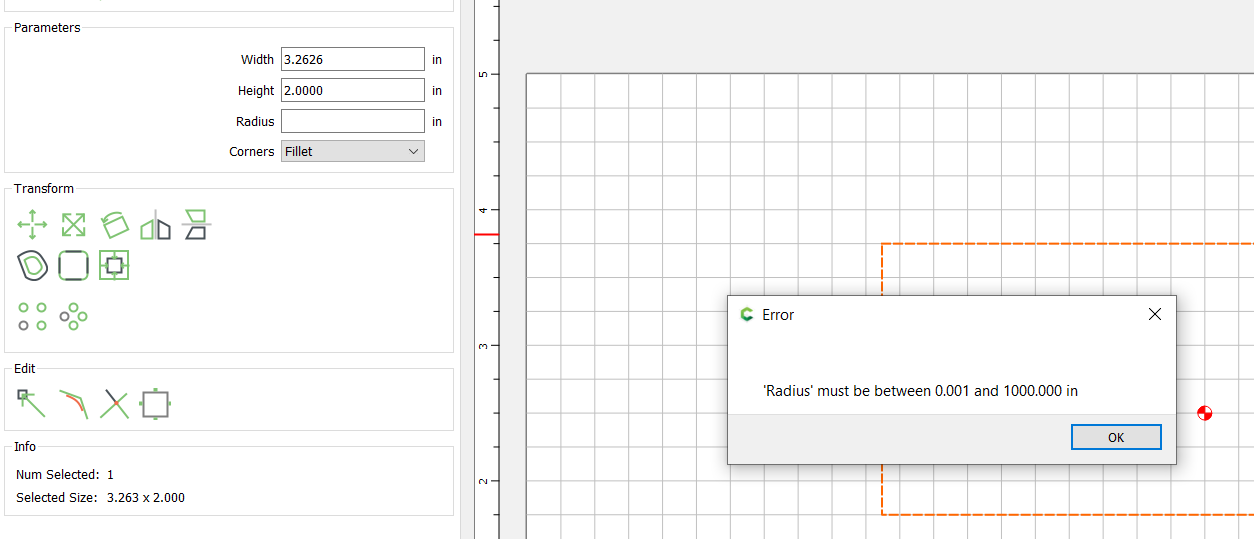
From this point on, if you select that rectangle (or attempt to create a new one), the radius value is 0 - and if you attempt to change anything about the rectangle (h/w) or attempt to create a new one, you will receive the error message.
The way around it is to click until you can get the drop down for “corners” to open and select something other than square and the change the radius value to a valid amount.
I think the right behavior will be for CC to Remember the last VALID value of the radius field, rather than the last one typed. If an error occurs, CC should not remember the invalid value.
- Gary
[EDIT] It seems that the code is putting a 0 into the radius field upon error…regardless of the invalid value entered. Therefore, there is SOME code that’s already managing the field upon error…it would make sense to just put the original value back instead of 0.