I have a 3/4 piece of wood that I am trying cut, I set the depth to 0.73 in. at first but the bit doesn’t contact the wood. I changed the thickness in Carbide Create several times all the way down to 0.5 and it still doesn’t get to the wood when it “cuts”. I was careful to zero it out each time so it’s not that. Any suggestions?
What is your Stock Thickness | Zero Height set to?
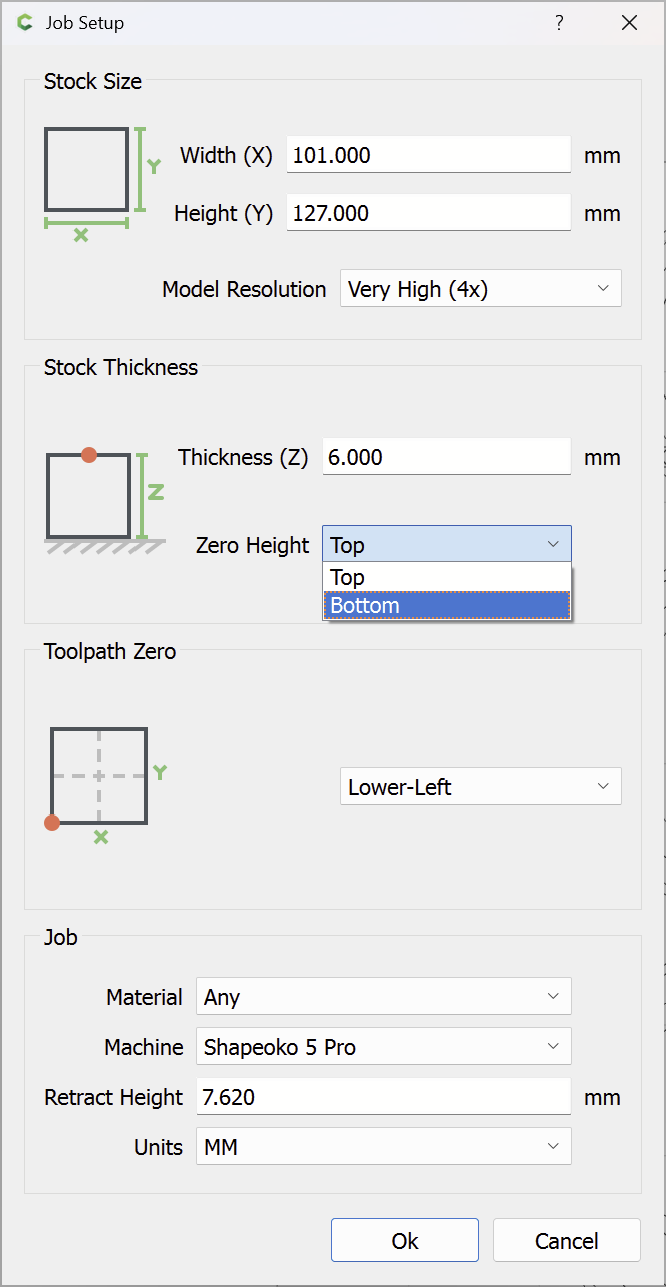
Usually this is caused by a mismatch between job setup:
https://carbide3d.com/hub/courses/create/job-setup/
and how origin is set relative to the stock:
https://carbide3d.com/hub/courses/running-shapeoko/movements-zeroing/
I have it set to top as you show.
Which CNC do you have and can you attach your .c2d file?
If you still have trouble, please send in the .c2d file and let us know step-by-step how you are securing your stock and setting zero relative to it and managing all tool changes, and send a photo showing the stock in place and the machine at the zero position relative to it (or a specified offset from that position) and screengrabs showing what Carbide Motion shows for Position and Machine Position (click on either to toggle to the other).
Maybe posting machine and z axis type can help diagnose the problem?
1 Like
This topic was automatically closed 30 days after the last reply. New replies are no longer allowed.