The STL model import on v8 seems to work differently. I have a 24inx24inx1in stock and want to carve a 3d relief model using a STL file that I have. I go to model tab for 3d import. I am setting the base height to 0.25in and Z scale to 0.75in. Merge type is Add. However, the 3d model is showing raised red indicating more than stock thickness. The same kind of import settings worked in v7. Any help here please?
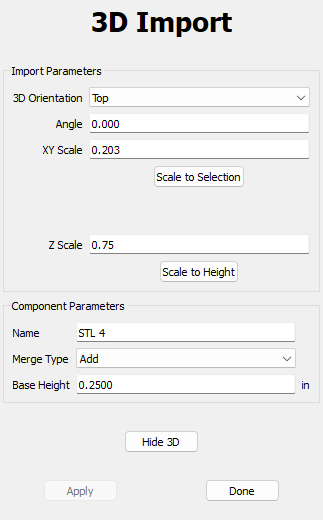
I figure I have to click the scale to height and select the desired height for the component in v8. So, after doing that, the model correctly imports. However, toolpath creation isn’t working since the model vectors and not selectable at all and neither is the model added to the default layer. When I click on the model nothing happens. Is this a beta version of v8. I have downloaded build 815.
Upload your STL file? (or send it in to support@carbide3d.com)
Screen grabs showing what the STL looks like and how it imports?
try creating a vector around your model. select the vector to create the tool paths.
2 Likes
Thanks yes, I found the imported model also has the option to add boundary vectors. That did the trick since my STL was an odd shape.
Thanks Will. I was able to figure it out, what the scale to height does in V8. That solved the issue.
This topic was automatically closed 30 days after the last reply. New replies are no longer allowed.