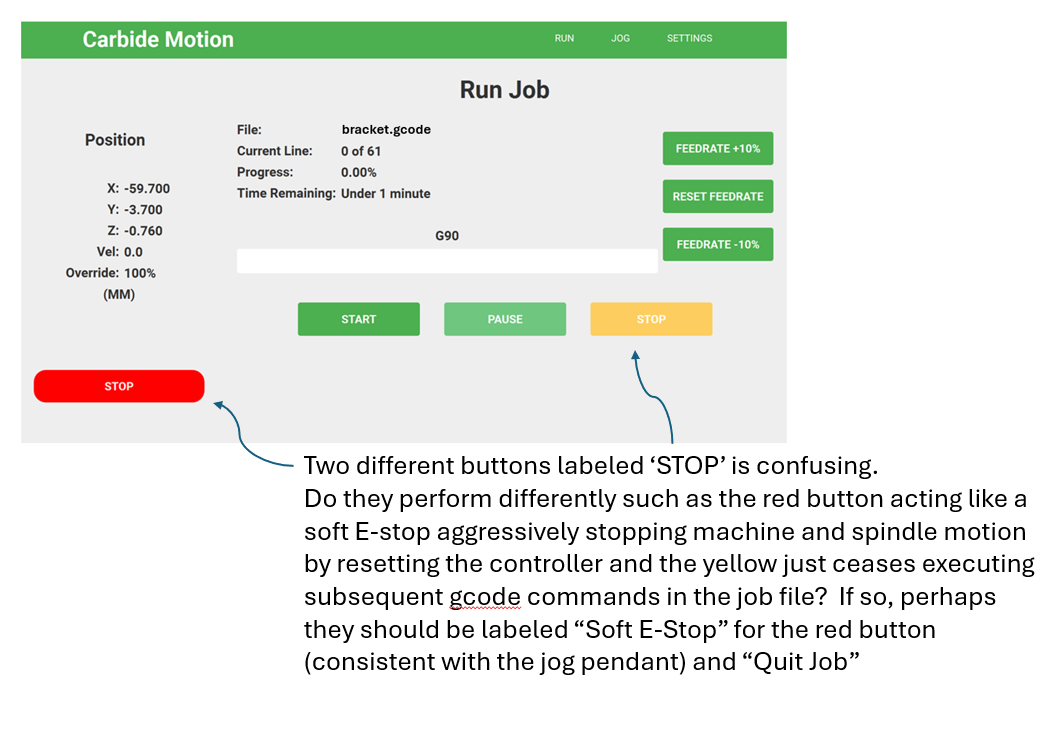
The red one labeled Stop should more aptly be called “Self Destruct”.
I had a gcode file that was sending the cutter in an unexpected excursion beyond the workpiece that would have eaten a clamp. A toolpath programming error… it happens.
So in a panic I hit the Red button (not the physical one but the software Stop button in CM). Yes it stops the machine, but it (by the program’s own admission) leaves the controller in an undefined state. That said, I cannot recover from this state even with complete power down and reboot of the PC running CM. Instead on subsequent machine initialization, the X-Axis limit switch no longer works and the machine starts trying to run the stepper motor for the X-Axis beyond its available range continuously.
Wow, great stop feature! I’ve already had to send my controller back soon after I bought it for a complete replacement because the X-Axis limit switch fails to work. Am I now experiencing the same problem again? Is this a long standing design fault with C3D machines?? Please help.
I don’t know the specifics of your ticket, but if parts fail back-to-back, it’s usually something else working against us.
The stop button is meant to be an emergency stop. To us, a group of engineers, an “emergency stop” should be hardware that cuts power, or otherwise disables the unit immediately. We cannot do that from a program on a computer, so we kill the motion controller as much as possible, which leaves the machine in an uninitialized state. So, in engineer-brain, this might be called something like a “Soft E-stop,” which means nothing to anyone. Instead, we made a red “Stop” and put it to the left, away from the buttons like “Pause”.
I’m just as happy to have it removed in the next major version change if it’s done more harm than good.
With that background context, what should that button be labeled?
Well it could have been just a coincidence that the X-Axis limit switch failed somewhere between the prior machine initialization just before executing this job and hitting the soft Stop button but I tend to be skeptical about coincidence. There was a span of about 5 minutes between the limit switch and machine functioning normally and this panic stop event which seemingly put the machine in this nonresetable state where the limit switch does not work even when testing in the debug screen of CM. Guess I’ll open a ticket and see what they suggest.
Well coincidence indeed it seems. I decided to swap out the limit switch with the spare and the problem resolved. Strange… I guess I was too quick to blame the controller again based on my early experience.
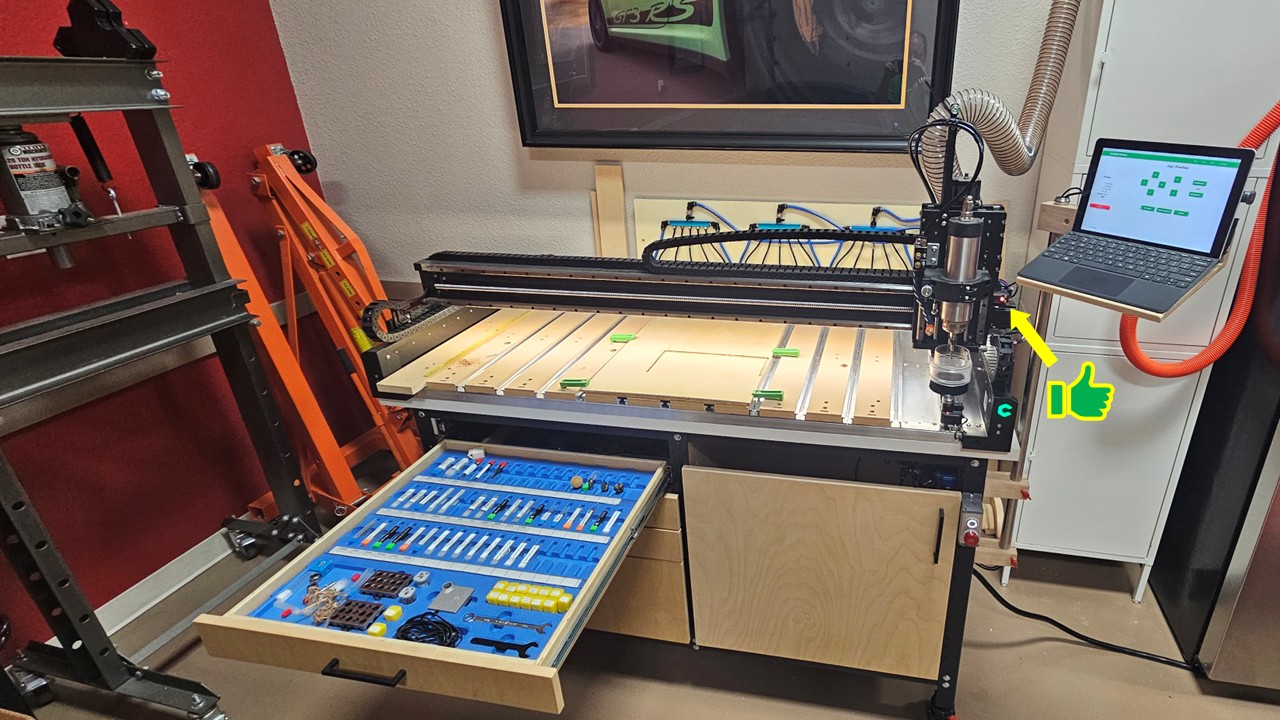
Thanks David. The air lines and manifolds behind the machine are a failed initial attempt at a vacuum table using a sealed MDF substrate as a cheap bed… didn’t work needless to say. Will be biting the bullet for an aluminum vacuum table instead. I also have air at the spindle for cooling and chip clearing when needed. I sometimes helpful with fine details in HDPE (like sign work).
Just popped in to add that I recently had two limit switches and three cable connectors fail recently. I removed all wiring from the machine when I got my 5.1 upgrade kit and legs and I must have messed up the Molex connectors. I was down for about 3 weeks troubleshooting and getting new parts. But I am now very comfortable making new Molex connectors
FWIW, Molex is designed to be connected and disconnected thousands upon thousands of times before failing. But even if it does fail, it’s also designed in a way that a fairly unskilled person can replace the connection without soldering or anything fancier than a crimping tool.
Glad you’re up and running again. And your set up is impressive. Nicely done.
E-stops are important to keep. The Nomad3 has no physical E-stop, so removing it from the GUI would be undesirable. More education regarding that button may be helpful.
From the sound, it reminds me of shunting a motor which causes it to stop quickly if in motion. This would create a large back emf, which the controller electronics should handle.
Anecdotally, I’ve used the red stop button successfully before and continued along after re-initialization. I also recall instances of bad noises and limit switch error messages that sorted themselves out with some combination of re-initialize / power cycles.
But, in my opinion, it’s not an “E-stop” because it’s software. That might be a distinction that’s only important to an electrical engineer. Is it an E-stop to you? Is the “software” part a meaningless distinction?
I feel the GUI could use some rethinking and clarity in this regard. I have an upgraded to 5.1 machine. So I have the physical E-Stop. I’ve pressed the software Stop button by mistake a couple of times mid-program when I meant to press Pause. Luckily no damage. At best its a hassle, need to reinitialize and zero.
The confusing part is when a program is not running, the Stop button brings up the “park and shutdown the machine” prompt. I use that end of every day. I realize CM must support multiple machine types. Still there ought to be a better way than a button which gracefully shuts down in one context and emergency stops in another.
When I operate the machine, my attention is on the work piece and the control panel in front of me. The GUI STOP is the closest thing to an “oh sh**” button I have. Certainly I would prefer a hardware interlock. Shunting or aggressively stopping the motors is an increment better than requesting the system to slowly spin down.
The physical power button and power plug are ergonomically inferior to a red button. If I need to prioritize the physical plug/power-switch then my attention is divided between three places: the control panel, the work piece, and the power plugs.
@WillAdams simply it’s not occurred to me. My expectation of the tool was that it would be a complete solution, rather than diy project. I address gaps as they become blockers. Edit: Thank you for the suggestion
In regards to two buttons on the control panel labeled “stop”. From experience, it is confusing to have two buttons with the same label with different meanings depending on context.
If you’re open to requirements, please consider:
“Stop” shall have exactly one definition
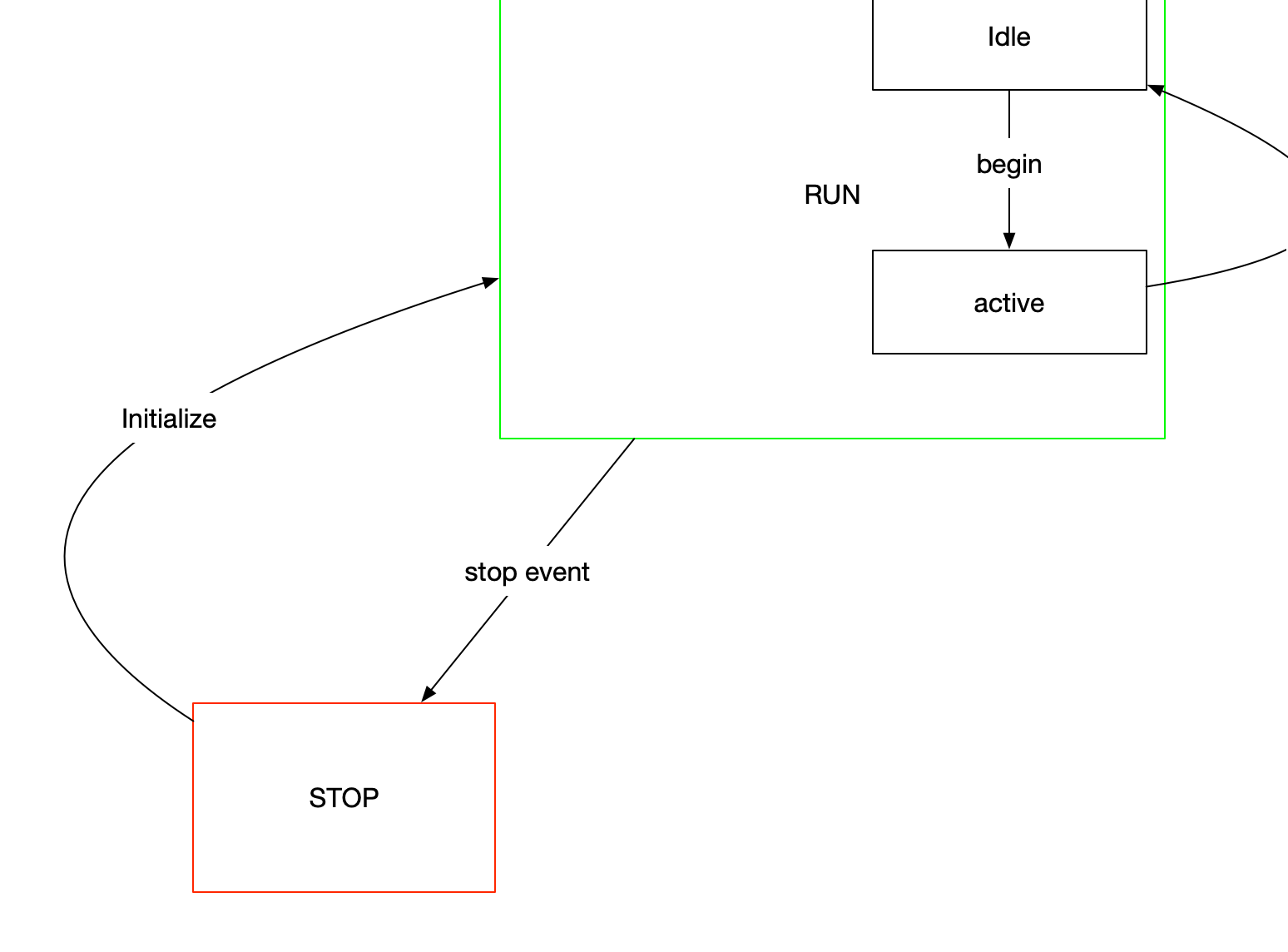
I have encountered this concept before, and think the program behavior aligns well with a RUN/STOP paradigm. Within RUN you have most of the online features occurring for example Begin Program, Pause Program, End Program.
Attaching a simplified diagram. The important part I think is that stop means one thing, it is the state with absolute least activity. Run and Stop are paired. All the activity is within Run, and labeled uniquely.
I have several ways to stop or pause my machine and have used all of them several ways with no issues. Made a pendant today that i can wear on my neck and it uses MQTT through home assistant to pause my job in carbide motion. Since adding a bitrunner a few days ago i figured i would like one so i can stray a bit further away from my estop and it will buy me some time without a full ebort.
I’ve always thought it confusing that the CM UI has two buttons labeled STOP.
My suggestion would be to retain both if the functionality is indeed different and clarify their function with the red button being labeled “Soft E-Stop” (assuming it actually issues a USB command to reset the controller) and the yellow button labeled as “Quit Job” (assuming it stops issuing subsequent gcode from the active job and returns to the default CM Run screen).
Thanks for posting this. I know there is another method that is used to created physical emergency stops, it’s not as easy as digging through your electronics drawer and pulling out a switch that you already have.