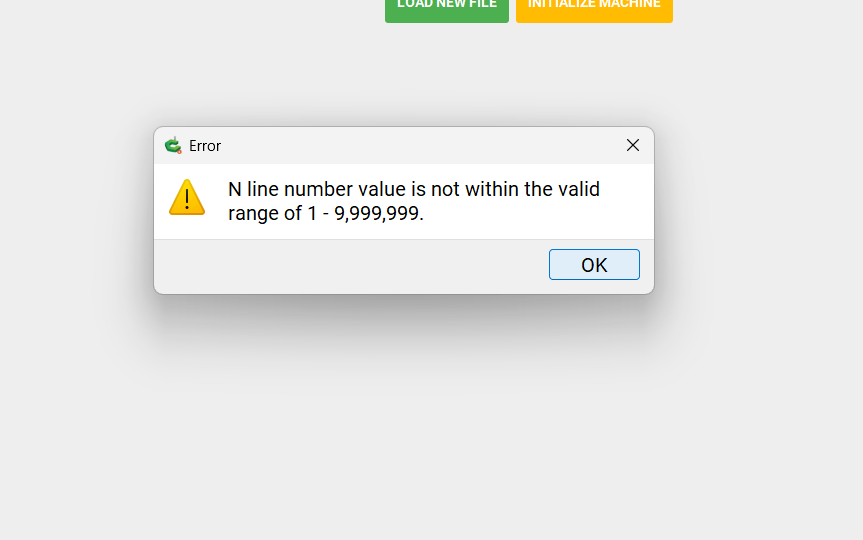
I’ve run, twice now, a .nc file for a 3D relief that first time stopped with the screenshot error message, this happened after 25 hours into the carving taking place. I then re-ran the job only for it to happen at 32 hours into the carving. SO, here is the issue. It has only happened since I updated CM to V653 from V6. I went to upload the original file in V6 with a 0.1mm stepover, which I have used for over 2 years of doing 3D reliefs, V6 wouldn’t upload beyond 44%, so I changed the stepover to 0.25mm, the radius of my tapered ballnose, the file ran and cut, but it wasn’t as smooth a finish as I usually achieve with 0.1mm SO, so the suggestion from tech support was to update to V653, which I duly did and now it stops with the error message that I have posted above. This has cost me in excess of 78 hours in total, including roughing passes and I’m frustrated beyond belief, that with a 0.25mm SO it works, but with a 0.1mm and with V653 it stops, anyone with any helpful answers please? I have sent the .nc file to tech support and am awaiting their reply.
I ran into that message. It’s a limit of GRBL max line numbers.
I had to split the path into multiple sections to get around it.
Hi Jim, I am not a computer boffin I’m afraid, so knowing how to split the path is alien to me I’m afraid? The file is one I bought from etsy and I don’t know how to fragment the artwork to generate multiple files, I hope that makes sense?
As was explained on support, Grbl has a hard limit of 10,000,000 lines — only files with line number up through 9,999,999 are accepted.
A further consideration is how long this file would take to run?
Break projects down into files which run in 6–8 hours at most.
In Carbide Create, for a 3D project, this may be done by drawing geometry to limit the extent of a 3D toolpath and using that geometry for said toolpath. Presumably, CarveCo has some similar facility.
I would also suggest reviewing feeds and speeds and tool selection:
I am using Fusion not CC. I create a box around the area I want to cut. So I make as many boxes as I need. A lot of times Fusion gets lost on high density cuts, so I split the areas just to get a gcode file.
I am not sure you can do that in CC.
You can (draw geometry and limit a 3D toolpath to a region defined by the geometry).
Not sure about CarveCo which is what @Chrisbarneys is using if memory serves.
I don’t use CC I use Carveco maker plus, it doesn’t allow the area to be broken up when the file is a 3D relief, it allows trimming only.
You are correct William, I am using Carveco maker plus and it doesn’t allow the artwork to be divided up, not that I can see and I have watched the training videos they have on their website. I have reduced the lines to under 10m by increasing the stepover to 0.22mm , that should make it come out fine. Thank you for all of your advice I will take a look at the information you’ve suggested.
This topic was automatically closed after 30 days. New replies are no longer allowed.