I’ve watched the tutorials but don’t understand the “use stock top - use stock botton” - is this something you choose or does the software make decisions about this? When is each used and why? As you might suspect I am brand new with regard to cnc.*beginners *
That is a decision one makes based on how/where one wants to set origin relative to the stock.
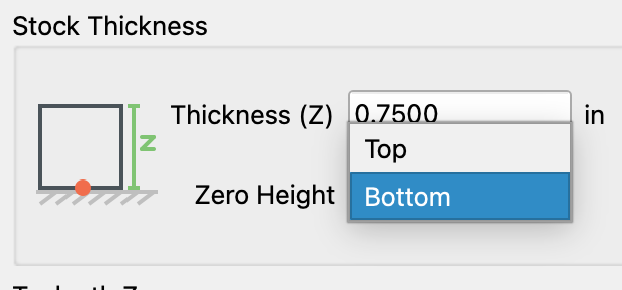
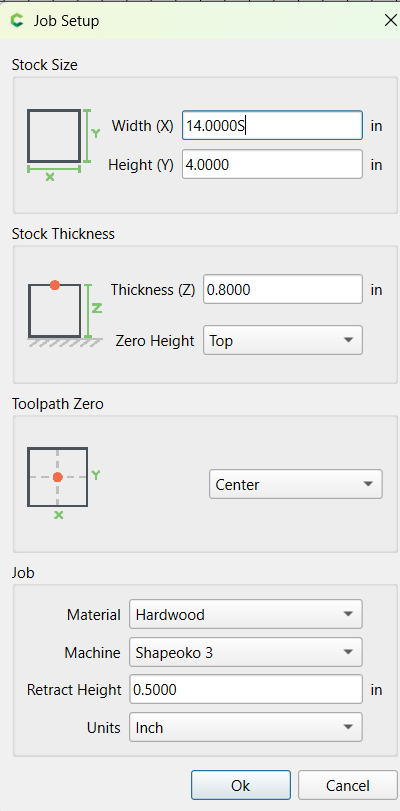
Unless there is a reason to do otherwise, we recommend folks use Zero Height: Top (of Stock).
2 Likes
They are basically shortcuts. Notice they are right beside manual inputs. So lets say you set up your project initially as .75 as the stock thickness. If you want something to go all the way through, you’d find yourself having to type .75 in every path you create. These simply let you tap it and it populates the value. and they are aware of whether you set up your project as 0 at the bottom, or 0 at the top and put the correct value in accordingly.
1 Like
I understand zero at the top but how does zero at the bottom affect the cut depth value?
I guess Im asking does start depth refer to layers if it isn’t zero?
Lets clarify something first to ensure I understand. In the job setup window, are you using zero height at the bottom of the stock or the top?
Top (default) as I see it (how did you post the screen shot paste from clipboard?
So start depth is literally where you want the bit to start on this toolpath. Here is a simple example. Given the attached photo and each ring in the photo is .25 inches deep. i would do this with 2 pocket toolpaths. The first one would use a start depth of 0 and a max depth of .25. Then i would do a second toolpath for the inner circle and do a start depth of .25 and a max depth of .5. Could the second toolpath have started at 0? Sure, but it would waste time
since all the material is already gone for the first .25 inches you’d be cutting air, so might as well have the second toolpath start at .25.

1 Like
Where top/bottom origin is set does not affect anything other than where the zero needs to be set when running the file.
For a bit on that see:
For the Job Setup aspect see:
It refers to a relative dimension. If origin is set to bottom, then that is where zero should be set and the top of the stock should be Stock Thickness above that.
If this is still not clear try a Training Session to go over it? Or set up two test files?
Thanks to everyone. I think I’ve got it.
1 Like
The confusing part when you first start is that when you top of stock as your Z Zero and the say start depth of 0 it’s the same plane.
When you use bottom of stock for Z zero the start depth of zero is really a different plane because the thick tops the stock is taken into consideration automatically.
You don’t select bottom of stock and then set start depth of -.75 on a 3/4 piece. It took me a while when starting to wrap my brain around that.
The general rule of thumb is to use bottom of stock as your Z Zero when running toolpaths that will cut all the way through the material. This reduces the chance that you will cut into your spoilboard.
If you aren’t cutting through then it doesn’t really matter which you pick in the software, just make sure you use the same reference point in the real world.
1 Like
This topic was automatically closed 30 days after the last reply. New replies are no longer allowed.