New owners of 4XXL, and so far have been doing just fine, however. I use a MacBook and my husband uses an HP Envy which runs Windows 11.
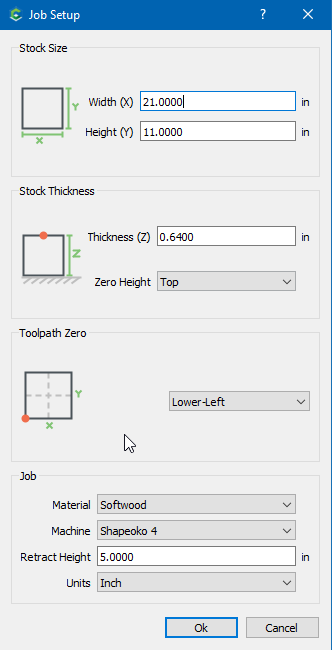
I have had zero issues designing on CC, but whenever he designs in CC on his laptop, straight chaos! The Shapeoko initializes fine, measures the endmill, but when it starts, it just drills straight into the stock (rather through the stock into the waste board). He sent me the file he is trying to make and it looks a little wonky. How and where did we go wrong here?
If your machine had mechanical/electrical issues both users would have problems. I have been on this forum for a long time and 99% of the time when people are experiencing the things you are describing it is something the user is doing.
The best thing you can do is contact support and send them the file that is causing problems and work with them on what might be the issue that is causing his difficulty.
99% of the time I have had a flub it was on me and not a machine problem. However the 1% was never explained and never came back.
I worked on computers since the first personal computers came out. My last 20 years of working I worked on enterprise level unix computers, storage and tape backup. Over the years I learned to never say never. So it is possible the problem is not the user but the machine but…
So with all those years of working on computers and waiting and waiting and waiting on them to POST, boot, start applications or crash and burn I told my daughter to put on my tombstone
Thank you so much. I was also thinking it was operator error, but I am a bit too new to say that with confidence. I’ll open a ticket and see what went wonky. I really appreciate you taking the time to answer me with such detail.
flag USA.c2d (212 KB)
Here is his file. I think I might see where the problem is, but I would rather a seasoned pro tell me before I start making smarty pant assumptions. Lol
The only thing wonky I see is the retract distance of 5.0" I think that will certainly hit your upper Z travel limit, which could then cause the stepper to lose track & your tool to dive too deep.
That’s what I noticed as well, thank you. We will make those adjustments and give it another go. Also by on TOP, you mean on the surface of the stock, not at the top “North” position, correct? Just making sure I am on the same page. Thank you again, I appreciate all your help!