Howdy!
Thats the right controller! It has 3 modes, one of which is “keyboard” mode.
No need to actively run key mapping software, Carbide Motion supports keyboard shortcuts. I pulled the shortcuts from this post
You should only need to sync key mappings once to the controller.
- Download the iOS/Android app “Ultimate Software V1” (https://app.8bitdo.com)
- Launch app and connect the controller
- set key mapping in the UI
- click sync
Key mapping I used
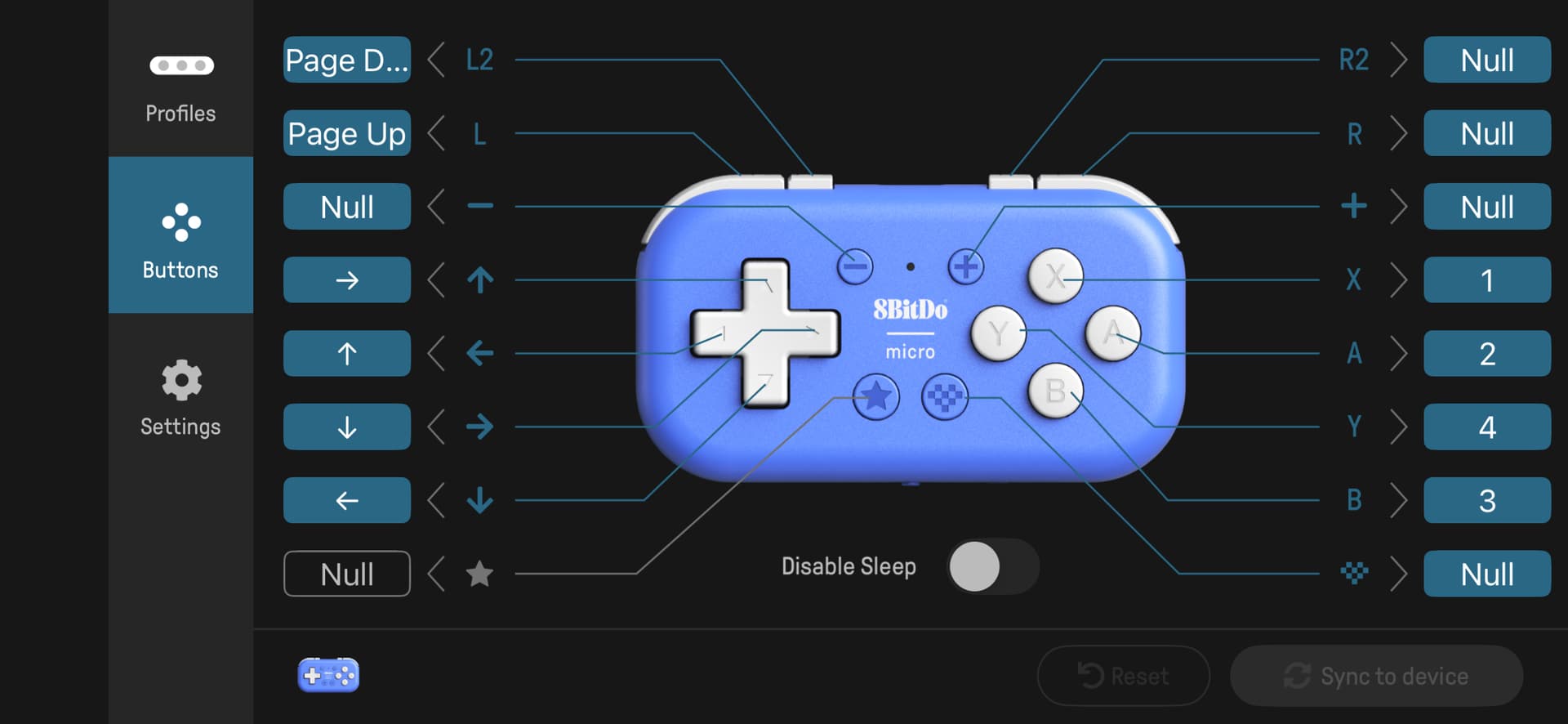
- D Up - Arrow Right
- D Right - Arrow Down
- D Down - Arrow Left
- D Left - Arrow Up
- L - Page Up
- L2 - Page Down
- X - 1
- A - 2
- B - 3
- Y - 4
- All others - Null (to avoid unexpected key presses)
From then on you just connect the controller over bluetooth to the Mac/Windows machine running Carbide Motion. It will look like it’s a bluetooth keyboard to the Mac/Windows machine, and Carbide Motion happily accepts the buttons on the controller as keyboard inputs.