Hey guys, could you let me know what/if anything I’m doing wrong or is it simply a case of CC won’t allow what I’m trying to do. So I have a block of wood, I pocket one side of it down a half inch, leaving an island which I can v carve the top of just fine, but when I try to v carve that pocketed area, it’s showing an empty path and no v carving when I set starting depth at that half inch. but if I set starting depth back to 0, then it shows an a lotted time, and still…the Vcarve doesnt show. I was hoping I’d be able to do all of this as one project, but I’n assuming I’m going to have to do this then come BACK to Vcarve the pocketed area? - files attached
example_depth_thenVcarve.c2d (308 KB)
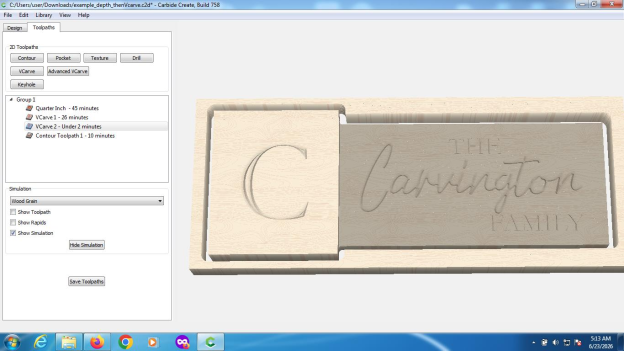
For Vcarve1 use a max depth of 0.655 inch not 0.155 inches. The carve starts 0.5 inch below the original (un pocketed) surface and has a max depth of 0.655 inches below the original (unpocketed) surface. Cheers.
PS. You could also scale up the pocketed area 0.25 inches in Y. This would eliminate the small artifacts which remain after the contour cut.
example_depth_thenVcarve.c2d (356 KB)
4 Likes
Dang. This worked, but why isnt my “brain” understanding “Why” it did? Lol (no coffee yet - be gentle). Lol
See in my head, I refrain from pudding the max depth because that makes me think I’m going to cut through the material.
Most time when I do a simple vcarve on the surface I just put a Max step of an eighth in the v bit carves it no problem. So I know I was going down a half inch, I would put the start depth at .5 and the max depth at the amount I wanted the bit to carve from there… Least that’s what I thought I was supposed to be doing why does your way actually work so that I understand if you don’t mind explaining
UPDATE
lol ok, my hamster kicked in, I get it now lol
2 Likes
This topic was automatically closed after 30 days. New replies are no longer allowed.