My first time using the drill cycle function, and it plunged right into the work. Any idea why it did this?
Here are my specs and the g-code it made. Notice the Z 0 in the code.
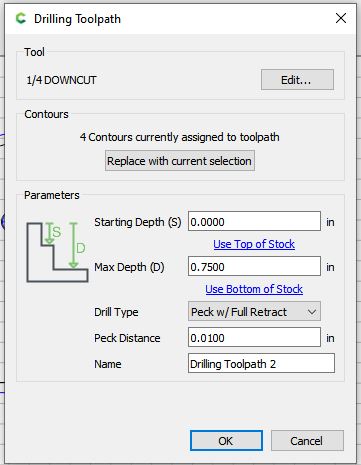
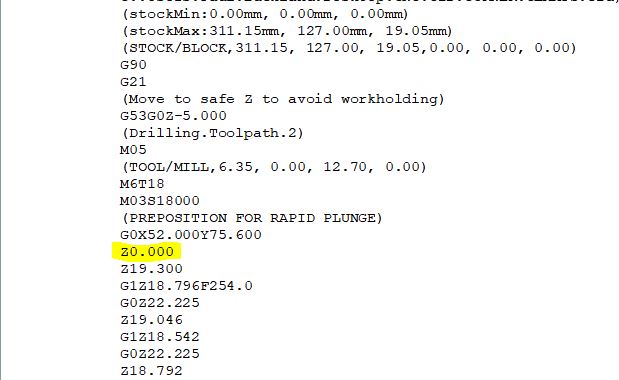
Even better, when you look at the following Z moves, it is pecking shallower each time. Strange.
I manually edited the G-code so that it wouldn’t plunge to zero so I could keep going, but this does not seem normal.
You can only see 2 pecks. It starts at 19.05, pecks down 0.254, then another 0.254… ??
The Z0.0 is definitely a problem. 
You’re right, Where’s my coffee?
Z zero is set to top of stock, and it should be 0.0, -0.254, -.508, etc.
I don’t use carbide create, is “Max Depth” looking for a negative dimension?
I set Z zero to bottom of stock. That’s why it’s all positive numbers
In that case, starting depth should probably be 0.75" instead of 0.00.
At least. It’s 3/4” stock and I have a 1/8” clearance. I did a test with multiple holes and it only goes to Z zero on the first one. The others work as they should.
I didn’t post the entire g-code. That’s why you only see 2 pecks.
Is the only solution to set my Z zero on the top of the part?
Send this in to support@carbide3d.com and we’ll try to have a developer look into it.
I tried several tests, and it only went to Z0 on one of them. I would say set zero to top if it fixes the problem for now as a workaround. It should work with zero set at bottom and needs to be fixed.
Carefully check your simulation, and the preview in CM if using it.
It measures “Starting Depth” and “Maximum Depth” from the top regardless of where Z zero is.
It’s not an absolute dimension, it’s the “depth” from the top of stock.
This topic was automatically closed after 30 days. New replies are no longer allowed.