Thanks to everyone who has reached out to help me so far. I’ve just purchased a Nomad 883 Classic that has the 0.9 GRBL Firmware. Eventually I will attempt to upgrade the firmware but right now I’m just trying to get it working with Carbide Motion v3.66. Right now CM recognizes the Nomad and will respond to limit switch strikes but I can not send manual GRBL commands or home the unit. Is there something obvious I’m missing? In another thread I saw someone mention sending a config file but there were not details on how to do that. It’s a bit frustrating for me because the unit was advertised as a fully working Nomad 883 Pro.
James, you are saying that you can’t send $$ through the MDI menu choice? Doing that while the log window is open will result in grbl echoing the $nnn machine settings. I don’t see anything obviously wrong in the log window printout you showed in the other thread.
Here is my 2016-era $$ printout (from when my 883.1 had grbl 0.9
$0=10 (step pulse, usec)
$1=255 (step idle delay, msec)
$2=0 (step port invert mask:00000000)
$3=3 (dir port invert mask:00000011)
$4=0 (step enable invert, bool)
$5=0 (limit pins invert, bool)
$6=0 (probe pin invert, bool)
$10=255 (status report mask:11111111)
$11=0.020 (junction deviation, mm)
$12=0.010 (arc tolerance, mm)
$13=0 (report inches, bool)
$14=1 (auto start, bool)
$20=0 (soft limits, bool)
$21=1 (hard limits, bool)
$22=1 (homing cycle, bool)
$23=0 (homing dir invert mask:00000000)
$24=100.000 (homing feed, mm/min)
$25=1000.000 (homing seek, mm/min)
$26=25 (homing debounce, msec)
$27=5.000 (homing pull-off, mm)
$100=88.889 (x, step/mm)
$101=88.889 (y, step/mm)
$102=200.000 (z, step/mm)
$110=2600.000 (x max rate, mm/min)
$111=2600.000 (y max rate, mm/min)
$112=1270.000 (z max rate, mm/min)
$120=270.000 (x accel, mm/sec^2)
$121=270.000 (y accel, mm/sec^2)
$122=270.000 (z accel, mm/sec^2)
$130=250.000 (x max travel, mm)
$131=250.000 (y max travel, mm)
$132=100.000 (z max travel, mm)
and here is my $# offsets printout from the same logfile
[G54:0.000,0.000,0.000]
[G55:0.000,0.000,0.000]
[G56:0.000,0.000,0.000]
[G57:0.000,0.000,0.000]
[G58:553.000,883.000,-103.480]
[G59:-102.900,-111.585,-122.770]
[G28:0.000,0.000,0.000]
[G30:-220.000,-10.000,-5.000]
[G92:0.000,0.000,0.000]
[TLO:0.000]
[PRB:0.000,0.000,0.000:0]
G59 in particular is the calibrated position of the center of the table in terms of mm from the homed position. It will have been a little different for each machine so yours looks very reasonable.
G30 is the tool sensor position (its Y value is spurious, since it doesn’t depend on where the table is…)
If you power down the machine, manually move all the axes to the center of their travels and then try to home, it still won’t home?
@Randy thanks for helping me with this. I still can’t get it to home. I sent $$ and got this:
Test Waiting…
<Idle,MPos:0.000,0.000,0.000,WPos:0.000,0.000,0.000,Buf:0,RX:0,Ln:0,F:0.>
gc_not_motion
___________$$ ___________
$0=10 (step pulse, usec)
$1=255 (step idle delay, msec)
$2=0 (step port invert mask:00000000)
$3=3 (dir port invert mask:00000011)
$4=0 (step enable invert, bool)
$5=0 (limit pins invert, bool)
$6=0 (probe pin invert, bool)
$10=255 (status report mask:11111111)
$11=0.020 (junction deviation, mm)
$12=0.010 (arc tolerance, mm)
$13=0 (report inches, bool)
$14=1 (auto start, bool)
$20=0 (soft limits, bool)
$21=1 (hard limits, bool)
$22=1 (homing cycle, bool)
$23=0 (homing dir invert mask:00000000)
$24=100.000 (homing feed, mm/min)
$25=1000.000 (homing seek, mm/min)
$26=25 (homing debounce, msec)
$27=5.000 (homing pull-off, mm)
$100=88.889 (x, step/mm)
$101=88.889 (y, step/mm)
$102=200.000 (z, step/mm)
$110=2600.000 (x max rate, mm/min)
$111=2600.000 (y max rate, mm/min)
$112=1270.000 (z max rate, mm/min)
$120=270.000 (x accel, mm/sec^2)
$121=270.000 (y accel, mm/sec^2)
$122=270.000 (z accel, mm/sec^2)
$130=250.000 (x max travel, mm)
$131=250.000 (y max travel, mm)
$132=100.000 (z max travel, mm)
ok
gc_dwell
___________N0 G4P0.05 ___________
gc_get_offsets
___________$# ___________
<Idle,MPos:0.000,0.000,0.000,WPos:0.000,0.000,0.000,Buf:0,RX:0,Ln:0,F:0.>
[G54:0.000,0.000,0.000]
[G55:0.000,0.000,0.000]
[G56:0.000,0.000,0.000]
[G57:0.000,0.000,0.000]
[G58:553.000,883.000,-104.035]
[G59:-100.705,-111.480,-122.970]
[G28:0.000,0.000,0.000]
[G30:-220.000,-10.000,-5.000]
[G92:0.000,0.000,0.000]
[TLO:0.000]
[PRB:0.000,0.000,0.000:0]
ok
gc_parser_state
___________$G ___________
[G0 G54 G17 G21 G90 G94 M0 M5 M9 T0 F0. S0.]
ok
<Idle,MPos:0.000,0.000,0.000,WPos:0.000,0.000,0.000,Buf:0,RX:0,Ln:0,F:0.>
@Randy When I attempt to Home it gives the following with the $h in red:
Test Waiting…
<Idle,MPos:0.000,0.000,0.000,WPos:0.000,0.000,0.000,Buf:0,RX:0,Ln:0,F:0.>
SET MACHINE STATE: JOGGING
SET MACHINE STATE: NEEDS_HOMING
SET MACHINE STATE: HOMING
gc_homing
___________$h ___________
@fonts, you can do a basic mechanical check to get electrical connections removed from the equation.
This is the top right of the Carbide Motion board that is plugged into the Arduino in the electronics box
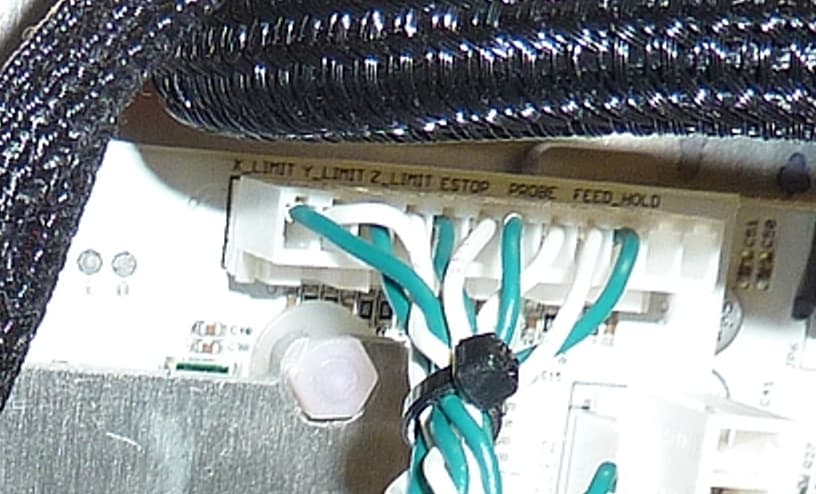
You might try unplugging and re-plugging that long connector that has all the switch wires coming to it. While it is unplugged you might make sure that all the terminals are fully inserted into the plugshell. If one is not, poke it in fully with a skinny tool. There is a locking tab on the upper (in the picture) face of the plugshell that you can verify is engaged.
While you are at it, make sure that the CM board is fully seated onto the Arduino headers. You might try unplugging and replugging it itself. It is possible that the contacts might have oxidized somewhat.
I don’t remember if single-axis homing was enabled in 0.9, but you could try sending $HX, $HY and $HZ to home a single axis at a time. If that works, you could possibly narrow down the homing problem to a single axis.
I did try installing CM368 into my CNC PC, and it was very basic compared to the current CM. (It also didn’t work properly with the grbl 1.1h I have installed) In the long run, I think you would be happy updating the 883.1 but agree with you that it would be best to get the machine working first.
BTW here are the limit switches in their immediate surroundings:
Y under front of chassis:
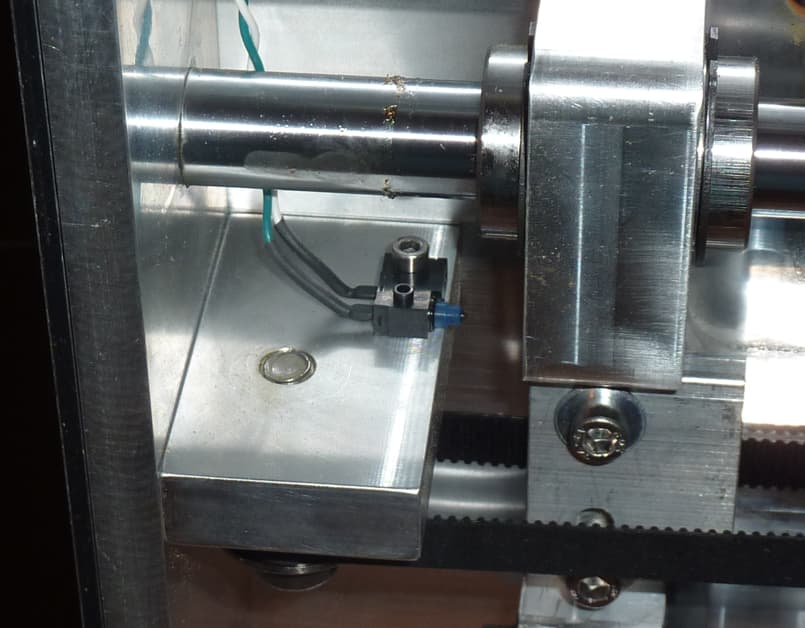
Z at top left of head:
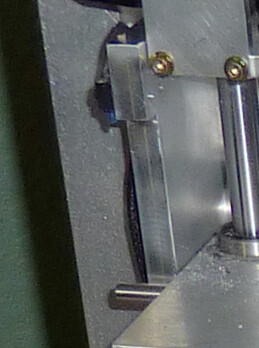
X in rear of chassis:
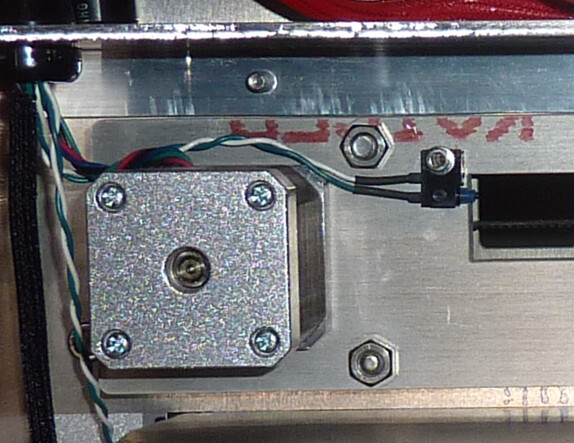
But I’m sure you have identified them by now! 
1 Like
@Randy Thanks for all your help. I finally got it working on CM 3.66 last night. Fully homing and able to make a test cut. Now on to the firmware update.
2 Likes
 Good on ya, James!
(for posterity) what did you do that solved your situation?
@Randy I’m not entirely sure but I think the janky 3d printed e-stop on the machine may have been depressed. It was physically out but I eventually yanked on it and I heard a small click. Of course this was also after going through the machine and checking countless other things.
1 Like
One good thing about this process is that you now know your machine intimately. That will help you in the long run.
After recommissioning my own 883.1, I 3D-printed a little housing to remote mount the e-stop switch (which is the standard twist-to-unlock type) on the front edge of my workbench. It was a long and somewhat awkward reach around to the side rear of the Nomad.
1 Like
This topic was automatically closed 30 days after the last reply. New replies are no longer allowed.