Hi,
I’m having using Carbide Create 8 Pro and I’m having problems entering new tools or copying Carbide 3D tools into a new database. For example, I have copied #102 End Mill (1/8") from the Shapeoko Pro 5 Hardwood into a new tool file and entered the same tool name in the Tool Name optional location. However, The numbers in tool data fields change to smaller numbers automatically.
I have also copied a C3D tool and added nothing to the Tool Name optional field and the numbers in the tool database fields change to smaller numbers and give me an error that the value needs to be between 2 numbers even though it already is.
Is there a bug in Carbide Create Tool Database? I have watched the tool database video several times and followed the instructions, but the database seems to have a mind of its own.
Any help would be appreciated.
Thanks
Matt
Could you upload a screen grab showing what you are trying to enter?
What version of CC are you using? Older versions did have a bug where metric ↔ imperial conversions were being improperly applied.
If you are not already, try upgrading to the latest version.
1 Like
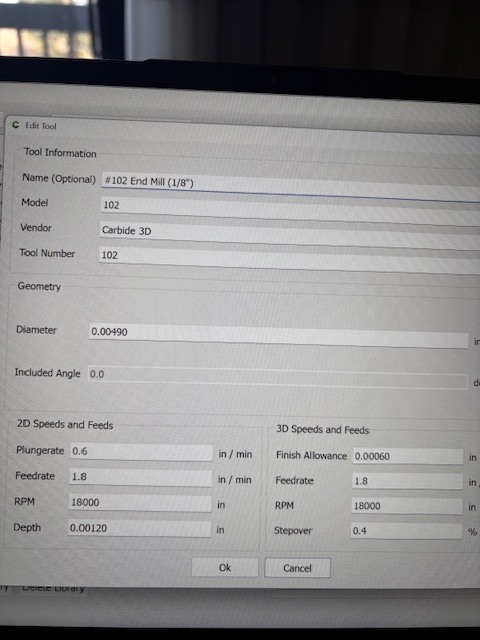
I’m using Carbide Create Pro Ver 815.
Matt
Please update to the current stable build:
If you still have problems in it, let us know and we’ll check this out.
Will, Ok will do.
Thanks
Matt
This topic was automatically closed 30 days after the last reply. New replies are no longer allowed.