I am building a tabletop with a deep engraving of the grand canyon. it will be filled with clear epoxy and surfaced to flat so the topo is under the table surface. I have a 1" whiteside bit that I will be using to surface down, my concern is using a pocket toolpath with CC Pro and having a plunge in the center of this top and then of course the direction changes as it works outward. Any work arounds within CC? Or should I work through Fusion 360 where I can control the toolpath a little better? I have used Fusion 1 time, it was a successful test cut, but I am by no means comfortable with it either.
The 1" fly bits can cause burning. If you want to surface epoxy then surface down until just a thin layer is left and then sand at 60,120, 220, 320, 400 and 600 grit paper to have more control of how much you remove. If the finished project will have finish the dull looking epoxy will shine up with polyurethane. If the finished work will have no finish then you will have to go higher and higher in grits to get the epoxy to polish up. When polishing epoxy be mindful that you can ruin your wood around the epoxy by wet sanding and getting the water and/or grit into the surface of the wood.
You can use a wood planner but be very cautious. The wood planner is a very violent operation and most planners do not like epoxy very much. The planners are designed around removing wood and not epoxy. Just as above surface close the surface of the material and finish by sanding to keep from removing too much material.
1 Like
I just draw up my own toolpath in CC, then contour / no offset it.
I set the max depth to 0.0001, and it outputs as 0.000 
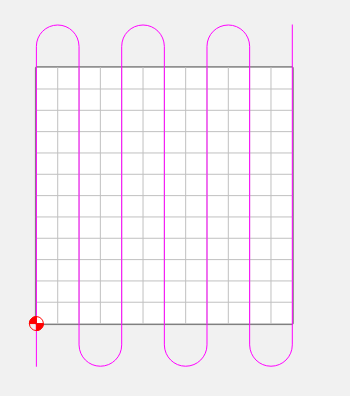
I use a 1 1/2" surfacing tool. Lower RPMs, faster feedrates, shallow DOC
4 Likes
I had thought about that with the burning. It melts really easy. It’ll have a finish applied, rubio monocoat. I like the idea of leaving a thin layer to sand off.
Brilliant. Just brilliant. Gracias. This is the path, and i shall pursue it. Easy to test too.
if you have CC Pro… you should look at the engraving toolpaths… they are basically the thing you want… you just need to make sure you pick the right stepover
2 Likes
That looks like it will work too. I could just make the area to engrave larger than my surfacing area so the change in direction is off the workpiece. I hadn’t even looked at any of the other toolpaths. I should probably dig in. Thanks!
1 Like
This topic was automatically closed after 30 days. New replies are no longer allowed.