Hi All,
I need help. I cut a Christmas tree tray yesterday and all worked well. However today my Pro is going crazy erratic. I have updated the software for Create and Motion, reloaded as a “New Machine” and have the same issue. Can someone point me in the right direction?
The usual cause for odd behaviour on a Pro is lack of lubrication:
https://carbide3d.com/hub/docs/maintenance/
Other possibilities include:
- too aggressive feeds and speeds
- slotting cut — use the new Cutout toolpath instead
- wiring/connector fault
post a photo of your machine and a problematic cut and the matching .c2d file?
1 Like
Hi Will !
Funny you mention lubrication; I just purchased wye oil to do exactly that. Also, 1i have been pushing the speeds and cuts to shorten cut time. I’ll give those suggestions a try and advise the results.
JefF
Can you give some details on “crazy erratic”. You’ll get better targeted suggestions that way. Missing steps, moving in the wrong direction, poor cuts, etc.
4wm
so what I mean by erratic cuts is the machine makes the initial pocket cut correctly. Then the following cuts in the pocket just start going in random patterns, even going outside the initial cut.
hmm…A pocket toolpath should start inside and move to the edge. If its going outside where it should, or a subsequent toolpath is, that sounds like steps are being lost which could be too aggressive cuts.
1 Like
I have wiped out the tool paths re-written new ones and I get the same results. I’m making .040 deep cuts with a 1/4" cutter. The feed rate is at 60 inch/minute as set up in the tool library. What is odd is it worked fine yesterday.
That’s not too aggressive at all which then points to mechanical issue not software. Try running on some scrap wood and record a video so people can see what’s going on.
[grid]
[/grid
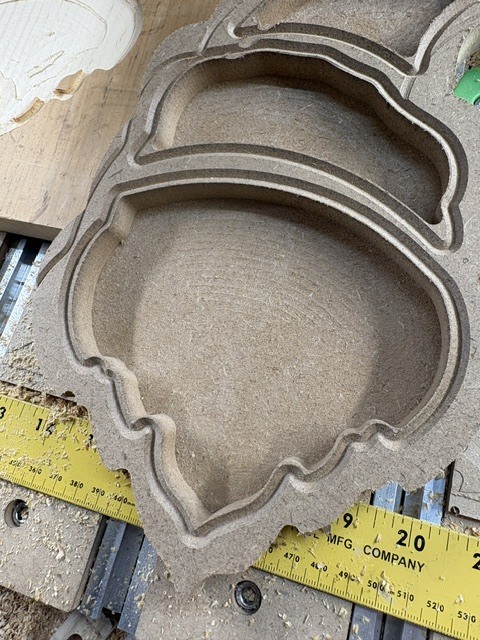
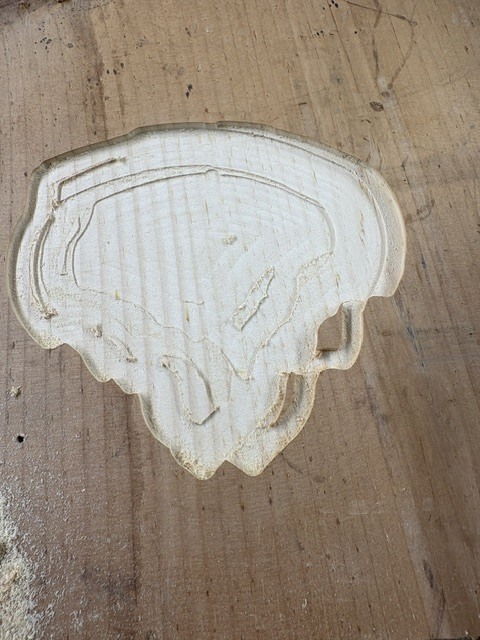
As you can see in pic #1 that the pocket cut fine. In picture #2 I started on a clean board with the same file and the cutter just goes in erratic paths.
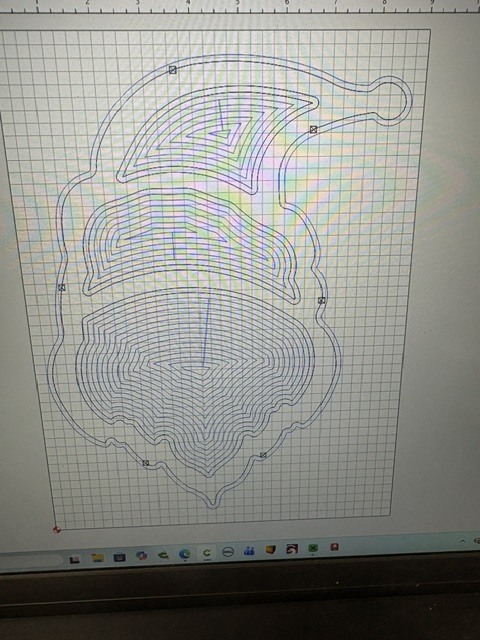
Pic#3 shows the tool path correctly but, that not what is happening.
Back in the first photo, I was trying to cut a sample on MDF but when the file got to a tool change to cut a bevel at the top it did not follow the contour of the pocket.
I’m lost.
If you post the file it would be easier to see if the tool paths or the machine are the issue.
Given the double pointed beard Santa has in the second picture it looks like lost steps. That would explain the random islands in there as well.
Something interfered with the spindle causing it to lose steps in the X axis.
1 Like
Gentlemen, I took everyone’s advice from your replies and dug into the “X” axis" components. Of course, I had it in my head that it was something in the controller or software but, your advice was spot on. I confirmed the wiring to have solid contacts. I changed the cable to the controller from my computer which had no effect. So, my next step was to remove the “X” servo motor. Everything appeared to be clean and operating properly except, while moving the gantry, I noticed a slight movement. I connected to the computer which engaged the servos which would hold everything still. When I went to move the gantry by hand in the “X” axis it moved approximately 2" inches and then told hold and stopped. In looking closer, the slide bearings (4) where loose on the bearing mounting plate. Getting back to the plate I found that all (16) mounting screws had about a quarter turn to tighten them to the plate. Re-assembled everything and gave it a shot. You guys ALL had it right! I was losing “X”. Apparently, the movement in the carriage was letting the belt miss on the servo. Long windy explanation but, I needed to let everyone know that your knowledge is much appreciated.
Thanks!
Jeff
5 Likes
Glad you solved it so you can get back to cutting.
I recently had a screw fall out of the bottom of the sweepy pro during a flattening job. Luckily I noticed it before anything bad happened.
Good that it was an “easy” fix. Sometimes we tend to go to the worst case scenario cause when we have a problem.
I usually take a walk around my machine when I start a job visually looking for loose things. Every couple of weeks I take tools around to verify everything is still tight.
There’s something to be said for preventative maintenance 
1 Like
Exactly why my maintenance checklist has this check on it.
Well maybe I spoke too quickly. I cut a pocket tonight in a tray and the “Y” axis sides are perfect however the “X” axis ends are not cut on top of each other as if the “X” is changing again. What should I be looking for now?
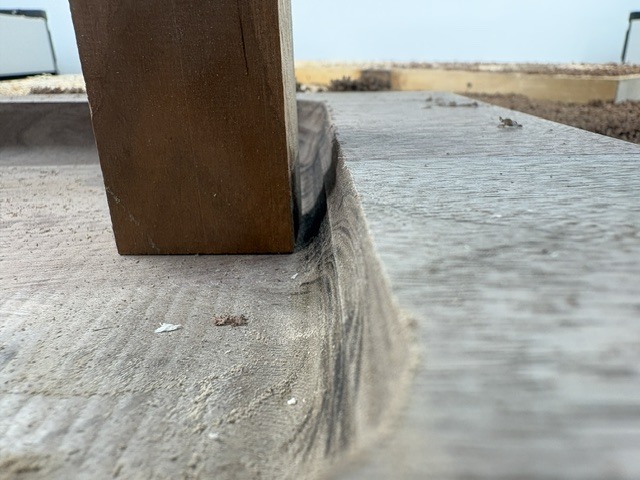
Can you post the file? How does it look in the simulation?
One way to troubleshoot this is to cut the same pocket test file at a very slow feed rate for each tool path. Does it still show this result? If not then go to the next pocket at the next specified depth of cut (DOC) but increase the feed rate and check results again.
Have you tried cutting triangles yet?
It seems the results show a mechanical issue in the X axis. Belts, motor coupler, loose or is there anything that is pulling the X direction like dust collection?
1 Like
Working through it I found the pulley on the “X” servo to be misaligned and loose. I ordered new belt thinking they may be hard and dried out so I’ll see how that helps when I get them installed.
3 Likes