I have a question about the BitZero V2 and its operation. I have reviewed videos and read several post but haven’t seen my exact question answered. I have a Shapeoko Pro XXL and my question is when using the BitZero to find X and Y, is it possible to load a part and cut only interior part features accuratly. for example, I cut a 12x12 rectangle on my table saw, and I want a 1 inch hole dead center at location 6" x 6". I want to create a program in carbide create that has a stock size if 12x12 and then I want to program a hole at the desired location, and have it cut it. If this is possible, is it possible to do without the BitZero? I’m hung up on the diamater of the tooling being used to determine where x zero and y zero is referenced.
My parts that I want to cut are going to be close to max size for my machine and I dont want to make a perimeter cut.
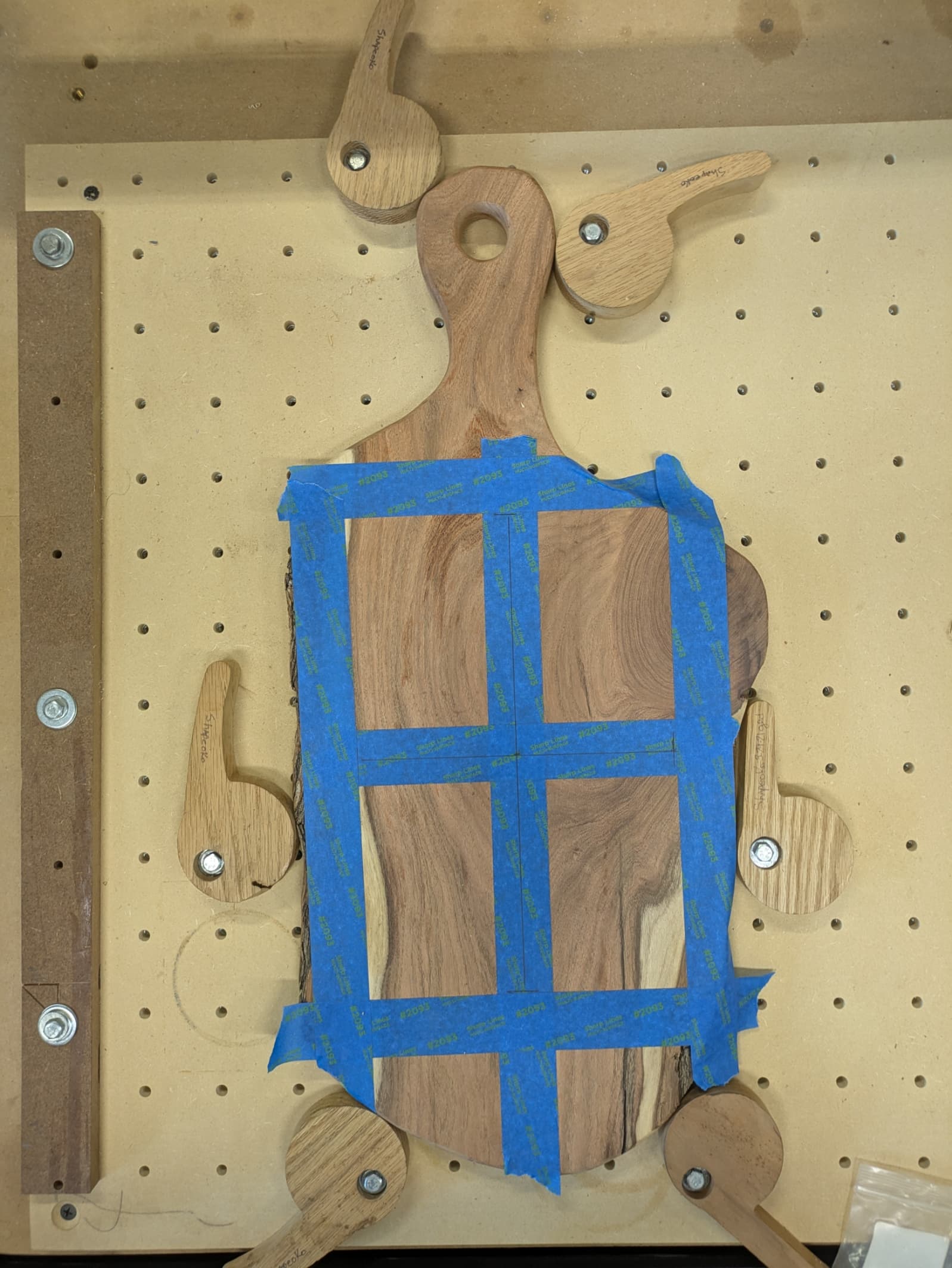
Personally I mainly use my BitZero to set the Z. I use the center on most projects that I do that are square/rectangle. I simply use a ruler to draw diagonal lines with a piece of blue painters tape in the center. I then insert a vee bit into my Shapeoko and set the X and Y in the center. I use jogging first fast to get in the area and then slower to get me right over the X I made on the blue tape.
When I use the BitZero for setting Z I am 90% setting the Z on the spoilboard (Bottom of Material) and save my spoilboard and I dont have onion skins to remove from my projects.
Using the corner is a good method but if you want a hole dead center then why not set your X and Y dead center to start with.
The center even works with irregular shaped items. I recently cut some lettering in to this for a friend. I made my center line and used a square to mark the cross line.
How accurate to the center do you need? 0.01”, 0.001”?
I do not own a bitzero, I usually zero the X/Y off the lower left corner due to a fixed fence but I also use center zero as well. If I need the most accurate zero I will install the smallest Deg V bit have and use my center reference marks on the stock. Keep in mind that even pencil marks are wider than the V bit tip and I use a center punch to mark the spot and then lower the V bit down into the punch mark and set zero. I’ve only done this several times and this was for my own testing purposes. Based on my testing this is usually not required at all. But again, I’m not running a business or machine brass/aluminum for precise parts, yet.
If you’re using 12”x12” cut on a table saw as your stock, I’m guessing the bit zero is plenty accurate. (Meaning if the accuracy is super critical, you’re probably not cutting with the table saw)
In theory the flutes of the tool and general runout could contribute to a slight offset, in practice that’s never been the case for me. You could also use a calibration blank for the probing operation which would eliminate everything but runout (that’s probably not worth the effort though)
Folks here are going to have lots of good suggestions for getting accurate, repeatable zeros on a standard size piece of stock. Definitely give them some consideration.
But to answer the question “is BitZero V2 accurate enough?” I’d say “almost certainly”
The bitzero is using both sides of the bit to determine zero. (actually 4 sides for both directions).
Imagine setting zero with a tool or dowel in the spindle using a hole. Touch the left side of the hole & set X to zero. Touch the right side of the hole and note the X location. Move to 1/2 that distance & set X zero. Now repeat the process using front/back for Y keeping X at 0. Then repeat again for X with Y at 0.
So regardless of the tool diameter, as long as it fits in the hole, you are finding the center of the hole.
Inaccuracies can occur when using a tool when the cutting edge doesn’t contact the side of the hole along the axis being measured. Or if the stock isn’t truly square or the bitzero isn’t firmly seated or moves.
All that being said, in your case Guy & Tim’s suggestion of using the center is much easier.
I may have sent the wrong message when I asked about a hole in the center, I thought that would be an easy way to reference what I wanted to do, the replies are great tips, but not really applicable to what I want to do, this is exactly what I want.
I want to cut a piece of material 30 x 30 on my table saw, index the lower left of the material as zero and then cut several part features at the exact locations in my DXF file, and not do a perimeter cut.
Ah gotcha, yeah the bitzero gives you a very accurate corner zero. It’s probably worth saying the zero is somewhat dependent on the angle of your stock being a true 90.
The other way to do this could be by eye/feel. You can set your X and Y independently.
Chuck up a tool and slowly feed in to a side until you can’t see any light between your stock and the tool (I usually slowly spin the tool by hand while doing this)
Then do the same for the perpendicular edge.
Raise the tool and travel to your current XY. This will be very close but it’s actually 1/2 the tool diameter off in each direction. Just move in 1/2 your tool diameter in X and Y and re-zero them.
That’ll get you pretty darn close, though probably not quite as close as the BitZero…hell of a lot cheaper though
I like the idea of a fixed fence, but how do you get the values for the corner consistently?, Do you never reset your x/y zero? how do you find it again if you lose it?
You can certainly get the X/Y zero really close via a small diameter bit or V-bit & eye-balling it. The BitZero gives more exact/repeatable location of the stock corner. I especially find it’s more accurrate by utilizing a small 1/16" end mill. How close your machined features are to the designed parameters is determined by not only the the accurracy of the X/Y zero to the stock corner but also how square & aligned the stock is placed with respect to the X/Y axis of the CNC. For best precison & accuracy, machining the perimeter of the object is the way to go. Setting up stock guides that are aligned with X/Y axis of the CNC certainly helps, but it is also prone to inaccurracies from slightly beveled stock edges or slight out-of-squareness.
You can set a fence with a corner that you can use to zero off of but that is offset from the corner of your stock. Then you just setup offsets in your design file from the Zero point to match.
Give it a try on some scrap material and see if all your desired locations are where they need to be. I use bitzero all the time and have yet to be off on any of my cuts. The thing to watch is that your material is held squarely in place to the machine
If you have a fence, then you should find the exact corner of it as exactly as you can (BitZero, probing, Mk 1 eyeball + V Bit, whatever), then save that location in a Quick Action.
In the future, invoking that Quick Action will set your X-Y zeros to that exact location. It will be as accurate as the repeatability of your homing switches.