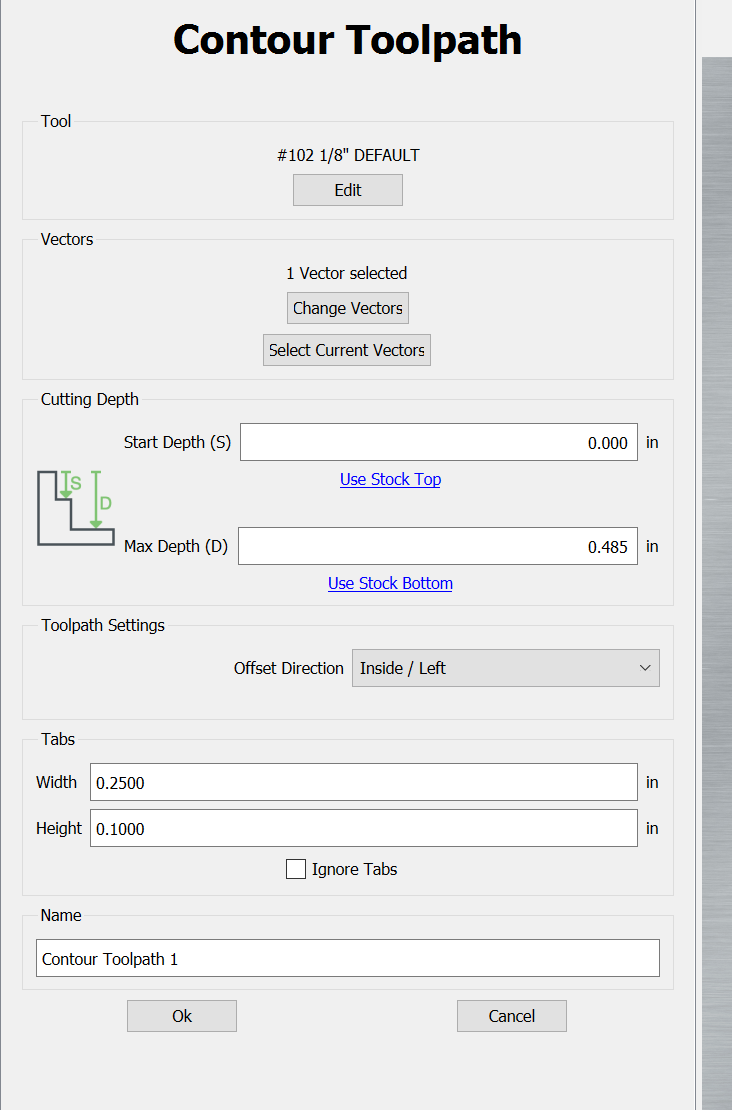
Ok, I can add Tabs with ease, very easy. Ok, now I want to edit the size of the tab height/length, how is this done now?
Is this right in front of me and I am just overlooking it?
Ok, I can add Tabs with ease, very easy. Ok, now I want to edit the size of the tab height/length, how is this done now?
Is this right in front of me and I am just overlooking it?
You assign the and place the tabs on the design screen with the vector tools, but set their width and height as part of the tool path definition.
If you already defined the tabs and placed not sure. I would delete the tabs and as Lester suggested go back into the tool path and modify the tabs. You could just go into the tool path and modify them, save the file and see if they changed. Tabs have come a long way. In the olden days you could not get tabs to delete or change. Various versions were better but the v7 seems to work very well.
I had a feeling I was overlooking it, and I was correct! Thank you.
Tab definition is not on the page where tabs can be placed. Apparently as I found out they are now in the toolpath setup. Logic to me would be both should be in the same area.
They previously were.
The change now allows tabs to be copied w/ geometry, and for one to do multiple sizes of tabs for a given part.
I needed this to be able to complete a project where I have pocketed both sides of a board to create a thinner item and wanted to be sure there were tabs to hold the piece when cut out.
I will post pics. (If it turns out) 


This topic was automatically closed after 30 days. New replies are no longer allowed.