Yes, I was in V7 & saved as V6. (That didn’t go so well)
Here they are in V6 amateur. (Pro turned off)
my new coin face ver 47 .c2d (1.0 MB)
cross face coin.c2d (817.0 KB)
Yes, I was in V7 & saved as V6. (That didn’t go so well)
Here they are in V6 amateur. (Pro turned off)
my new coin face ver 47 .c2d (1.0 MB)
cross face coin.c2d (817.0 KB)
Great! Got both and they show up in the simulation fine. I am heading to the CNC and cut out now and see what happens. I REALLY appreciate your help.
Not sure I understand the extra box or additional circles in the files and what they might do or why they are there? I will need to add the insert pocket to hold the coin itself (that’s the circle with the merged small circle sticking out to the right side of the design…this is supposed to give a way to mount the coin and also allow for eaiser removal after cutting.)
This has been a nightmare for me for the past 3 weeks and now hopefully it will come to furcation with your GREATLY appreciated help.
Thanks and I’ll post what comes out!
By adding the extra BOX or the CIRCLE around the design elements, it does away with the pocket/circle that is supposed to hold the coin in place during the tooling process. If I disable either one of those, nothin show up in the simulation(s).
Have to have the hold pocket to keep all the centers aligned I think??
The extra box & circle was just to remove the outside material for the simulation so it looks like a round coin. You can just delete those, or just not output them as G-Code (disable them).
It is and was and appreciate all the help. Had a great discussion/help with Kevin Barnett. I downloaded CCPro and purchased the MCetcher along with a 501 and 502 ready to start cutting!!
I has been a long journey for sure but hope springs eternal and I know I’ll have more failure along the way, but sometimes the “Journey” is as or better than the destination!
I’ll keep posting as progress is made and when I get a final design and cuttings and maybe a pic when done.
OK, here we go.
Here is my first attempt to cut a coin. Not quite what I’d hoped for but at least I have something to work from now.
As you can see, the coin got VERY hot and even scorched the mdf pocket. And, at that, even though I had slowed the plunge to .3 and the speed reduced to 40% override, the coin still moved in the pocket and the router sounded really bad trying to cut.
Do I need to use oil for cooling on this? Go slower? faster?
BTW, don’t try to pick the coin up very soon after…ouch!
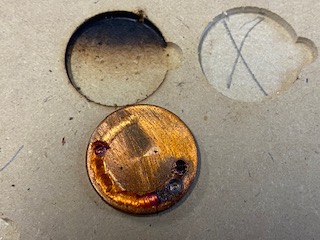
What was holding the coin in the pocket? I don’t see anything to hold down the coin.
The design is to hold the coin in place via friction on the size of the mdf pocket. The “scribe” you see around the circumference of the coin is my very first attempt when the mdf pocket was to large an allowed the coin to turn.
This pic is the second attempt after reduction the size of the hole and making the coin very tight in the mdf pocket. I used the same blank as the first time since I’m still working out the details…obviously. 
I’m working on reducing to a 1/16 from the 1/8 bit along with slowing down the plunge rate and reducing the DOC/pass.
I just wasn’t sure if I needed to have oil on the blank to hold down the heat, but may not if these changes work.
Thanks
I may have missed it, but what material / coin blanks are you using?
And which toolpaths, tools, speeds, feeds, DOC & Stepover did you end up using?
Can you post the current version of the .c2d file?
I’m using brass coin blanks, 1 1/4 dia. and 1/8" thick. Was using a 1/8 end mill for the chain hole, but just changed to a 1/8" drill and cut the hole out fine.
Now moving on to other tool paths. Will post some more when I get more.
Thanks
Things are never supposed to get (really) hot when cutting, so when they do it’s usually a sign that the tool is rubbing rather than cutting. This can happen if you are feeding too slow (the endmill spins fast and does not move much “into” the stock, so it can’t bite into it to cut a nice chip, and instead rubs the flute against the stock, which generate tons of heat). So chances are you should go (much) faster in terms of feedrate, and/or slow down the RPM
For recommended feeds and speeds for cutting brass with a 1/8" tool, check out this video from @wmoy:
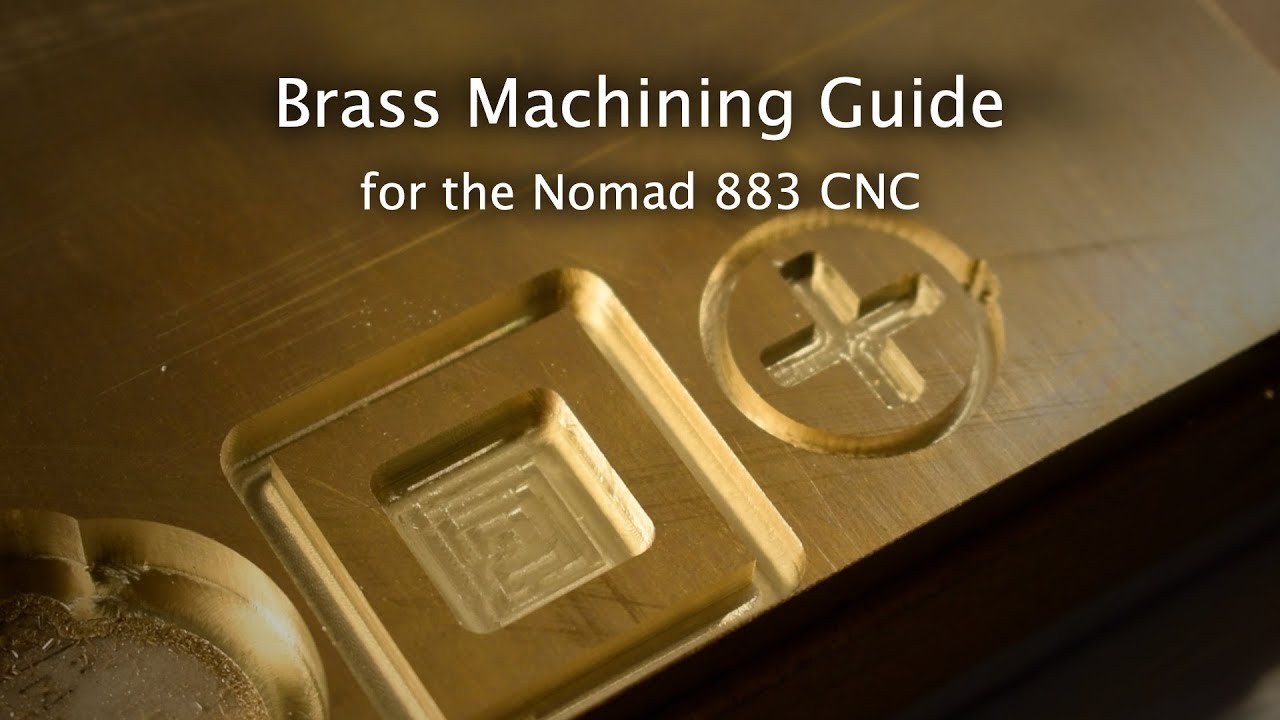
(It’s Nomad related, but applies equally to a Shapeoko)
At 01:29 he shows recommended settings for a 1/8" endmill:
Using a ZrN-coated endmill does help.
This topic was automatically closed after 30 days. New replies are no longer allowed.