Making a compass rose with Lat and Long. How do I put in a degree mark?
typing one into text…??? ALT 0176 °
2 Likes
Unfortunately, your next question is going to be how to get a prime and double prime.
Unfortunately, those characters are not in the character set normally displayed by text in most fonts available in Carbide Create, and the text object in Carbide Create only allows a single font to be used for a given string of text.
EDIT: see below for one example of a font which allows setting these characters.
The best thing to do would be to set this text in a third-party application, save the source file, then convert the type to paths, export to an SVG, then import that.
Bouncing off @WillAdams statement, (edit) “The best thing to do would be to set this text in a third-party application” (sorry about the misquote @WillAdams ) I use Adobe Illustrator for almost all my texts/fonts. I started because one of the required fonts I need is specifically an Adobe font.
Two things that have then been a positive.
- I have access to hundreds of fonts.
- It’s an easy export as an .svg which is a huge boon.
Using a 3rd-party application is not strictly required — Carbide Create could do this, just one would have to manage multiple objects or blocks of text and their spacing by hand — shades of the old days, when one designer would set headlines as individual characters and then use MacDraft to painstakingly align them and adjust the spacing.
There was at least one utility which expanded on this, Glenn Reid’s wonderful TouchType.app for the NeXT…
Agreed. And there are certainly many times I WILL use CC for my text in the projects I’m doing and prefer it.
Being a lover of fonts, I do enjoy having access to literally 100’s of them for the signage I do. So there’s that 
Ages ago, when I had more money than sense, I bought Adobe Garamond, and the matching Expert Set on floppy disks and got the originals booklet… bought pretty much every one of the originals as well as Garamond Premiere Pro, and even managed to get a copy of the booklet for it as well:

used to research each font which I purchased which didn’t include a booklet and then work up one, print, and bind it by hand — I think the one for Agfa’s Eaglefeather is pictured in:
and when I wrote up a bit on Prof. Hermann Zapf’s Zapfino, I was able to include a flipbook animation:
1 Like
For the degree mark I would draw an appropriately sized circle and move it into position (like a superscript). If you need minutes and seconds, a " and ’ are both probably available in most fonts (" =the double quotation mark, ’ = the single quotation mark). Cheers.
Minutes and seconds are indicated by prime and double primes.
The uni-directional quote marks ’ and " are not the correct characters, and an apostrophe or double curly quotes ’ ” are even more not the correct characters.
Unfortunately, if one sets a prime or double prime symbol using the correct characters: ′ ″ they will not appear in Carbide Create, in most fonts.
Arial is an exception:
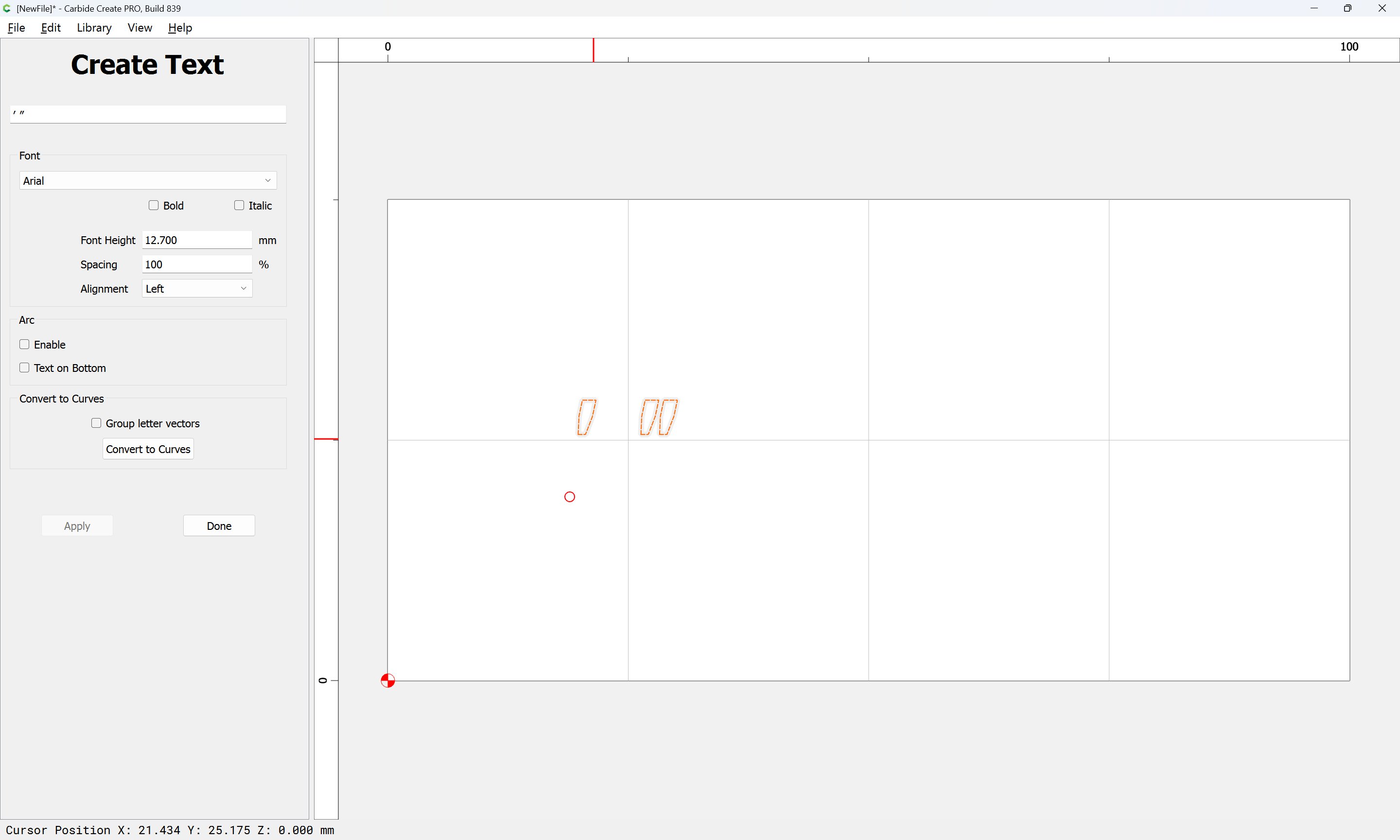
Attached as a v8 file.
1 Like
Yes, some fonts would not be an acceptable substitute but many would (depending on target audience). Not many would know the difference between a Times New Roman single quote and a technical prime. It may or may not be a simple solution for John.
It doesn’t matter if people can’t tell the difference — using the wrong character is an error, and diminishes the craft of typography and interferes with clear and correct communication.
2 Likes
This topic was automatically closed after 30 days. New replies are no longer allowed.