I am confused on the boolean operations. Sometimes it seems to work, others not as well. I am attempting to modify the stripes in a flag file I downloaded. Some of the stripes have little vee shapes connected to the stripes in the corners. I have been able to edit to get a line or rather a .001 tall rectangle vector by using the boolean operations in some cases and not in others. With the end of the stripes ending just short of the border of the outline ( a US country map) I do not want to change the border outline of the project with a square rectangle.
Any help would be appreciated. I try to learn these things but sometimes just don’t get it.
Thank You
Steve
Please post the file you are having difficulty with and the specifics of what you are having trouble doing and we’ll do our best to work through this with you.
I have had mixed results with boolean operations. I was recently designing something and went round and round which of 2 objects were selected first and if it was add, subtract or union. After using control Z to back out of an operation that did not work the first selected and second selected would switch. Eventually I got the boolean operation to do what I wanted but I never did figure out how I got it to work. I had posted on the forum and Will Adams answered with a link to the wiki but that did not help me understand exactly what to do.
I am not sure I understand all that I know about boolean operations. Some how it just autommagically worked.
It’s logic.
The key selection is added to or subtracted from, or the entire selection is joined together.
If undo changes things it’s because it alters which object is the key selection.
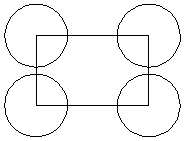
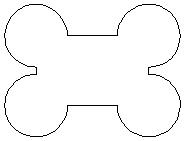
3.
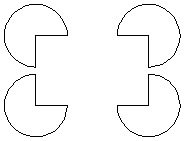
4.

These are examples.
3 Likes
This topic was automatically closed 30 days after the last reply. New replies are no longer allowed.