It’ll take a couple days. I’ll update everyone when I am done. Thanks to everyone for their combined help!
Hi Clay, one other thing to check first, on the Material Setup dialog in Vectric (right hand side Tollpaths settings), check the Z1 height setting and make sure it is not too large a value causing the Z to lift too high for your machine. That can occur when you are using someone else’s file, they set it high to clear the clamps they were using.
Regards,
Allen
1 Like
Thank you for your work on the post-processor.
I have a Shapeoko 5 Pro 4x4.
I downloaded your version 5-6-7 file and copied the two v7 files.
I am running VCarve Pro 64-bit version 12.013.
I am using the “Shapeoko 5 4x4 - Carbide Motion” machine configuration.
Only your two PPs show up in my Post Processor dropdown list.
I am using the “inch”.
When I save my toolpath and transfer and run it on my router, the spindle doesn’t start up.
Looking at past posts, I expected it to start.
Also, while it moves to the correct xy position, the Z-height is about two inches too high.
I see you have a spindle, and I expect the PP works correctly on your machine.
Can you suggest how I went wrong using your PP?
Thank you in advance for your help with this.
+
I use that PP and have a VFD/spindle and it works great. You mention router, do you have that or a spindle and if the router do you also have a Bitrunner?
On the first path of a project it moves the spindle to the “home” position for the project and should display a message waiting for you to put the dust boot on and then hit start. Then it does a 4 second spin up on the spindle before proceeding to cut.
On subsequent paths in the same job it stays near the bitsetter and asks for the dust boot to be added and press start.
1 Like
Allen,
Thanks for the tip. It isn’t too high. My Z acis started having problems and I upgraded it to the z-plus and it works much better. Only problem is I can’t see the light for the z limit switch.
I did what was recommended and created similar files in CC and in Vectric and both ran just fine. I then went back to the be tric file for the reindeer mantle piece and still get the out of bounds message. I click to go ahead anyway and it still works the way I expect, now.
I am only a hobbiest but am not an idiot. I go into the code and it still looks like it should work, so at this point I just don’t understand how the out of bounds error code is calculated. I am left with doing a trial run anytime it comes up, with my hand poised over the stop button until I know it works as expected.
Thanks to everyone for their help. Sorry I’ve been quiet for a while, I don’t get to play in the shop as much as I’d like.
One possibility here is that the out-of-bounds warning, if for the Z-axis, is triggered by the first tool being short (my understanding is that rather than re-calculate the warning after each tool change, it is done at the beginning — since CM doesn’t store offset tool lengths, it uses the initial tool for all calculations), then, further along in the file where the deeper cut which triggered the warning occurs it is being made with a longer tool which is successfully able to make the cut.
Or, maybe the cut is w/in the couple of mm of allowance.
That’s the way I see it. If the tool you currently have loaded when you initiate the job is not the first tool in the job then I take that warning with a grain of salt.
Hi. Aspire V12 user with a Shapeoko Pro here. I just tried your ATC post processor and it worked well. I came across your PP by accident and was very happy because when I initially got my machine, the Carbide 3D folks said I could not carve toolpaths with multiple tools.
Thank you for your efforts on this. Do you accept donations/thanks via PayPal or Venmo?
3 Likes
Hi there NYC_Woodworker_17,
Your kind words are more than enough for me, thank you!
Allen
1 Like
Hello. Quick question on your Post Processor. I noticed there is a v5, v6 and v7. If I am still using a router and not a VFD & spindle, should I be using v7, or one of the earlier versions?
Thanks,
Corey
Hi Corey,
v7 is only for a Spindle/VFD.
v5 and v6 is only for Trim Routers. v6 adds an additional text display feature beyond v5, which is explained in detail in the v6 addendum user manual.
You should be fine with either v5 or v6 for your trim router.
Hope that helps.
Regards,
Allen
1 Like
Hi Guys. Sorry for this question but I’m still a bit of a newby. I have been using Carbide Create but decided to get Vectric VCarve Desktop for a couple of reasons. Much of what I see online talks is about the pause to change bits which is familiar to Carbide users. Apparently VCarve does not do that out of the box. Then I see discussions about post processors, though many posts are a few years old. That lead me here so I downloaded the ZIP files in question. The documentation is very daunting and I am no where close to understanding the nuances. All I am concerned with is that in want VCarve to pause and prompt for a tool change. Do I need this particular post processor to achive that? Thanks for your understanding.
You need a post-processor which supports tool changes — if Vectric doesn’t include one, then their tech support should be able to advise, along with step-by-step instructions on where/how to place it.
I’m using the V7 version of the above post processors (since I have a spindle on my Pro XL).
Once you install the post processor it is pretty seamless.
Basically, it has the pause to change the tool, and then another pause to put the sweepy on.
I’m not on the computer that I have vcarve on, but I recall it is pretty easy to install (and use)
John
3 Likes
Vectric software does include a post-processor that has the tool change written in. It’s also pretty easy to add any post-processor such as the ones @Allen44 has here. The biggest difference is the added lines that remind you to preform certain tasks which is really nice. Since you are new to navigating all the new stuff in Vectric, if there’s any issues with it I’d be happy to help walk you through it.
3 Likes
John and Steven. Thanks so much for your replies, they’re very helpful and give me confidence. I’m going to try a test today with the built in Carbide Motion processor and see how that goes. After that I may give the one here a try.
Thanks again!
Good morning all,
I have decided to post one more update to my Post-Processor for Vectric use with
Carbide Motion, this will be version f (5f, 6f, and 7f). I consider this to be a minor
safety issue update for a 1% issue, so might not appeal to most. So this will be
a lengthy explaination.
The main reason for this update is because of an issue I found reported in the
Vectric website forums. A user reported an event that occured to him when his
toolpaths had completed, and he had a keep-out zone programmed, that the
final XY home rapid move crashed into his workholding clamps in the keep-out
zone and broke his bit. Although the keep-out zones were honored during the
toolpath executions, the final home move it was not resulting in a crash.
I had a somewhat similar event occur following a three-hour vcarve. I was using
a 3.5 inch tapered ball nose end mill for the vcarve and the toolpath completed
with the bit down in a valley and during the final home move the bit had not reached
safe Z yet when the home XY move occurred and it gouged across the top of the
project. Luckily the bit did not break but my three hour project was ruined.
As some say, when using an open-loop type servo system, sometimes “stuff”
happens. So to try and alleviate the 1% events and save bits and long projects,
to compensate I have added in version f a two-second dwell delay following the
final SafeZ move command to give the Z axis a little additional time to lift prior to
the rapid XY home move. Also, during tool change SafeZ moves, I added a
one-second dwell delay. I doubt that that extra time will be very annoying, but
it just might save a broken bit or clamp crash.
I also decided to take this opportunity to do some general cosmetic cleanup of
the file and text displays as well as condensing the User Guides into one
simpler manual since I got complaint of it being too elaborate.
And finally, yes, I have noticed that Vectric updated their embedded PostP to
version 8 basicly deleting Vtransfer and G2/G3 arc support, but I have decided
to ignore that for now.
Now, for full disclosure, being an older retired hobbyist, I only have one machine
now for testing, a Shapeoko Pro XXL with 65mm Spindle/VFD. So I have only
fully tested version 7f. Meaning since I no longer have a Trim Router installed, I
have not tested the updates to versions 5 and 6, so just be aware.
Any comments please feel free to DM me, I do keep tabs of the forum every
few days. Unless someone finds an issue, this will probably be my last version.
Take care, sorry for the long diatribe, happy CNC’ing.
Allen
PostP_v5f_v6f_v7f.zip (2.0 MB)
6 Likes
Thanks Allen. I did notice this behavior once and held my breath and all was well. I will give the new post a try this weekend.
1 Like
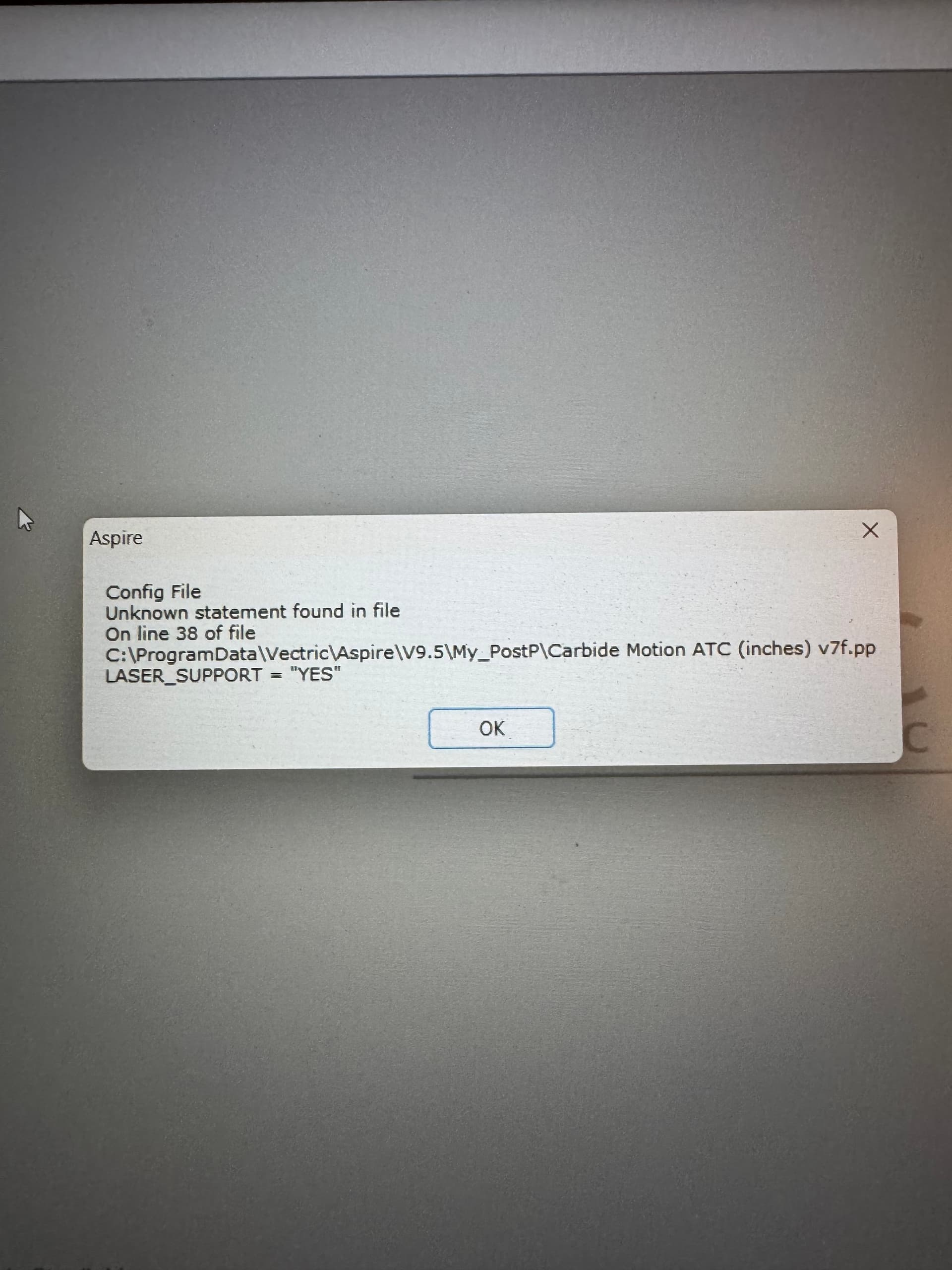
Hello Allen44, I have a shapeoko 5 pro with spindle and im using version 9.5 of vetric aspire. i was hoping to use your post processor zip file. I downloaded it and unzipped it and installed on vetric aspire and a error message coming up when opening vetric saying this.
"Unknown statement found in file
On line 38 of file
Laser support= “yes”
was hoping you might could help me with this if im doing something wrong or if you have seen this before. I included a image if you can view it. Thanks in advance!
nfi
You could start by commenting out the line by bracketing that line in parentheses, then try it again. GCode uses parenthesis to indicate comments, and ignores whats inside them.