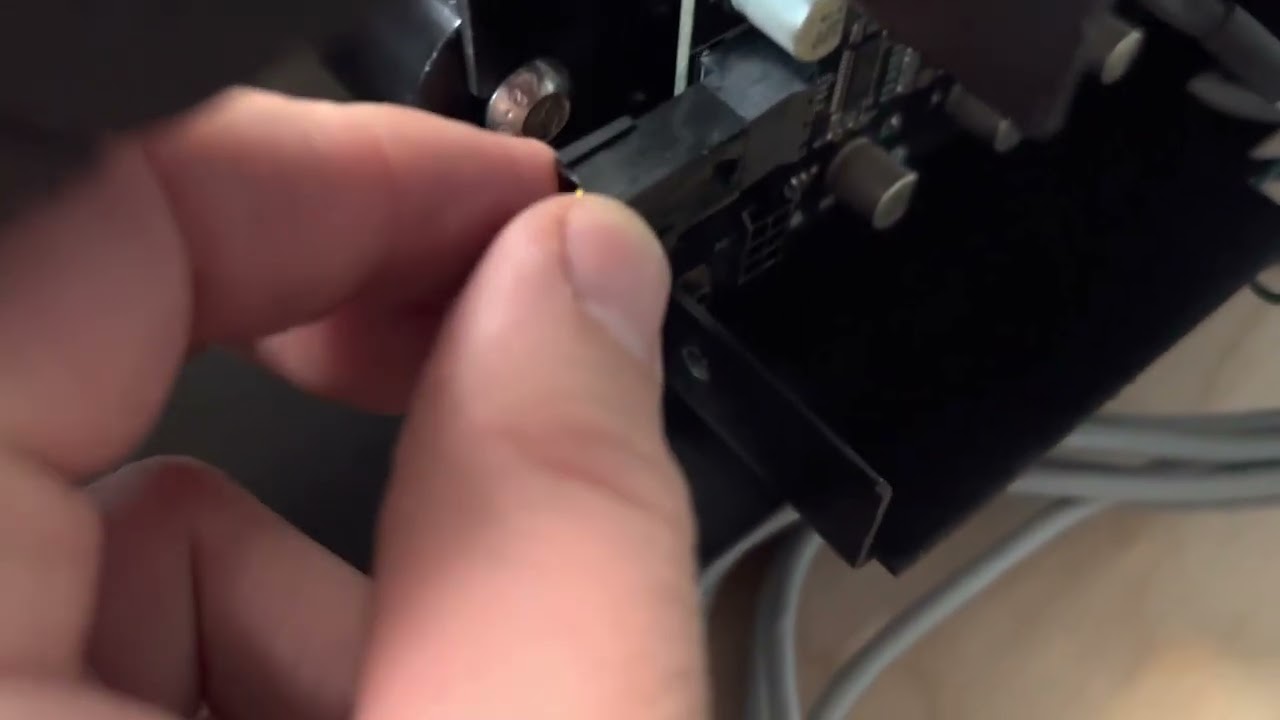
Hi everyone, just received my Shapeoko Pro XXL a couple days ago and yesterday spent getting everything assembled and today I started to connect all the wires etc etc. I ordered everything additional like the BitRunner V2 and BitZero V2.
So when installing the BitRunner V2 it felt like the connection on the PCB board was kind of wonky a tad bit and loose. Also the connection was super super super hard to connect. I kept looking at the male and female ends both thinking something was off but nothing was off. Anyways I got the connection which honestly felt like something that wasn’t meant to connect.
With that the connection/solder possibly feels loose. I can slightly see (barely) behind the PCB board. Looks like 6 solder spots holding this male connection on the pcb board but when I slightly move the male connection it looks light a 7th solder spot and its going in/out the pcb - I’m not 100% sure. Could this just be a tab on the male connection through the pcb to keep the male connector from twisting/.
So video below I took to give a better idea. Anyone’s male connection on the pcb like this? Is this normal? Should I contact Carbide 3D? Thanks
Yes, you should contact support@carbide3d.com. It may still work since only 2 of the 6 pins on that connector are actually used, but still.
This will only affect the BitRunner, so you can still proceed to complete machine assembly and initial testing while you wait for a response from support.
As @Julien noted, please contact us whenever you need to — we understand that many folks can only use their machines evenings, weekends, and holidays, and do our best to assist folks during those times, at least via e-mail.
Well I got an email response back and I gotta say it’s not the response I thought I’d get. I was told to just not touch it or not to move it and just as long as the BitRunner works just to ignore the loose connection on the PCB board. Not the response I expected or doesn’t make me feel good especially knowing you’d expect nothing to be loose and further down the road if this becomes even more loose from running.
I don’t know what to think here now or what to do. Again sure it may work and I haven’t tried yet. But still it doesn’t ignore the fact of a possible loose connection that over time could become even looser.
Feeling pretty frustrated and not happy about that response. I think of the idea of a car dealership telling you something’s loose but it still drives so just keep going and it’ll be ok as long as it drives. Not sure what to do. And maybe I’m overthinking this, I’m not sure. Spending over 3k isn’t small these days either, sure it’s not the most expensive CNC but still it’s a pretty penny these days. Again maybe I’m overthinking it, not sure.
Hi Steve, not a bad idea and definitely doable but my only concern I guess you could say would be if the solder connections are loose or broken slightly and if they will make connection after hot gluing the piece in place. But definitely very possible.
I have not tried running/setup on the new Shapeoko or BitRunner yet as I finished assembling late last night. And today and Sunday I’m tasked with installing new flooring for the fiancé so I gotta wait till Monday to jump back on lol.
Hi everyone, I’m just now getting around to posting an update here. This past Monday I heard from Carbide 3D first thing in the morning. One of the technicians called and went over everything. He explained the connection is perfectly good and that the connection is meant to give a little like a spring because otherwise it could possibly break due to the tight connection. He had a couple boards next to him while on the call to confirm this is exactly normal. I finished plugging everything up and everything is running perfect no issues.
So if anyone ever has this or questions this I would say it’s normal and nothing to be worried about. Again designed this way because of the tight connection between the plug wire and the plug connection on the PCB board.
How crazy you ask this as I almost made a thread asking this very question today lol.
So today I did tackle this and decided to try something and it worked so it should work for you as well. What I did is run my green ground wire through my Y Axis (Left) drag chain and then ran it through the drag chain on the gantry. Basically I followed the router power cable all the way. I did not need to clip open all the tabs on the drag chain, only a couple. For the most part I would feed the green ground wire through pushing it and turning and sometimes using one of the Allen keys to help feed it. But sometimes I had to open one of the clips to help pull it through. I think I only had to open four clips at different areas of the drag chain.
This was super easy, clean and nice. I just tried it today and it worked. Btw not sure if your running the XL or XXL but if running the XXL you probably will have two green ground wires. Use the longer one to fit properly. Hope this helps
We just installed the Bitrunner V2 and can also say that the modular plug to the board is crazy hard to install. I felt like the connector mounted to the board was going to snap off. I carefully pressed the board connector into the board while I wiggled the wire connector onto it. It was a bit scary, I watched the video and snickered on how it just popped into position with just two fingers.
Everything seems to be working now but I wanted to chime in for the next version.