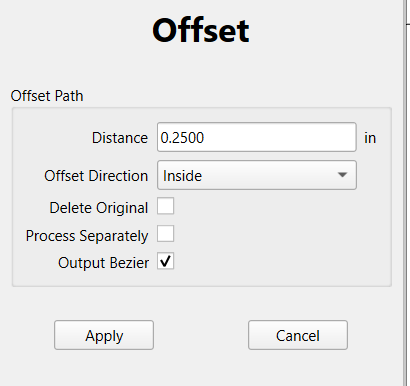
Is there a way during the Offset event, it keeps the sharp corners:
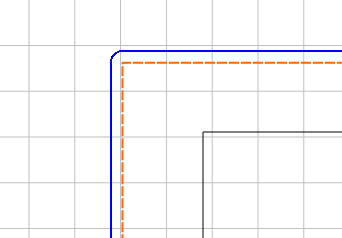
I Edited the Nodes in the inner to be sharp, but it still rounds the corners?
I may be missing the obvious… 
AL
Is there a way during the Offset event, it keeps the sharp corners:
I Edited the Nodes in the inner to be sharp, but it still rounds the corners?
I may be missing the obvious…
AL
It is intentional when offsetting to the outside to round things by the radius of the offset, since this matches the typical design intent/tooling limitations.
When working in Carbide Create, start at the outside and work in which will preserve the sharp features — the alternative is to either re-draw/re-create, or export to an SVG and do this offset to the outside in a tool which will preserve that design aspect, then re-save as an SVG and re-import.
That is what I assumed, thank you for confirming.
Good question. I often had the same rounding on outside offsets and looked around to see if there was a square option.
What is “Output Bezier”?
What is “Process Separately”?
Output Bezier results in a Bézier curve rather than a polyline.
Process Separately iterates if there are multiple selections.