Please upload the file and we will look into this with you.
L300x120x20.c2d (56 KB)
Carbide Create File
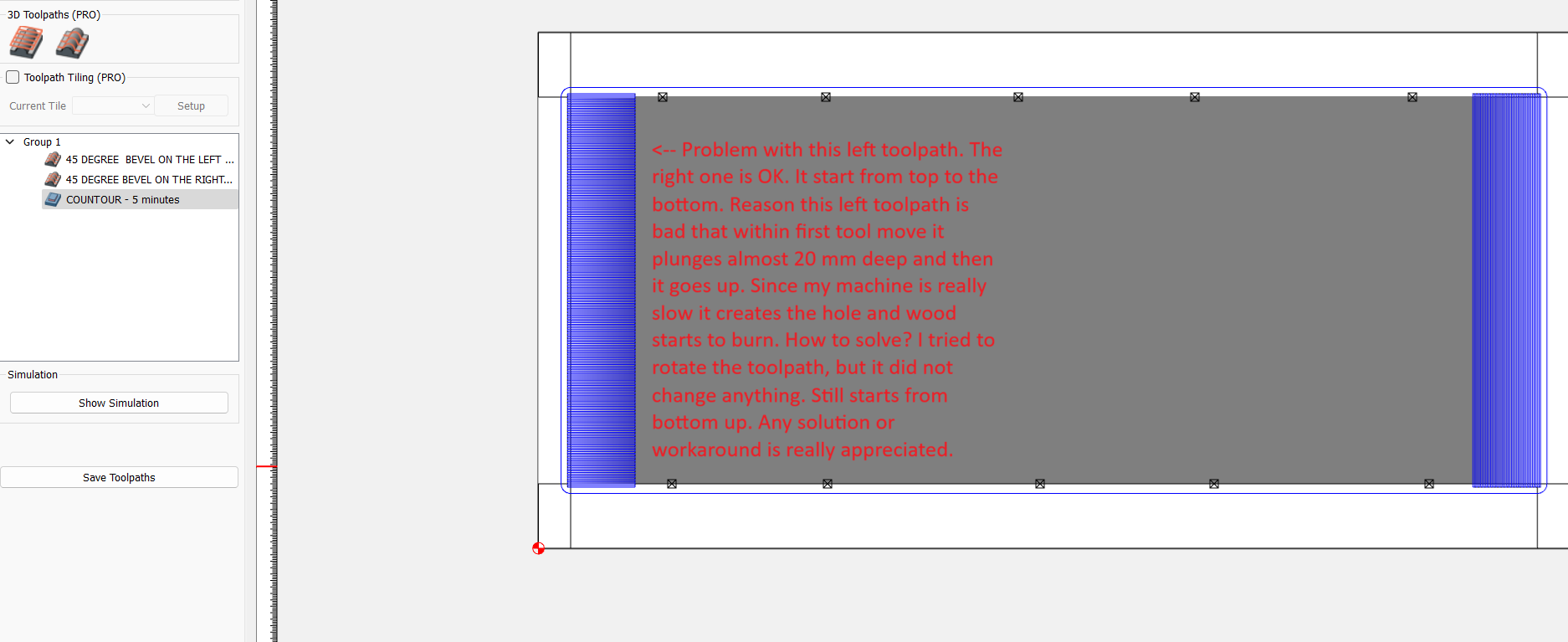
If the 3D model has a hard edge (white background behind the edge), and the boundary is on or outside the modeled edge, the tool can fall off & plunge to the bottom of part.
It’s best to make the model geometry bigger than you need, then limit the path with your boundary.
I will test it as soon as I can. Thank You!!!
Please, send me the file how you did it ?
Ah, that was not the problem. You are only using a finish 3D path, and it just happens to start at the deepest point. Try running a rough 3D path first. Use the largest stepover & depth per cut you are comfortable with.
Ok. Lets say this is solved  … Other problem: when I finish my work with file close it and open again. My model components are gone!! Automatically toolpaths are bad.
Where are you saving the file? In what format?
Could you upload a file saved from a current version to a local drive which has lost its 3D model?
I use iCloud to transfer .c2d files from one computer in the house to another in the shop. If I move to fast between locations I’ll get that also.
I have found that sometimes emailing them to myself is faster. The files themselves are not large. I know this defeats the purpose of having one master file that updates the changes etc but it’s my work around when needed.