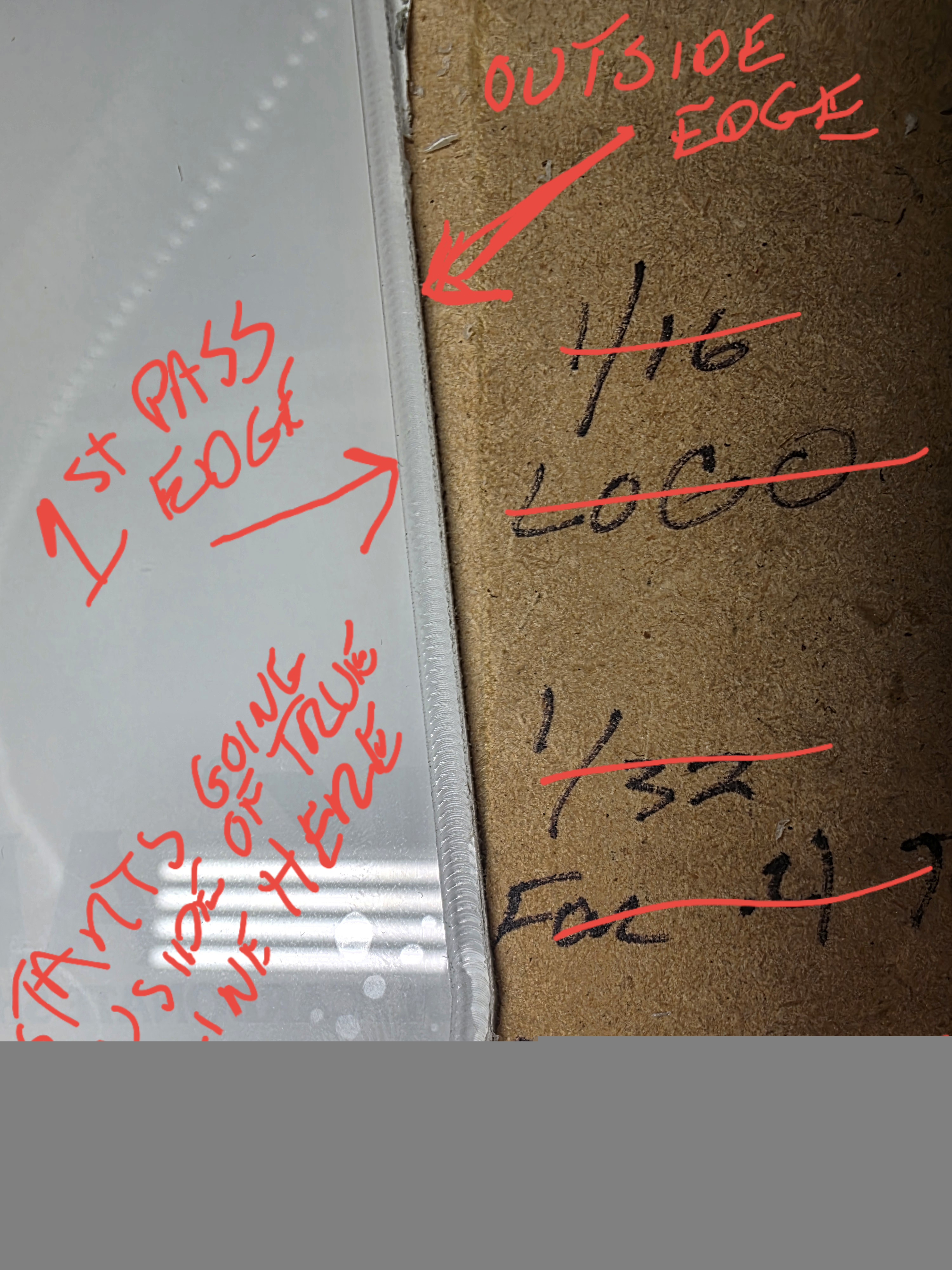
I was trying to use carbide create and carbide motion to cut out a project. When I import dxf into carbide create everything looks good. No open vectors. I then proceed to edit the toolpath for 1/8" end mill, contour cut, starting at 0 and cutting through lexan that is about .125" thick and I am having it do .020" a pass with a feedrate of 75.0. I tell it to cut outside right and ignore tabs. I then save the toolpath and load it into carbide motion. After setting zero and center of project. I then start the cut and for some reason there are 2 or three areas around the project that the cnc will make the router make a pass about 1/8" inside of where it should, then on the next pass it cuts where it is supposed to. But, by the end there are 2 or 3 spots where there is about a .020" depth cut about and 1/8" inside of where it is supposed to be. I have done this project twice and made sure to tape down the project securely with heavy duty double sided gorilla tape and the same thing has happened to both porjects in the same exact spots. The project does not move while it is cutting in that area. I have verified that there is no bogus/extra path in the vectors that would make it do this. The file looks complete and good. I just cant make heads or tails of what could cause this issue. I am using a Shapeoko 4XXL. I have attached a couple pics of what I am talking about. The majority of the project is cut where it is supposed to, just these couple spots that turn out like this. Any help here on what would cause this would be greatly appreciated.
Upload your C2D file.
Here is the c2d file
chopper window toolpath v3.c2d (44 KB)
I think you have either tool deflection or mechanical 'slop" (in the X direction). You are cutting a pretty deep slot, the usual advise would be to instead pocket a slightly wider region so there is better chip clearing and less tool engagement:
Here’s the same file but with a pocket instead (but check the tool settings before trying it!).
chopper window toolpath v3.c2d (68 KB)
EDIT: It’s hard to tell, but you might be getting some melting? You may need to get a bit better suited for plastics. If you are getting melting, then all bets are off while it’s stuck to the bit.
Michael,
Thank you for your help. We checked the x axis belt and it was in our opinion loose. We tightened it and tried it again and then found that the project x axis dimension was too close to the limits of the cutting surface. We then rotated it so the long axis was along the y and even though it is the same dimension it was able to get the cut we needed with no issues that way. After the first mistake today we only had enough lexan for one more cut so with the scraps we have left over we will try a pocket cut and see if that is a better cut for the future.
This topic was automatically closed 30 days after the last reply. New replies are no longer allowed.