I was working on a hard maple cutting board with a walnut inlay. I cut the inlay and inlay plug. Glued in the inlay plug. Created a program to cut the inlay plug leaving the inlay plug about 0.025" proud of the surface. Made the mistake of zeroing off the cutting board and not the top of the inlay plug. Was able to stop the machine but not before it cut 0.025" into the cutting board. I have since removed the cutting board. I was thinking of resurfacing the board 0.025" and then recutting the inlay. So my question is how precise can I expect the zeroing of my system when I’m using a bit zero? Is there any way to position the system so that it cuts in the initial inlay cut or I’m expecting more than the machine is capable of?
Generally speaking, the machine will do an excellent job going back to the same position. The onus is really just on you to make sure you put the piece back in the exact same position.
I don’t own one of the large form factors but I can say the Nomad will repeat to tenths of a millimeter or less all day long.
For woodworking, I expect your machine is plenty repeatable to do what you need.
As for how you get your cutting board back in the exact same spot, hopefully luck is on your side 
1 Like
Thank you for your reply! That’s what it comes down to is how to set the position of the work piece and zero accurately.
I would say that once removed all bets are off. The machine remembers the zeros and positions as long as you did not set zero on another project. So the machine is very capable of repeating if the project has not been removed from the spoilboard. It might be possible but I doubt it would work. However right now it is a complete loss. If you try and succeed then great but if you try and fail it was failed anyway and the only thing wasted was time.
I use an L bracket on my Shapeoko to position most square work. That gives me a consistent place that my work will be positioned. I have had disconnects or mistakenly shut off my machine and simply re-initialized and loaded my file and it worked flawlessly. However I had not moved my work piece.
Here you can see my L bracket.
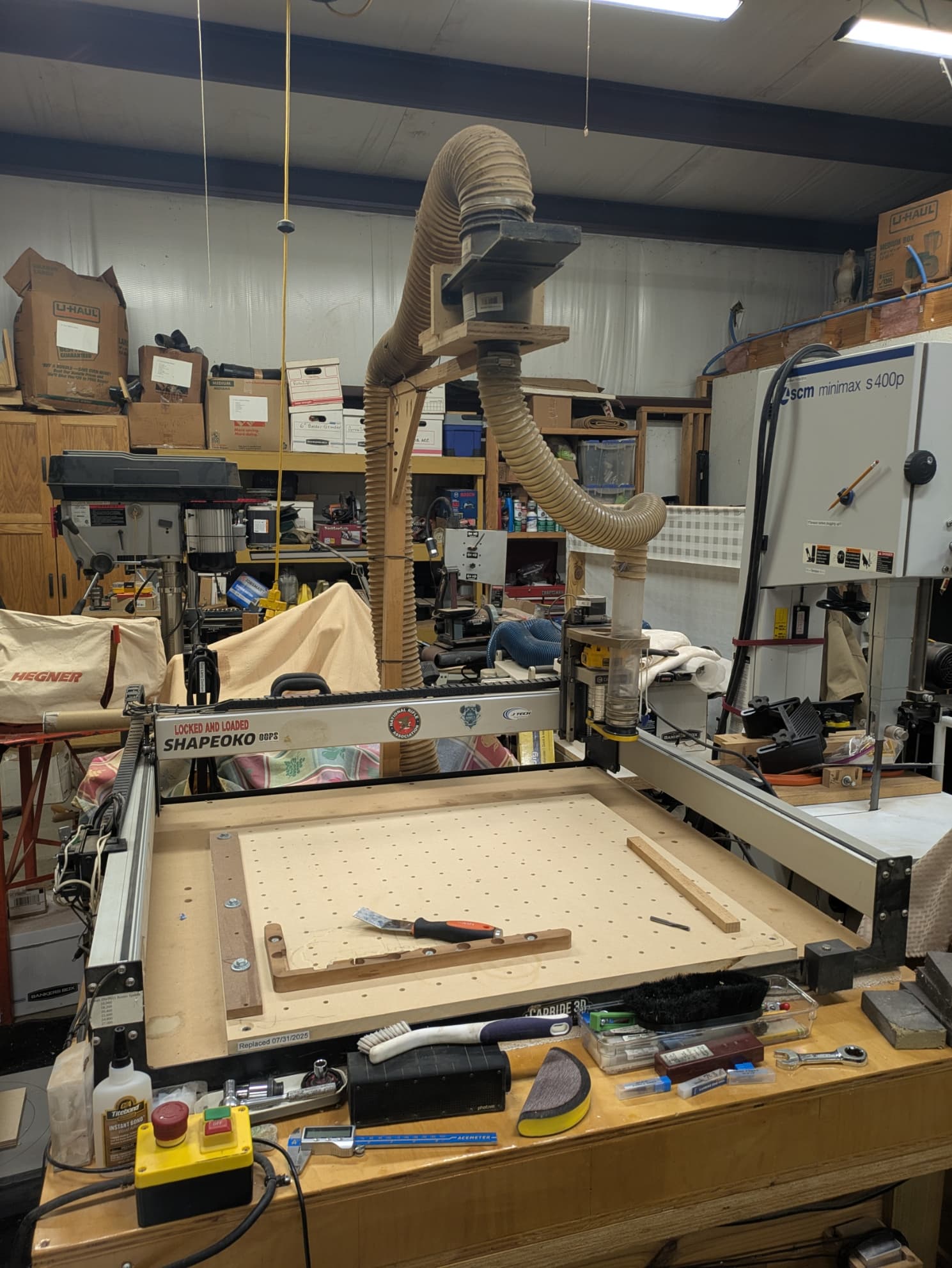
As @gdon_2003 said, all bets are off.
If you can establish 3 points or two planes on the board, you could confirm location/orientation.
You will notice some offset not matter what, the question is can you hide or ignore it.
Thank you for the reply. Looks like I’ll have to surface the cutting board and start over.
I would just go ahead and level off the cutting board at the.025. You might be surprised that your inlay still fills in the gaps. Good luck.
I’ve done several jobs where I wanted to put the part back on the machine & do more cutting but didn’t have a square edge to locate & orient it.
I pick several points on the design, jot down the coordinates & use a V-bit in the machine to align the points. If you have any straight vertical or horizontal lines in the design, use those to align the part, then find a couple discreet points to set your position (zero). You can type values into the into the XY fields rather than clicking “Set Zero”. Just make sure you hit Enter after typing.
4 Likes
Interesting idea. I already surfaced the cutting board but I’m going to try that as a learning exercise. Thanks.
1 Like
To elaborate, say I have this design. I pick 3 points that look like they will be easy to indicate.
(the circles).
Place the piece on the machine as close to aligned as you can get it.
Place the lower left clamp (Green) snug but not real tight.
Indicate point A with a V bit, and type in the X & Y values.
Now move the bit to point B and tap the piece to align it in Y.
If the point is a bit off in X, jog to align it & type in the new X value.
Put a 2nd clamp on the right (or anywhere really).
Go back to point A & verify it.
Check point C to be sure.
Add another clamp upper left & tighten them.

3 Likes
I plan on trying this when I finish up my current project. Is there a way to type in an X, Y coordinate and have the machine move to that spot? Thanks again.
MDI
G0 X___ Y___ (Rapid)
G1 X___ Y___ F60 (Linear with feedrate)
Don’t remember if there’s a way to do it in the CM UI
2 Likes
This topic was automatically closed 30 days after the last reply. New replies are no longer allowed.