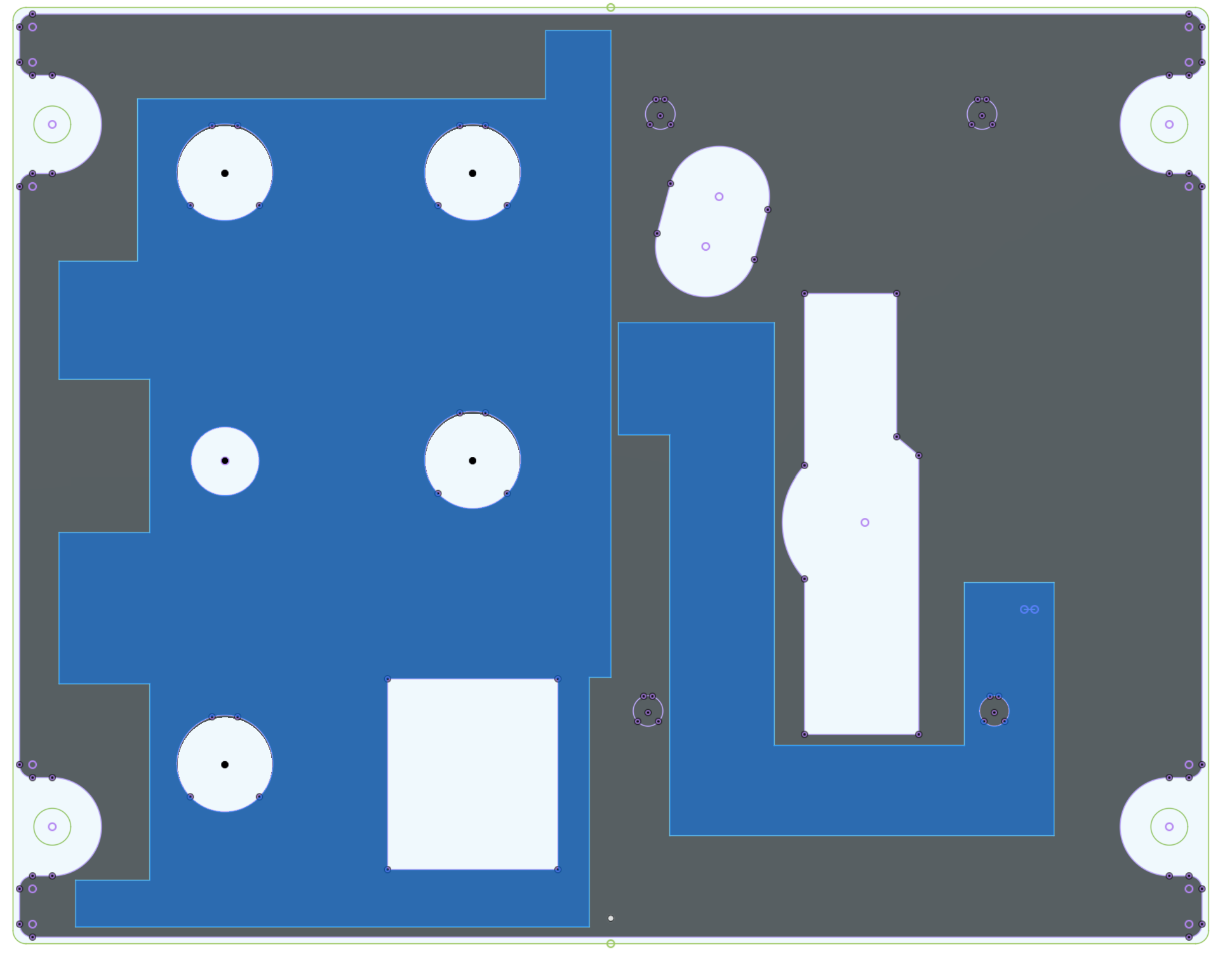
I need to mill a 4mm deep pocket in a 6mm acrylic panel. The pockets are moderately large – like 80mm x 60mm but are more complex than just a rectangle. I’d like to rough out the pocket to about 1-2mm from the final dimension with a 1/4" endmill, then finish with an 1/8" endmill. I’m not sure how to do this. I imported a DXF with the outer shape of the pockets (there are two of them), then created a 2mm inside offsite. This looks perfectly good to me. I then created a pocket toolpath for the inside “roughing” area using a 1/4" endmill. That looks fine. I created another pocket toolpath out to the final dimension and specified a 1/8" endmill. I think this is where I’m going wrong. That toolpath is starting from the center and of the pocket and spiraling out as if there was material there. That’s obviously not what I intended, but I don’t know how to tell it that most of the material is already gone.
Is maybe the right way to do this to specify the finishing pass as a contour that I cut on the “inside” of the line? (and make sure that this is a tiny bit of overlap with the pocket operation?)
I’m sure there is a bog-standard way to do this, but I’m not sure what it is.
What you want is ‘Rest Machining’. It is available in CC Pro.
The poor man’s version is to pocket with the larger endmill, then inside contour with the smaller endmill. If the Pocket and the Contour use the same vectors, then the smaller endmill must be at least 1/2 the size of the larger endmill.
If you want the pocket to be inset from the final outline, you’d need to look at the simulation to see if it clears everything.
If you post your file here, we can see better what you are trying to do and how well possible solution might work.
Is the objective of using smaller cutter only to remove material from the tighter corners? Are you looking to get a complete smooth cut on the finish pass?
One common standard is to use the Rest Milling on the roughing to clean out the corners so the finish pass has very little resistance. Then make a complete finish pass.
2mm seems like a lot of finish stock for a 1/8" tool. I would probably go 0.5mm or 0.25mm
If the finish on the walls isn’t critical, then using rest-milling on the finish pass will save time.
You could rough & finish with the 1/4", then rest-mill with the 1/8" to clean out corners.
As suggested, share the file & be a little more specific about your objectives.
Sorry for the lack of clarity – I’m still trying to learn what’s relevant and what’s not. My main goal here was to use the small cutter reach areas the larger cutter can’t get into (which includes the tight corners). I don’t have CC Pro so rest machining isn’t available to me. From Michael’s post above, though, it sounds like I can approximate that by a pocket operation followed by a contour with the smaller tool. To see what I’m working on, see the attached image. The blue areas are the pockets. The panel itself (the gray area) will have previously been cut out with my CO2 laser cutter.