I just downloaded V8 and it appears tabs are not showing up in simulation on CC files that were created under an older version. I tried deleting and recreating them but that didn’t work. Any suggestions?
This changed happened at v7:
https://carbide3d.com/blog/carbide-create-v7/
Tabs are now a part of the vectors, not contour toolpaths
We added a new tab command to add tabs to a vector. If you copy the vector, you copy the tabs too. This should be helpful for users that are doing production work where they may want to fine-tune the machining of a single item and then copy and paste an array of them for full production.
1 Like
Thanks as always for the excellent support Will. Just so I’m clear, although they are not showing in simulation they will be in the final product?
Ignore my follow up. I will read first. Thanks
You have to go into the main design window and the little square box and add your tabs.
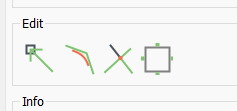
In the toolpath you define the tabs but you have to go to the edit to actually place them.
1 Like
Got it thank you very much.
This topic was automatically closed after 30 days. New replies are no longer allowed.