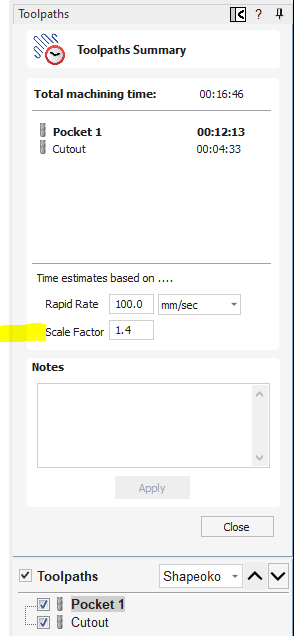
Estimates for toolpaths on Carbide Create V8 are almost 30-40% lower than actual time shown on Carbide Motion.
Is that something wrong settings wise that I need to tweak? I design using create on a separate PC and my Shapeoko Pro XXL is connected to another laptop which has motion. I save the toolpath in the design file itself that motion reads.
There are lots of ways you could estimate how long g-code can take to run. I have a suspicion that some software is just counting number of lines in a file. Other software seems to parse the file and attempt to guess based on predicted machine acceleration in the post-processor.
Pretty much one way… Time = Distance / Velocity.
Using a simple algorithm that doesn’t account for accel/decel, you should get estimates that are shorter than actual times.
If the algorithm in CM uses the acceleration settings from GRBL, it would make sense that CM estimate is larger than CC, which doesn’t know the acceleration settings.
you also need to use realistic values when programming. If I program at 200 ipm the estimates will be off, since the machine tops out at 180-something.
What’s actually buried in the programs? Only the resident super-genius, @robgrz knows
It is not just this machine/software. Our Bambu 3D printer at work (3D printers also run gcode) will claim that it is finished printing up to several minutes before it actually is. Only when I see from its webcam that it is actually done, will I walk over to retrieve the print–not that watching an FDM printer do its thing is any less interesting than watching a CNC doing its thing…
I am definitely not a programmer, but it seems to me that to generate an accurate time estimate, you’d need to run the gcode through the motion planner in the software, and thus the estimate would take as long to generate as physically running the gcode would.
Stepper motors operate on quanta of motion–the quantum being an individual motor step. Based on the desired motion direction and the defined acceleration, at each moment in time the motion planner needs to determine for each axis whether to take a step or not, and if so in which direction. And it does that in real time…
The fudge factor would vastly depend on the intricacy of the toolpaths. 3D contour? fiddly text? big broad pockets? If it were not for the variable actual moment-to-moment velocity due to the acceleration limit, the calculation would be straightforward and no fudge factor needed.
Vectric has a fudge factor built into their time estimate. Does CC have something similar?
The idea is that you run an initial toolpath on your machine, note the time difference between estimate and actual, and then enter the adjustment factor so that estimate matches the final and any future toolpath estimate should be more accurate.
You should have read my comments correctly before replying.
I said both software (That mean Carbide Create and Carbide Motion). I said they should have the same calculation method SINCE THEY ARE MADE BY THE SAME COMPANY. This is logical no???
I was not talking about the estimate made by ALL SOFTWARE in the industry
Indeed. I expect it would vary based on job type & even machine. It would still be interesting to see some actual numbers. I’ll try to remember to jot them down, I have a couple jobs coming up here.
My gut is saying it’s going to be relatively close, perhaps using only a couple fudge factors based on job type.
@Mseguin CC doesn’t know the accel/decel numbers, where CM should, so should be able to provide a more accurate estimate. If they were both using a simple formula, then yes they should be the same, or very close. Note CC is calculating based on the operation/tool path, where CM is based on the Gcode, which could have some variation. It also is likely adding some time for things like toolchanges (M6).
I’ve done some simulators for very fussy customers (production shop making millions of parts) that need very accurate estimates. We’ve been able to dial them in to something like ± a few seconds for very small jobs. ± 10-20 seconds for very large jobs.
But even those had a fudge factor applied to get them really dialed in.
I did read it and understood what you are whinging about, but this is a subject that keeps popping up, and if the solution is as simple as you seem to think it is, it would have been implemented by now.
@Mseguin If you want a really accurate time estimate, do a dry run (no spindle) and use a stopwatch. As I said above, to the best of my understanding the only way for a motion planner to know the actual time of execution is to execute the actual moves. If this is the way for C3D to generate a true time estimate, will you accept a 3-hour toolpath generation for what will be a 3-hour run? That would give a 100% accurate time for every single run.
I used to be bothered by the disparity in the two numbers, but I have learned, that for me, I no longer even look at the estimated time in CC as the time element won’t really matter until I actually start cutting. That is when I will see what CM says for the estimate time and that is the closest to being accurate. I would analogize it similar to how long I might think it would take me to complete some non CNC project but until I actually do the work, the ‘estimated time’ is just that, an estimate. In the big scheme of things it is not that big of a deal.
The only reason I ever look at time estimates is to take a 10,000 foot view over if I did something incredibly stupid in setting up my toolpaths. Beyond that the estimate is useless.
The GPS navigation unit in my car apparently assumes I can accelerate instantly to the posted speed limit, and always stay exactly at that limit… I similarly disregard its optimistic time estimates
Agreed with this. The ultimate net time it takes doesn’t matter. But the relative changes are useful for endmill selection strategy. And If I’m at a makerspace on one of their machines, it’s useful to know if I can run a cut before closing time.