Dropped em and can’t find them.
Did you loose the bolts and the metal rod the bolts thread into ? If you lost both your best bet is to deal with Carbide3d support. I will let some else verify the size of the bolts.
Bill
1 Like
They are M4 SHCSs, ~18mm in length — let us know at support@carbide3d.com and we will do our best to assist.
Since @WillAdams has the dimensions for you, I was wondering, scary for me. Can we put a small nick in the threads up the length to cause friction to possibly stop the backing out under vibration. Or a compression nut.
I don’t know, have seen this issue happen to many.
For a while now we’ve been including lock washers which if the bolts are properly tightened ought to both keep folks from cracking the housing by over-tightening, and keep the bolts from vibrating loose too quickly (check them before each usage of the machine per Machine Operating Checklist - Carbide 3D )
1 Like
Michael:
This solution was posted on the forum. Small pieces of leather between the lock washers and plastic housing. It has worked for me although I am not a heavy user.
It is very easy to implement and inexpensive.
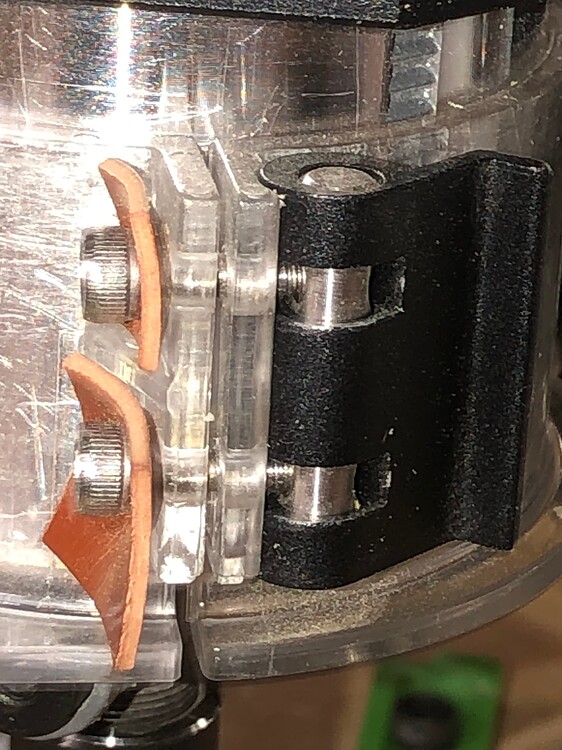
Bill
2 Likes
Thanks Bill.
Almost like a Nylock
Some vibratight would work in the threads. Just use removable locktite and not permanent.
I have lock washers on mine and they still vibrate loose
I did fine that the over center lever did drag way too much and would bind, This meant I had to loosen the screws off more then they should be. I used a thin couple of drops of silicone oil on the lever to prevent it from binding which allowed me to properly tighten the bolts and provide a much smother operation.  Still on occasion they would loosen, so non-permeant locktite did the job.
This topic was automatically closed after 30 days. New replies are no longer allowed.