My Shapeoko 5 Pro CNC is messing up all my 3d carves every time. I keep on trying and it messes up again and again. I can’t figure out the problem. Looking forward to hearing back from y’all. Thanks!
You need to describe what you are talking about. Pictures help.
4 Likes
What CAD/CAM software are you using?
Where is the origin set in the file?
How are you setting it relative to the stock? How is the stock secured?
What tooling are you using? Cutting what material? At what feeds and speeds?
1 Like


Please upload the files in question and post photos showing how the cut turned out and documenting how the stock was secured and zero set relative to it.
I am using carbide create pro and carbide motion for this project.
I’am not quite shure what you mean by that second Question.
I’am setting it in the lower left corner of the stock. I’am also using the clamps that shapeoko sells.
For the roughing toolpath I used the 1/4 inch bit and the speed dial was set to 1, for the finish toolpath I used the 1/8 ball nose bit for the finish the speed of 4.
I will send pictures here in just a minute.
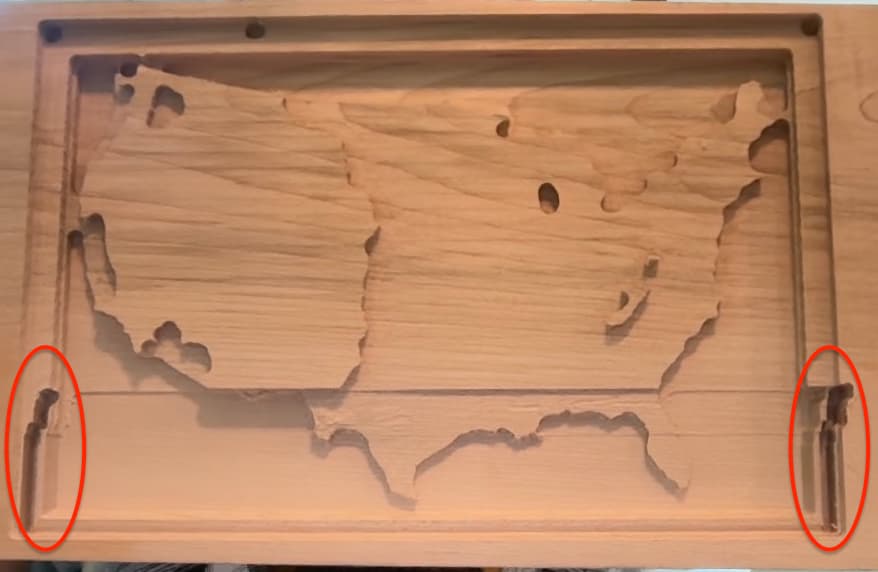
It would stat good then it would do that.
I used the clamps shapeoko sells.
And zeroed it in in the left hand corner
Upload the file?
Photo showing how the clamps were applied?
It’s saying that my file is to big.
Upload to Google Drive or somewhere similar and post the link or e-mail to support@carbide3d.com
It is saying “Sorry, that file is too big (maximum size is 4 MB).”
Here is the link:
https://drive.google.com/drive/folders/1qX1uFAdW1JeLxWQkHAAF4kCnBDQWqyd5?usp=sharing
looks like a slot cutting issue to me. When the bit has to cut in a deep slot the friction is high, therefore the force needed to continue cutting exceed the power the stepper motor can provide, the stepper motor misses steps, and that way looses the proper alignment: it is out of position, tries to cut very deep with the now very deep cut, gets stuck and even can cause fire.
Therefore narrow slots -if needed- must be cut with extremly conservative speed, proper bit (no down-cut or compression bits), or if ever possible should be cut as a pocket, the very last depth cut then as contour because of the tabs. Tabs are only possible with contour cuts, not with pocket cuts.
The latest motion version (still beta?) has that feature automated, I think, did not try it yet.
Sorry, I do not see that C3D file in the depository you sent the link for.
2 Likes
This topic was automatically closed after 30 days. New replies are no longer allowed.