I bought a Shapeoko XXL with the bells and whistles. Who new how much a proper table would cost. Around 400$ And I haven’t even got the wood yet. And I still need to get a shop vac, table saw not to mention calipers and all the tools one may need.
This is a investment but I love cnc so I will stay the course. I work with NX at work so I’m leaning towards Fusion 360 but is there a reason I should get Vcarve instead?
On the gripping hand, one can do this on the cheap — I did when I first started.
I have to admit that even now, my Pro XXL is on a pair of rather rickety wooden tables, bridged by half the top of a ping-pong table which was left in my basement.
Investing in good dust collection (HEPA-rated) is a good idea though.
While a table saw can be useful, what one really needs is the ability to break down stock — a handsaw is fine for that if working w/ lumber — if working w/ sheet goods, either buy smaller sheets, or get a tracksaw and a sheet of foam (I have a quite small/inexpensive tracksaw).
Inexpensive calipers are fine when one starts out, and you’ll probably want some files at least for post-processing cut parts, but other tools can be purchased as projects demand.
6 Likes
Fusion 360 is good for mostly mechanical parts and designs. Vcarve is great for asthetic parts. Both can do either. I personally prefer F360.
1 Like
thanks for the heads up I will look into the tracksaw I’m a newbie so I never even heard of it lol.
is the engraving in F360 comparable to the Vcarve toolpath in Carbide3d or carveco?
No. Vcarving is one of the things that F360 does not do out of the box. I am not sure if there is a plugin that adds this functionality.
1 Like
Thanks, now that was a major question of mine since I hadn’t heard of that type of tooolpath. I wasn’t sure if it was just engraving or not. In fact I plan on getting the free versions of both software to figure that out. Because I do like the modeling features in F360.
Do not buy any additional tools until you get up and running with your new machine. You will be surprised by how much you can with what you already have.
Your first few familiarization projects will be simple, time consuming, and a little frustrating, but will get better from there. Home Depot and Lowes will cut sheet goods into manageable pieces for free and a hand held circular saw can bring you close to a good cnc size.
Many users here like to get the absolute most out of every inch of stock and that’s not a bad way to go. I prefer to let some go as waist material to be discarded and make my hold down strategy easier (example: have my rough board at 14x12 when my finish size is 13x11, etc). The cnc will cut a decent edge anyway so why argue with precision on rough cuts?
As you go along, you will find yourself in need/desire for a more efficient procedure but by then you will be better educated as to what you really need. It’s a pretty big boat, welcome aboard.
2 Likes
It’ll do it with an engraving toolpath, but nothing is as “automatic” as vcarve. You can get more control over the toolpaths with Fusion, but, for v-carving it’s probably not the best.
3 Likes
Hey the cost of fun just keeps going up. As a newbie woodworker go slow. Many people rush out and buy a bunch of consumer rated tools and are disappointed. As someone else pointed buy your tool as you need them. My advise is to buy the best you can afford. You only cry once buying a good tool instead of crying every time you use a bad tool.
I have a full woodworking shop. The table saw is at the center of my shop and is the heart. Stay away from Harbor Freight tools unless it is a one time use. Their tools pass the definition of a tool but just barely. I understand they are improving their game but they are best for supply items and not for real tool needs. There is a tremendous amount of advise on youtube about tool comparisons.
Track saws can do a lot of what a table saw can do and at the end of the day you can break it down and store it. Even if you later want a good table saw you can still use a track saw for breaking down sheet goods on the driveway to make it easier to hand large sheets of plywood. I use a shooting board with a 7.5" circular saw and a piece of 3/4" rigid foam to break down sheets of plywood. I hate trying to cut a full sheet of plywood on a table saw because of its weight and bulk. I break it down into manageable pieces and it is easier to store over a full sheet of plywood.
If you have questions please ask them on the forum. There are quite knowledgeable people here that are glad to help.
6 Likes
Will, you just made my day!! 
I was just browsing the forum when I saw you use the phrase: “on the gripping hand”. I didn’t think that was in usage today, but it pulled me back about 40 years to when I read “The Mote in God’s Eye” (and more recently the follow up, “The Gripping Hand”). Now I’ll have to try to use that in everyday language (and then explain what it means and from whence it comes).
THANKS!!
2 Likes
It’s a favorite novel of mine (one which also got me wanting a stylus computer, which I’ve been pursuing since my NCR-3125 running PenPoint).Glad to meet a fellow fan!
Need to find time to read Pournelle’s daughter’s 3rd novel, Outies.
1 Like
Thanks for the heads up I purchased wood from Home depot to make a work table. Let the Journey begin.
1 Like
I use both F360 and VCarve, though lately I’ve been using F360 much less, and almost exclusively for 3D printing rather than CNC.
Why did I use F360 to begin with? I already used it for 3D printing and I liked being able to see the finished design before creating the toolpaths. However, VCarve is now my go-to program for CNC.
There is also the licensing issue with F360. If you make any money with your CNC you would have to buy the F360 license too, which over time is much more expensive than VCarve.
In terms of gear, dust collection is first priority. You may not feel like that, but it absolutely should be. As for the table saw, buy the best you can afford, but until then, for thinner stock, a had saw, a jig saw or a circular saw can go a long way.
I couldn’t use my CNC as effectively without my callipers.
1 Like
$5k machine, $3k in extra ‘stuff’. And I already had a bunch of tools that I didn’t need to buy.
And this is just the beginning!!! 
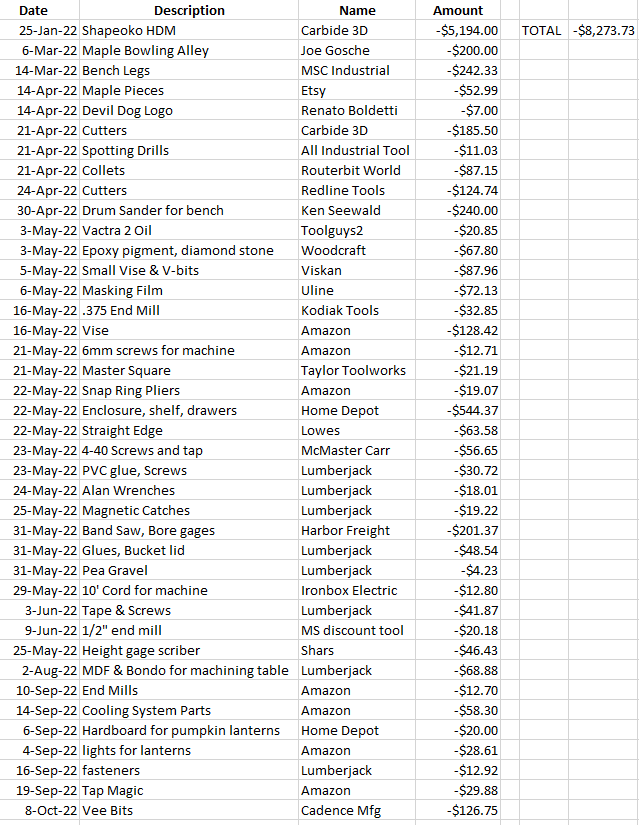
1 Like
good points I almost forgot about the Calipers. I use Siemens NX for design and I would go to fusion but I’m not sure it has the vcarve toolpath. So I think I’m going to go with the Maker+ because I like the ability to create 3d reliefs from 2d art. Or at least try that one first , then try Vcarve if I’m not comfortable with that. And I ordered a 16 gallon dry/wet vac from Home depot so I hope that covers the dust collection.
thanks again
1 Like
Let me know how the HDM works I plan on upgrading to it when I cut more aluminum. Also great job on the spread sheet that’s what I need to do and a great Idea.
I love the HDM. I’ve cut a bunch of aluminum parts. You have to baby it a bit, and use HSM strategies.
While dry cutting is possible, mist coolant really helps a lot.
I don’t have a dust system on the machine. Just a shop-vac sitting near it. It’s enclosed so the mess stays inside, I just have to clean the screws & rails after every job. I may put one in eventually.
Right now it’s getting cold in Michigan so my next upgrade is heat to my garage.
I also use NX a lot. I work for Siemens creating postprocessors & simulations, teaching customers how to use NX CAM, and some automation programming. I have an NX post for the Shapeoko if you want it. The only significant customization is I output a retract, rearward move & OPSTOP (M01) when the post sees a “CUTCOM/OFF” so you can program multiple passes to dial in a high tolerance cut.
I also have the models for the HDM & 3XXL for simulation.
1 Like
wow. And yes I would like the Shapeoko post and models that would pretty much speed my process up triple time. I thought I might be the only one using NX. If there’s anything I can assist you with let me know. You just made my day.
I myself been doing this for years I first I bought VCarve then I bought VCarve pro then I bought Aspire finally!
I have fusion 360 and I also have shaper 3-D
And I design and both of those, but I can transfer that design easily and in VCarve…
I have designed just as easily and VCarve pro as I can in shaper 3-D or fusion…
1 Like