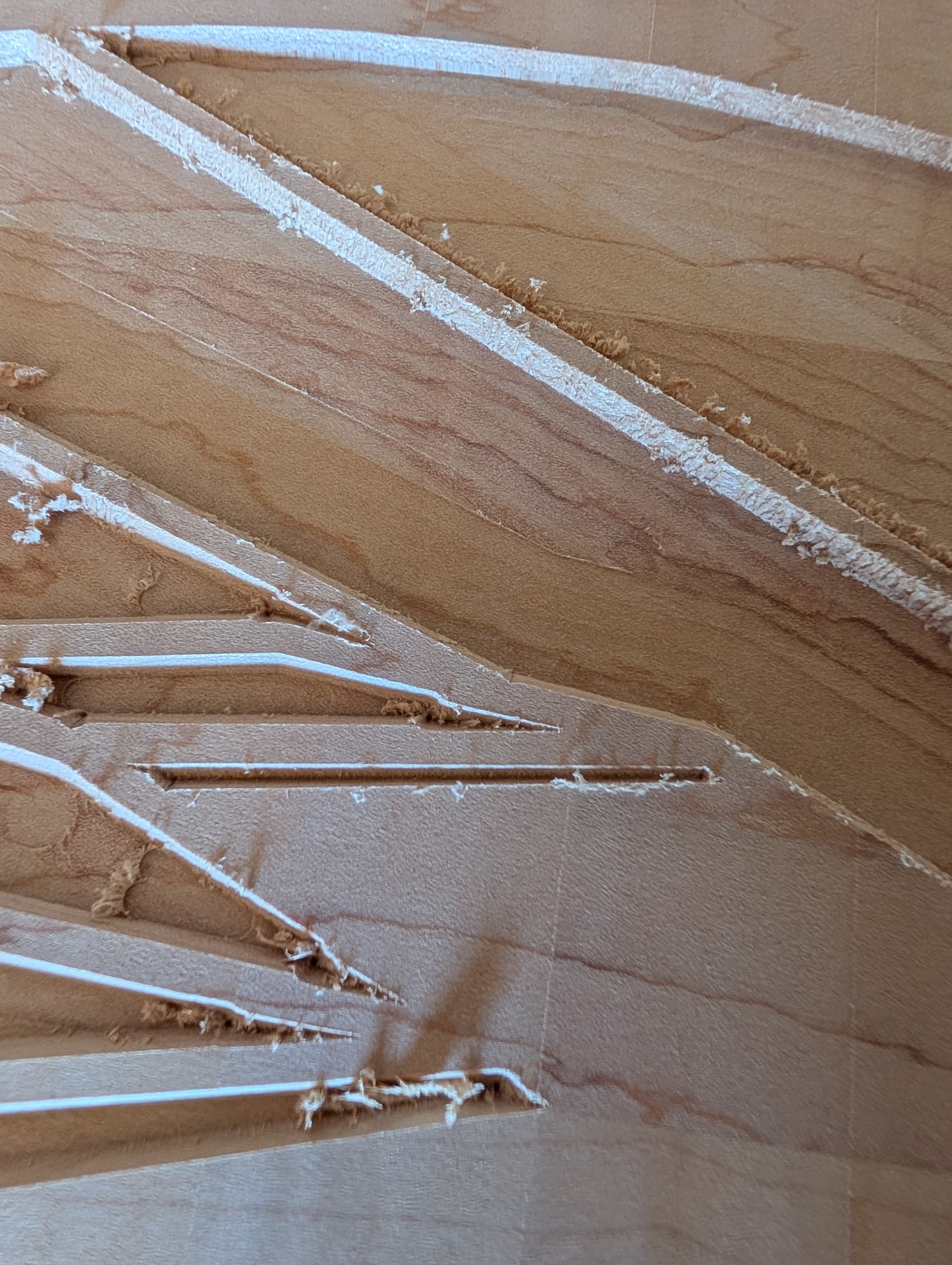
My machine has always had something off about fine detail work when it comes to using rest machining, but it really seems to be getting worse, and no longer confined to drift when switching bits.
As you can see in the picture, I was trying to mitigate the issue of sloppy rest machining by finishing with a an advanced V-Carve pass. That… Didn’t work. Here, you can see the Y Axis obviously drifted quite a bit “downward,” towards the Y 0 point when it came time to do the corners. However, at other points in the piece, the Y Axis has drifted "upward’ instead. Obviously, these don’t show up in the simulation in Carbide Create. Now I’m going to need to spend a considerable amount of time trying to ease those errors and see if the project is a waste or not.
Does anyone have any advice? What I’ve tried already:
-recently lubricated all rails
-re-tensioned the Y belts to ensure they were the same.
Please help. I can’t keep needing to dedicate an hour of additional work to clean up what the CNC messed up.
With the power on and the spindle OFF, grab the nose of the spindle and try to move it around. The steppers should keep it locked in place until you are really pushing on it.
If you have any movement at all, chase that down and see what is loose.
You didn’t say what machine you have, so there’s no way to give you much more ‘directed’ advice.
remove both Y-axis belts and put a bit of tape on the pulleys so as to more easily see their rotation
power up, connect and initialize, Z should home normally, as should X, while the Y-axis motors should turn until they time out — do they turn evenly and in synch?
power down and reinstall the belts swapping end-for-end and side-for-side if in good condition
Sorry, Shapeoko Pro! That info was in the first draft in my head, but didn’t make it into the post!
To your point about movement - there’s definitely a slight bit of movement “up” and “down” the y Axis if I press - maybe 1/16 of an inch, enough to account for the imprecision i see in my projects. I have to exert some force, but not what I would consider a lot. After that initial tiny bit of give, I can push quite a bit and not have any movement at all.
The movement is coming from the pulleys (or whatever the term is for the motorized things that the belts loop over.) I can see them very slightly turning along the belts as I move the spindle.
Does this mean the pulleys or motors themselves are defective?
Edit: there was the tiniest bit of slack in a couple of the pulley set screws. I tightened them, and the movement seems to be gone! I can now put quite a bit of force on them without them budging at all. So maybe it was as simple as that!!
I’m absolutely shocked. I was able to tighten the pulley set screws just the tiniest bit, and when I turned it on again, the bit of give that I mentioned in my reply to mhotchin was completely gone. That may have solved the problem right there, but I’ll be sure to check the other things as well.
Re: the maintenance kit, I have the Pro, so the kit only includes new belts (which I don’t think I need) and oil (which I already have and have applied recently).
I’m just going to say that tightening the set screws on both Y pulleys and the X pulley has eliminated 99.99% of the slop. I’m getting cleaner, more consistent performance when rest machining than I have EVER gotten. Thanks for the help!