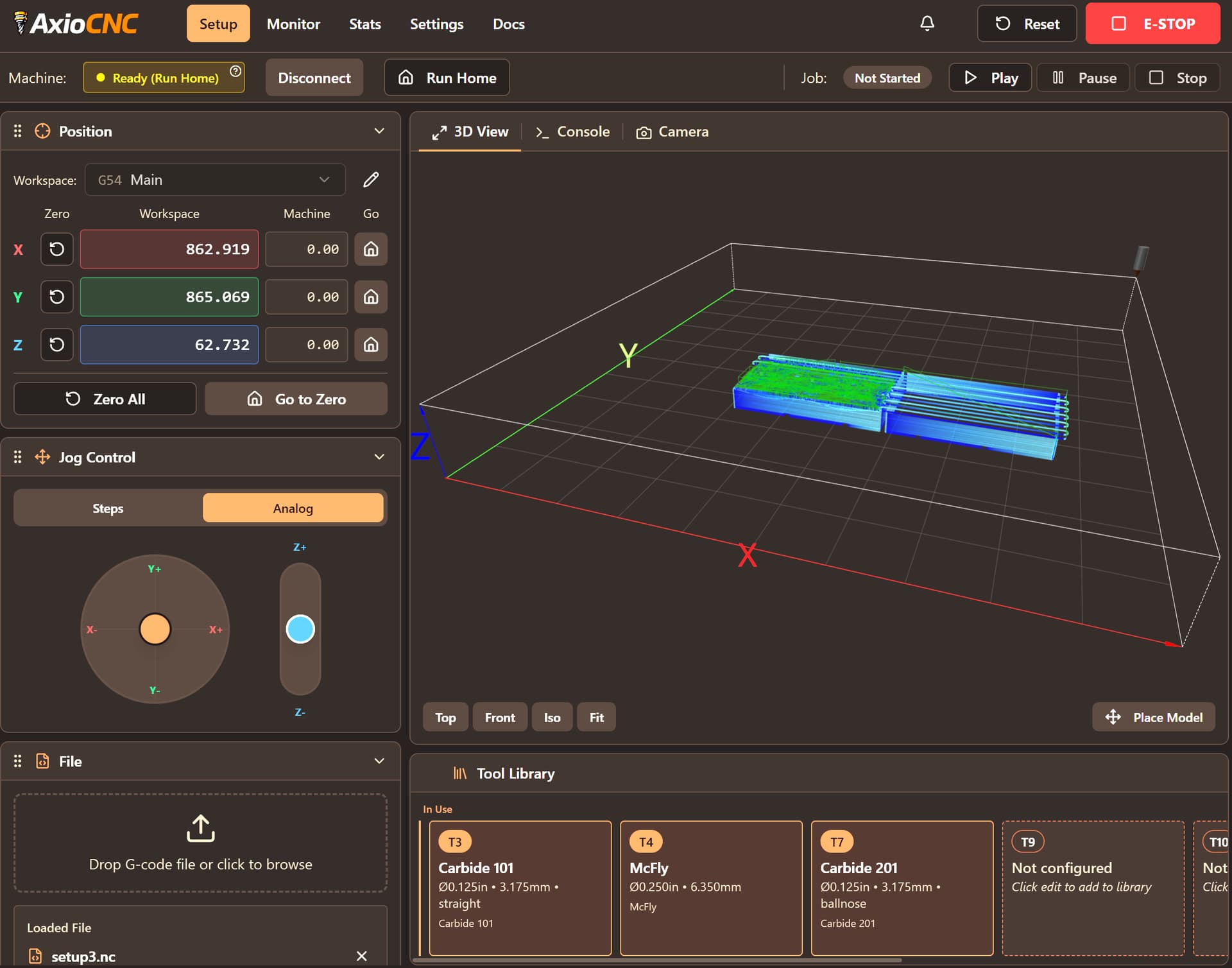
Love my Shapeoko 5 Pro, but I wanted to run a different controller software. I liked cncjs, but wanted more, so I built a new app on top. It’s called AxioCNC and adds a lot of features, especially for Shapeoko machines
Native BitZero and BitSetter tool changing
Modern design with themes
Job outline so you always know where your tool will cut
Gamepad support (connected to either the server or the browser)
Tool library so it says the next tool is “Carbide 201 1/4” Straight Endmill" instead of “T4”
Shows time left to next tool change, how much cutting each tool has done in its lifetime, and how much time was spent cutting vs. transitioning
Lots, lots, lots more
It’s completely free and open source. I built it for myself and my own Shapeoko but wanted to share as I think it’s the best controller/sender software out there now. Check it out at https://axiocnc.com
Absolutely. We’ll see if the jog pendant is open enough to work with 3rd party software.
Feed, Spindle, Rate overrides are on the very short-term roadmap!
@cryptyk
Geez, why does this seem too good to be true? I’ve been watching gSender developed over the years, and for various reasons I’m still using 1.4.3 while they’ve moved on to 1.5.7. There are still programmatic problems with each new version. (Particularly vexing is the tendency for the software to allow/cause, at random, a runaway jog!)
So, watching your video demo I saw that you list "Shapeoko 3” as a machine that you program for. Does that mean all flavors; such as my 3XXL?
Are there any specific gCode requirements with respect to post-processing from software such as Vectric?
Regarding Zero setting blocks, are the blocks from Sienci programmed into AxioCNC?
Are there any reasons that the ubiquitous Mikita router setup would have problems?
@CrookedWoodTex That sounds like my story. I was using cncjs for a long time and it worked great, but they stopped developing it. I wanted things like built-in XYZ probe support, joystick support, and an active developer. It also had a UI that invited mistakes like having the X+ button right next to the Z- button.
I tried UGS - It crashed constantly
I tried gSender - It plunged into my piece because of a bug
I tried ioSender - It was an even worse UI than cncjs
So I went back to cncjs and started changing the UI in some key places. Then I just…kept going
To be fair, gSender inspired a lot of my ideas. And I’m sure AxioCNC will have some bugs too, especially in these early days.
In regards to the Machine Presets, when you choose a machine it sets 4 values: the machine’s XYZ size, and which corner it homes too. I know the preset for Shapeoko 5 Pro is correct because I have that machine. I’d like to build the rest of those presets out and add more, but the ones there are just placeholders. It’s VERY simple to add new ones, so I can support any machine you’d like. If the size for the S3 is wrong or different that the S3XXL, I’ll just add new items to that list.
There’s no specific requirements for gCode.
For zero setting blocks, I have the BitZero and generic Touchplate. I just looked at the Sienci Auto Zero touchplate and they provide docs for open source developers to integrate into their own senders! So I’ll add this to the list to work on and get it supported
@Mseguin
Thanks for the kind words. AxioCNC is open source so if the CM team see anything in there they like, they’re welcome to use it!
It should work just fine on a basic grbl machine. The joystick and analog jogging only work on Grbl 1.1+. Other than that, it should work great. Let me know if you run into any issues, as I only have the S5Pro for testing.
It has a spindle delay that you can set. Whenever an M3 command is part of a gcode file, it will execute the M3, then wait n seconds before going to the next line.
It doesn’t have a built-in warmup (e.g. 60+ seconds at different ramps), but you can either do that with a very simple macro, or I’m happy to make it an optional button. You could also just turn the spindle on and adjust the speed.
What kind of ramp do you use and what would you find most valuable?
a) Very custom - rpm and duration with adjustable number of steps
b) graphical ramp where you can adjust the curve
c) A couple of simple presets so you can just choose and go
I’m still new at this (~ 2 months) and from my understanding if the temps are lower than 59 degrees the Shapeoko spindle and maybe others require a warmup cycle.
I like the idea of option “C”. Maybe a setup for a “Warmup Cycle” where we could tell it to make 4/5 steps at specific “xxxx” RPMs and “xxxx” seconds as duration then save those presets and when we hit the “Warmup Cycle” button it would progress through those settings?
This was from Shapeoko manual.
“Final tip: to optimize the life and precision of your spindle, it’s useful to run a
“spindle warmup” routine at the beginning of a session in the shop. The warmup
routine consists in initially running the spindle at very low RPM for a little while,
then gradually ramp up the speed, to the maximum value, over about 10 minutes.
Below is a simple G-code macro to do just that.”
 I’ve been watching gSender developed over the years, and for various reasons I’m still using 1.4.3 while they’ve moved on to 1.5.7. There are still programmatic problems with each new version. (Particularly vexing is the tendency for the software to allow/cause, at random, a runaway jog!)