Warmup cycle:
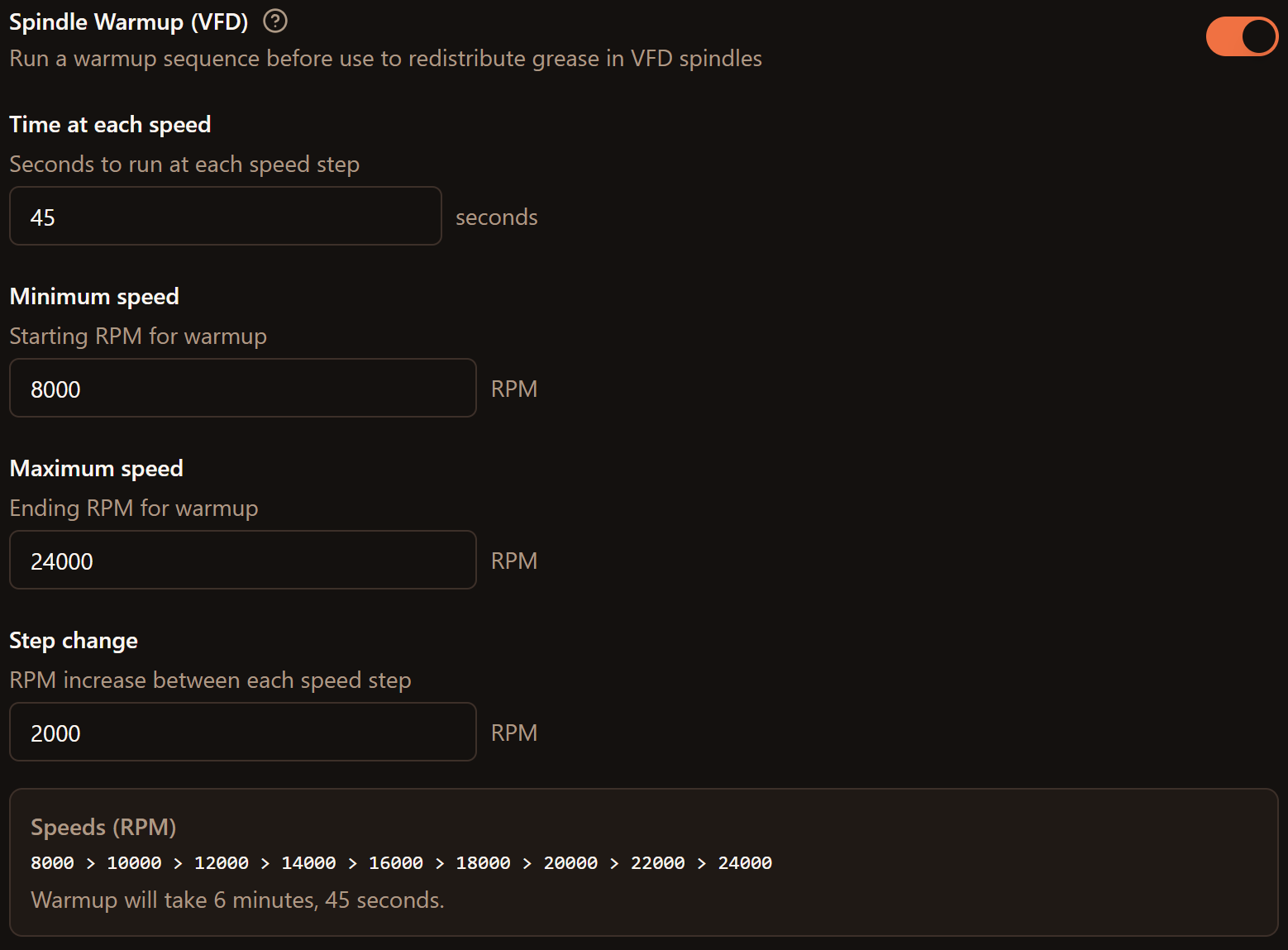
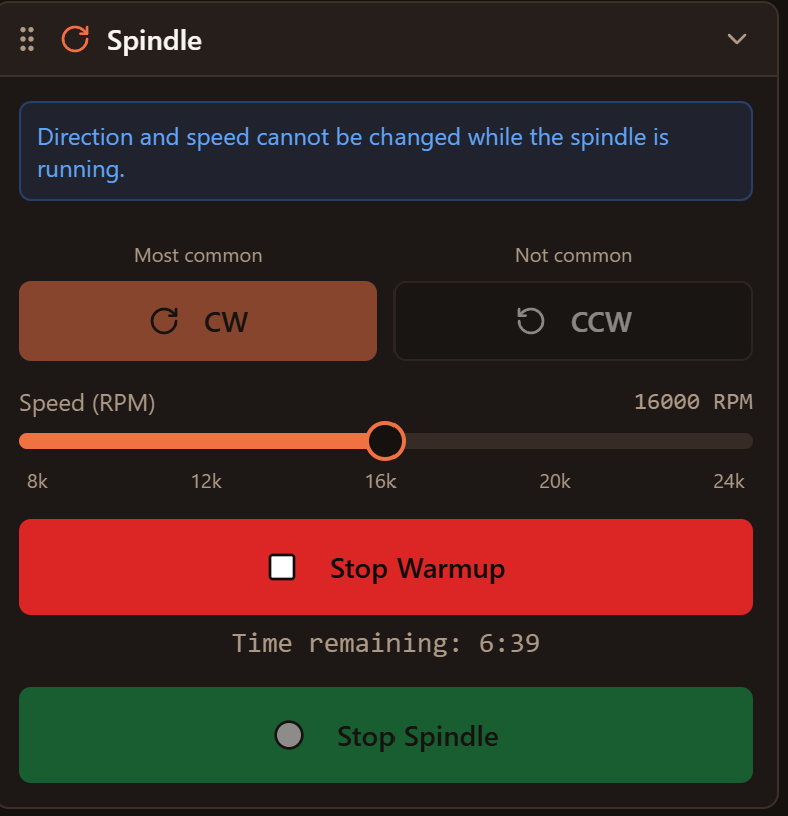
Any thoughts? Look good?
That looks like it would work. What’s the difference between Stop warmup and stop spindle?
I have Stop Spindle disabled while Warmup is running. Maybe I’ll just hide it while warmup is running to make it simpler. They do the same thing.
So would be like “Exit” to get to the previous menu? I wouldn’t think the spindle would be running while getting ready to run a warmup. Either way it looks great!
Video worth a thousand words:
You can normally choose a direction/speed and start the spindle manually.
But when you go into Warmup mode, I hide the stop spindle button. To stop the spindle in warmup mode, you push “Stop Warmup”
Hope that makes sense 
Why not to fork gSender? it has a plenty of features
cncjs has always been very stable for me. gSender hasn’t. I wanted to prioritize that reliability. I also wanted to make this primarily a server-based app, rather than a Windows app.
Are there things you see in gSender that you want in AxioCNC?
Thank you! This has got a lot of potential. I’d been thinking of doing some similar but hadn’t gotten around to it.
Any thoughts on collision detection/warning or key mapping for jogging (I use a bluetooth keypad)?
I’ve also been thinking about a way to create and save sequences of gcode files to easily track and replay. It’s a bit of a hack to avoid paying for a Fusion license that allows tool changes but would also be nice as a way to add some metadata around the gcode files to simplify managing and reusing them.
Yah i’ve definitely thought about collision detection! That’s on my list of things to work on, but there are some more basic things first.
I also have keyboard jogging on the list - higher up than collision detection
I’m curious what you mean by sequences of gcode files. If you have a bunch of gcode files that are one tool each, you can basically [with some tweaking] just copy/paste them into one file with Tx M6 between them.
Or are you thinking of something else?
Yep need the keyboard jogging for my current jogging controllers to work. Even better if C3D would open up the interface for the new jog pendant 
Awesome work. Will definitely check this out.
Kinda sorta reminds me of another new project I have been following:
@cryptyk
Which brings up the grbl compatibility that I didn’t mention: grblHAL.
This looks awesome. I do my design work on a Mac, then have a Windows tablet to run CMotion at the table. I tried to install the Mac version on my Mac and got these errors:
Thanks for letting me know! Can you try this one instead?
https://github.com/rsteckler/AxioCNC/releases/download/v0.0.88/axiocnc-desktop_0.0.88_x64.dmg
Totally - grblHal is on the list. After I get the app sorted from a usability standpoint. I want to add laser support and 5 axis support, too.
Can’t wait to try this out. I’ve been on cncjs on rpi for a long time, wish there was still development there. Same experience with gSender, so much promise, too many bugs.
Is there a way to change the port so you could run alongside the cncjs install on an rpi? Or maybe there’s another way to go about that. Assuming if I install it will create a conflict with the cncjs install also using port 8000.
Here’s a post I wrote up a while back on the cncjs custom commands feature and using it to create rapid position locations. Would be a great feature in this. I wish you could assign a keyboard command, but I don’t think there is a way, like ctrl-shift-b to execute rapid move to back center and get the spindle out of the way. Looks like you may have this with the Rapid widget I saw in the video.
And agree with keyboard commands as well, I just setup a macropad with the cncjs commands. Works pretty well. If this works with a gamepad though, maybe even better (and something new to purchase…). Be a nice feature to have those keys customizable, couldn’t tell from the video if that was the case.
Great to hear that keyboard jogging and collision detection are on your radar!
To clarify my feature idea let me give a more concrete example. Some of my projects have 10 or more tool paths with a variety of tools. What I’d like to be able to see is a view like the following:
Inlay Bowl Project
 Bowl roughing scallop [1/4" End Mill]
Bowl finishing scallop [1/4" Ball Nose]
 Inlay pocket v-carve pass 1 [30° V]
 Inlay pocket v-carve pass 2 [30° V]
Inlay pocket clearance [1/8" End Mill]
Starting one of these loads up the tool path gcode file and begins the wizard flow you’ve built. Completion of the tool path would mark it as done (or canceled if it didn’t complete?). It would be slick to incorporate the Tool Library you already built to show a better name for the tool used in each as well. Perhaps the time remaining next to the running one as well…
A layer above this could be a library that allows you to manage these projects with additional description/metadata. My ideal setup would allow me to quickly find a project, load it up so the view populates with the tool paths and tools, and then kick off each without much room for mistake.
I recognize that some of the described capability is available when your CAD supports tool changes. I probably wouldn’t go that route though as you can’t easily restart in the middle of complex multi-tool gcode. My ultimate version would recognize when tool changes are, and are not, needed and optimize the workflow accordingly with an option to auto-continue when no change is required.
Ryan,
I sent him the specs for the Pro XXL to incorporates as a default. I used the values reported in CM.
Also I looked at the capability to export the tool library from Vectric to see about a mass upload. Looks like it comes out in an SQLite format I will have to piece together. Hopefully the CC export is more useable.
I think the format is TinyDB for the Vectric library