@robgrz It looks like the download link is still pointing the 827 build.
1 Like
Sorry- give it another look now.
Got it, Thank-you!
plus a bunch of characters to get to 20
2 Likes
There was one interface aspect which I specifically asked after which I wanted to touch on here — circles and polygons draw from the center out, while rectangles draw from corner to corner — but note that either behaviour may be toggled by holding down the shift key (ctrl also works for rectangles).
4 Likes
829 is up at Carbide Create Beta Downloads
- (FIX) Clicking on a layer color to change it now selects the layer first so the correct item is changed.
- (FIX) More tweaks to the Trim command.
I think this build fixes the remaining bug introduced since 817. So, unless something comes up, this will be moved to stable at some point in the next week.
6 Likes
Love how the rectangle creation works now, much more intuitive IMHO…
Oh, and I can drag a circle using the center again, well done!
1 Like
Am I correct in assuming/guessing that if I want the latest and greatest version of CC I have to do a new download? I am currently using V826. Trying to get a firm understanding on how new software upgrades are handled. If that is correct, what is best practice on saving…save over the last version or store as a new download? Thanks in advance.
Right now they are posting new beta versions quickly as the community is trying it out and offering suggestions. Beta versions are a work in progress.
It seems official version will be released fairly soon.
1 Like
Every version’s installer has a unique name, you don’t save over anything - the installer will be a separate file once you download it. You need to download the installer to get a new version, there’s no auto-update in Create. You will install the new version over the previous version after downloading though.
2 Likes
Now up to 830:
I just realized that when Snap to Grid is enabled the Option Key when held down on mac disables that when dragging out a circle, square, and Polygon. Nice!!! Thx @robgrz
2 Likes
3 Likes
Lastly, I have updated:
for the current build 830 — if anyone sees anything which I missed, or has any suggestions or corrections, let me know.
2 Likes
Thank you C3D for the [J] shortcut for join vectors.
2 Likes
We’ve been playing with the latest beta, and it’s been remarkably trouble-free for us. Given the magnitude of the changes we’ve made, it only makes me think that we’re missing something. (Or, maybe we have a decade of software PTSD to overcome)
Has anyone found any problems with the beta?
4 Likes
Just downloaded 831
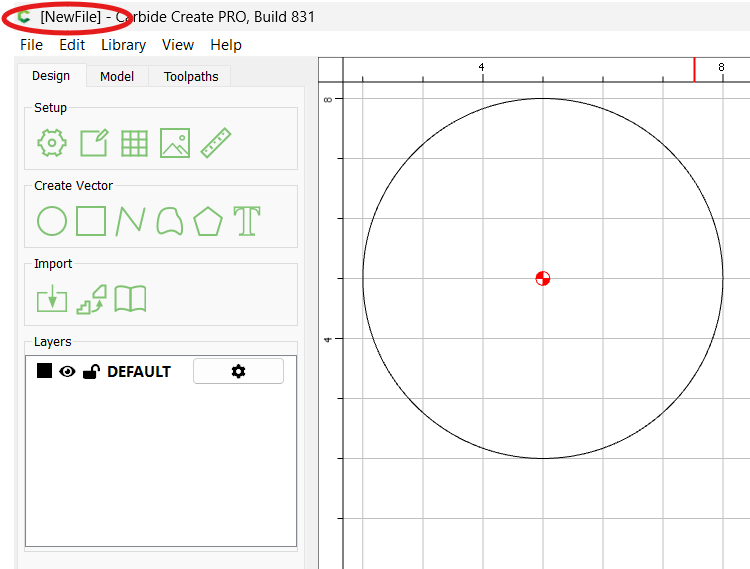
When I open a file from V7, no filename shows up in the title bar. Still just shows [NewFile]
It still seems odd that the cursor snaps to nodes & grid points when there are no function dialogs open.
Layer panel seems normal again, but now a double-click is required.
Nothing to report on current changes.  Nice work, Rob!!!
3 Likes
EDIT: One aspect of this is since if a file had a 3D component, its removal would be a destructive change if saved over the original file, so not using the original filename saves the user from doing that.
FWIW, I find that helpful for checking dimensions/locations w/o bringing out the measuring tool.
1 Like
I don’t think that was the intent. Send me your file and we’ll take a look.
The snaps are used as the starting point for dragging objects, so they need to be active when there’s no command running. (You could think of it as “the default command” running, in that case, which is probably how we’ll restructure the code at some point.) The old code mostly had snaps active by default from a behavior point of view, but it was less clear in the way the UI showed it.
1 Like
Just created a circle in a V7 file. Open in V831…
Test_V7.c2d (44 KB)
I could have sworn it didn’t start snapping until after you select an object to move. Maybe I just missed it before.