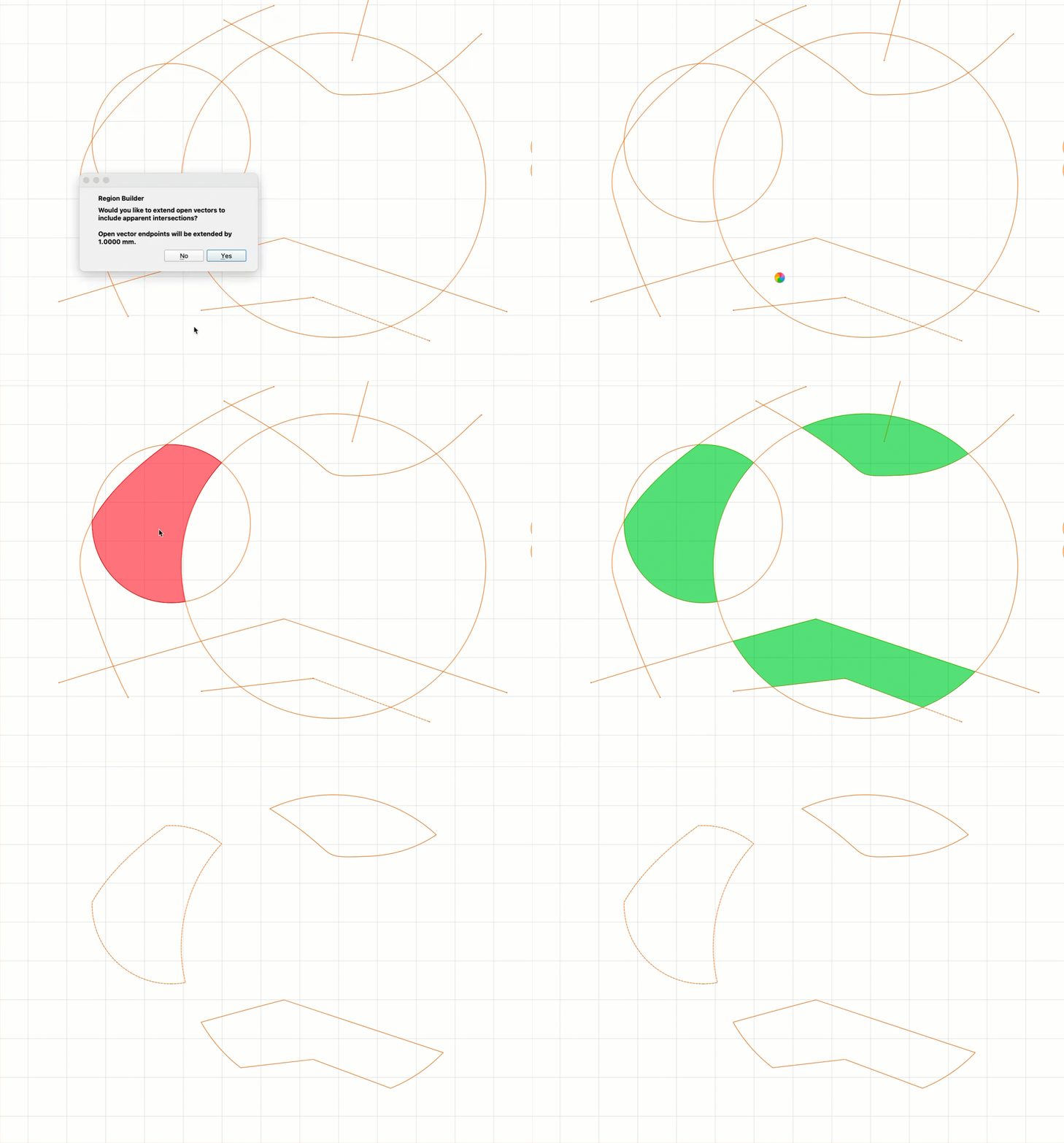
We spend a lot of time going through threads here and tickets we get in support, trying to figure out how the problems could have been avoided. In Create, I think the #1 group of problems is confusion around booleans, vector trimming/joining, and grouping. New users thrash between all of them, trying to get the output they want.
I wanted to share a quick work-in-progress we have for Create right now as a new way to handle this. For lack of a better name, we’re calling it the Region Builder. Here’s how it works:
Select a bunch of overlapping open or closed vectors
Click in any region that’s formed by the overlapping vectors
When you click “done” the vectors around the regions are all clipped to create new closed vectors.
The output vectors keep their original node structure, so it’s easy to edit them with the node tool.
We have a couple of options:
You can choose to merge adjacent regions, or not.
You can extend open vectors by a few pixels, so vectors that appear to touch in the window do end up touching (even if they’re actually a little short).
If all goes well, this might get released next week.
you just pulled a lurker out of the shadows. This is a feature of many CAD programs that I have wished for in current platforms for years! My first exposure to CAD was in 1989 on CADKey and was officially trained on AutoCAD v9 that had a similar “hatch” tool where all you had to do was select within a boundary to create a new entity. This would be a much appreciated tool for tracing boundaries and scanned images for outlines.
This is something I’ve been hoping for too! One thing I really appreciate about the Carbide 3D team is how you’re always working to improve the products and make them better over time. It’s nice seeing a company keep pushing things forward instead of just leaving products as-is.
Alright, conventional wisdom says you should never release new code on a Friday, but YOLO.
(FIX) Optimize grouping/ungrouping for a large number of objects.
(FIX) Revert the Qt version to a slightly older version until later this year.
(FIX) Undo for offsets now resets the selection state.
(PRO) Made “Flat” the default for new model components to save on calculation time.
(NEW) Added new Region Builder command.
(NEW) Offset command now has an option to delete the original vectors.
(NEW) Offset command now shows a preview of the offset as the parameters are changed.
(NEW) Offset command now has an option to not combine the offset vectors. When checked, each vector is offset separately.
(NEW) Offset command now has an option to rebuild the offset vectors as bezier curves.
(NEW) Enter/Escape complete the offset command.
I have a lot more faith in the Region Builder command than I do in the new offset code. There are probably a lot of edge cases to find for that one. And, offsetting a bezier curve is always approximate, so uncheck the bezier option if you need better accuracy.
I last 2 times I have loaded the newest version of CC, the program
still shows build 845. I just took a quick look, and I have the flat modeling
command. I did read where someone had the same problem recently.
I may have missed something along the line.
Jim
There is a defect such that - if there is a TEXT field in the selected items when you invoke the Region Builder, it crashes (bug splat) - I put that info into my bugsplat report.
What a shame! Now where I start to understand the CC work philosophy you make it that easy! Life is not fair. Probably will make it much easier for beginners, and I am not much more than that.
Re Region Builder, have you looked at shaper origin’s studio? They have a nice feature called shape-shifter: When you enter this mode, all selected objects are fully intersected, and you can then select the pieces you want. When you’re done, you can either keep or delete the original objects, plus you get the new region.
Their software is nice, worth looking at – I’m mostly using Carbide Create but there are origin studio features it would be nice to have.
I haven’t tried the Shaper software, but you just described the Region Builder command, if I’m reading your post correctly. (Though “Shape Shifter” is a much better name)
@robgrz I’ve been keeping a list of bugs, ui cleanup, desired features, etc for create and motion. If that would be helpful, let me know and I’ll forward it. I’m a new cnc user with a software developer background, so a fresh pair of trained eyes