I change the bit after every practice cut that does not work. I’ve never clicked new tool before re-probing for my zeros. After the cut doesn’t work I place another piece of stock down, re-zero, load new file with altered start depths, it instructs me to install endmill, then again goes to the bitsetter.
Nothing is going to tell me to change a bit after a job when I stop it, it just goes back to the home, and I jog it over to the new stock and start over
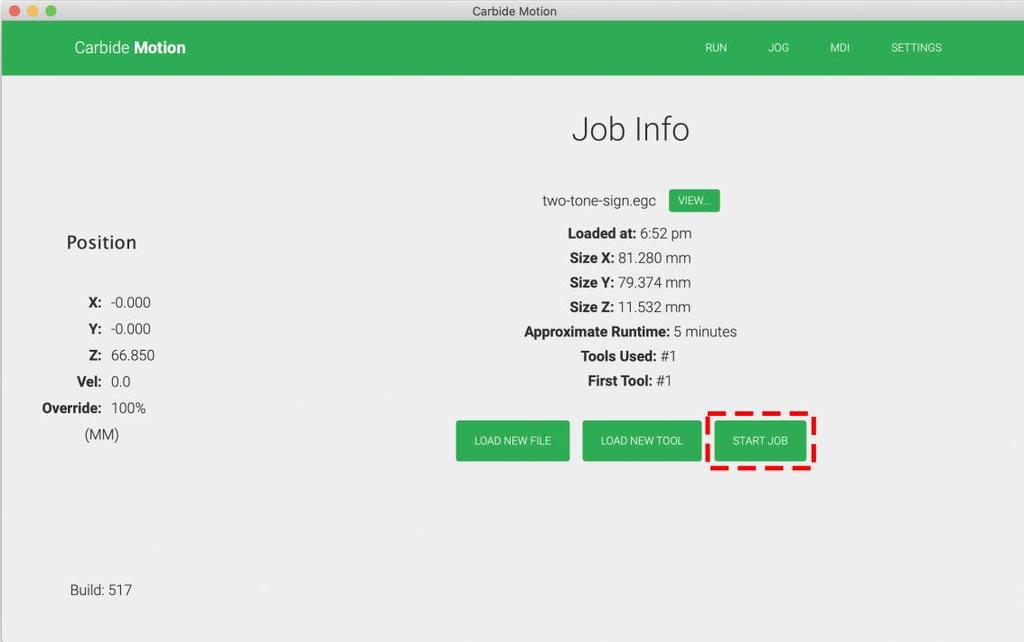
If you are changing back to the gage pin to zero again, use the “LOAD NEW TOOL” button to change your tool otherwise the program is setting the new origin thinking the tool that you ended the first practice cut is still in there until the next BitSetter operation.
I’m not at my machine so I had to settle for this picture. Ignore the red dotted box around “START JOB”. Even though you aren’t prompted, whenever you change a tool with the BitSetter enabled, you must use the “LOAD NEW TOOL” button so CM knows to account for a change in cutter stickout.
Yup…if you’re changing back to the pin and not clicking on Change Tool, that is the source of your problem. The degree of the problem is pure luck in terms of how close the tools are in length…that’s why it seems so random.
Alright, I’m going to assume that is my issue because I’ve never clicked that button, I always thought being that I was re-zeroing it would account for that. Ill try it after work today and come back with an update.
If you rezero with the same bit you cut your previous test with, rather than switching back to the gauge pin, you wouldn’t need to…but because the last thing the bitsetter measured was the cutter, it thinks the cutter is still in there when it calculates its height on zero. The difference between the length of the cutter and the length of the gauge pin is the error that will plunge the bit.
I gotcha… Yeah I am always ending with a 15 degree V so I can’t probe with that on the bitzero. So I would jog it up to the front again and insert the gage pin, never telling it I was changing the tool.
If you used something like a corner jig you could keep your v bit in and just probe Z since X & Y would be the same - this would save you time and cut down on potential for error.
When you set the work offsets, did you set the length offset of the dowel pin before setting the work offset?
If not, your Z work offset and your tool length offset won’t be related in any way and it would be reasonable to assume you would have a crash when you start the program.
step-by-step notes on how you are initializing the machine, setting zero relative to the stock, managing each tool change, including photos and screen grabs
documentation of the discrepancy which you are arriving at and an explanation of how you are measuring it
Some of what you’re asking for is pretty straightforward, but you’re asking me to take photos, screen grabs and write step-by-step notes every single time I run a project, just in case this random event occurs?
For what it’s worth, I followed the advice to run a test of the project on a scrap piece of stock before the actual cut, for it to work well - until the final cut, when it didn’t.
If there are users out there - only using CC and CM to design and run their projects - and have never had this happen, then it might be user error, but I’ve got a nice piece of oak sat on my machine ready to be cut into three boxes, I’ve looked at it and re-checked the CC and CM files - and I keep putting off running the project in case it goes wrong.
One common thing for this sort of issue is that people tend not to report things that they think don’t matter or could be the source of a problem. Like describing how they make a cup of tea as “I pour the water into the cup” but not considering things like filling the kettle to a specific level, waiting until it has boiled, putting a teabag in the cup, etc, as being overly relevant.
Something that has cropped up recently was an assumption that job boundaries are significant and in someway “reset” the state of the machine with respect to tools and lengths, and that between jobs is a different state to when a job is loaded. As such, activities in this period were not thought about when describing the problem.
I’m not suggesting at all that you are making an error, but am just hoping there’s something you haven’t considered could be relevant, that you haven’t said, that is in fact relevant.
Every time I’ve looked into this on support, it has come down to some step which was left out, or a tool change done w/o using the interface.
Use the checklist:
and it shouldn’t happen — if it does, we need a repeatable, documented example which causes it in order to have a programmer look into it. Please send such a documented example in to support@carbide3d.com