Whenever i try to run g-code from CCpro it always stalls and says hold in yellow and never does anything else. I tried re zeroing the xyz access still a no go.i homed the machine and reset the xyz to zero when i send it the router goes all the way to the left and stops on the limit switch and the hold comes up again where the run should be. Has anyone been succesfull running genmitsu with cabide create pro?
Which post-processor are you using?
I used the g code if that is what your referring to.
in carbide pro i am using the trial
Under Edit | Select post-processor what post-processor have you selected?
I have it on GRBL tried basic also.
Check w/ the folks who make the communication/control program you are using — Basic G-code should have worked.
Im using candle open source
That’s supposed to work:
You may need to open the gcode up in a text application and look at it. You will unfortunately have to educate yourself on gcode. If you have some gcode that has worked previously compare the old file with the new ones you are trying to create. As @WillAdams mentioned do not use the Shapeoko/Nomad post processors because they add commands that your machine cannot understand. The Basic and/or GBRL should work.
The issue may not be the gcode. Have you successfully used the machine. If this is a new machine then you need to troubleshoot with a known good file that has worked on your machine or type of machine before. If it is new you could be chasing your tail.
I figured it out my x y access was zeroed to the center. I usually don’t do that but i did on that project.
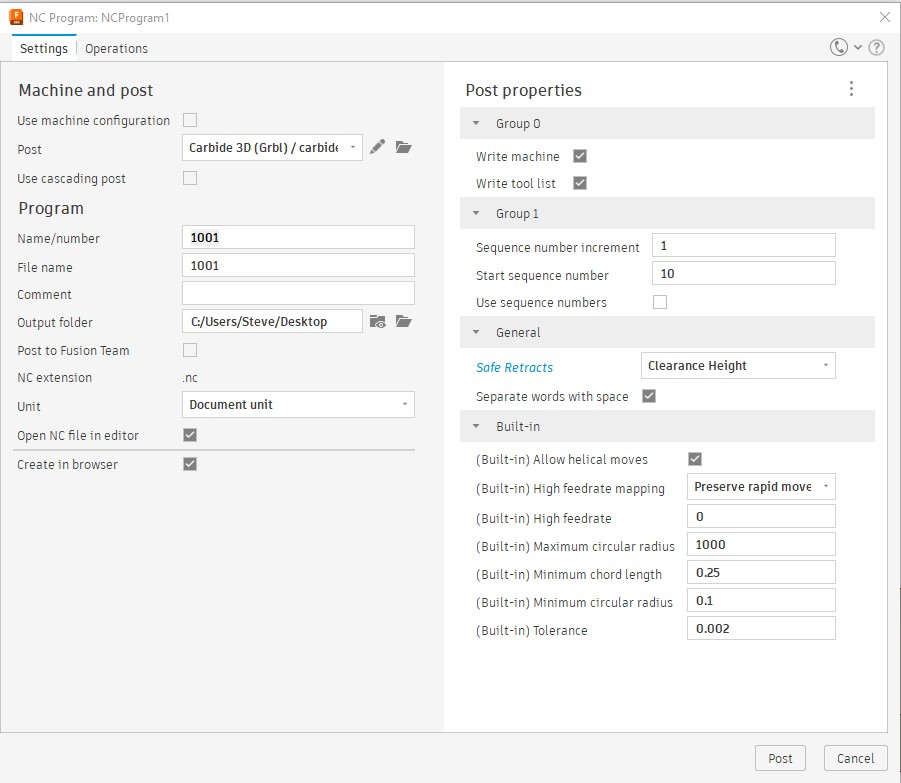
just as a note, I use Fusion 360 and use GRBL post processor as well as UGS for the sender. In the G code, there is alway some reference to G28, Tool # or something that hangs up the code before it starts to run the project. I get a pause or hold message each time I start. I just hit continue instead of always modifying the G code and it works fine. My process ends up as hitting start, the Z jogs up a bit and then pauses. I hit continue and then it runs the entire project as normal. I probably could edit it but its easier to just hit continue in my case. In fact it sort of acts as a final check for me.
When you post process, In Fusion 360, in Post Properties, under General, you can change the Safe Retracts from G28, to Clearance Height.
1 Like
Thanks for the reply. I’m experiencing the same thing in candle. I hit the pause button and it continues. Kinda funny.
1 Like
I helped a friend override his issues with G28, but to be honest, its been happening so long now, I just expect it, hit continue and let it go. Its almost like the system is saying “Joe are you sure you want to make this cut?” ha ha ha…
This topic was automatically closed after 30 days. New replies are no longer allowed.