Hi Folks,
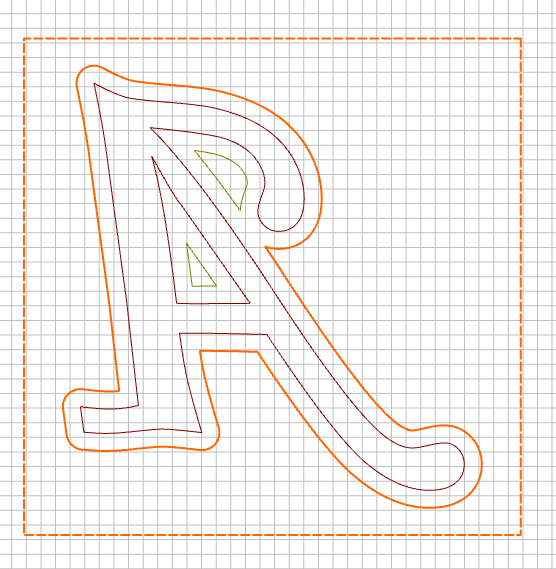
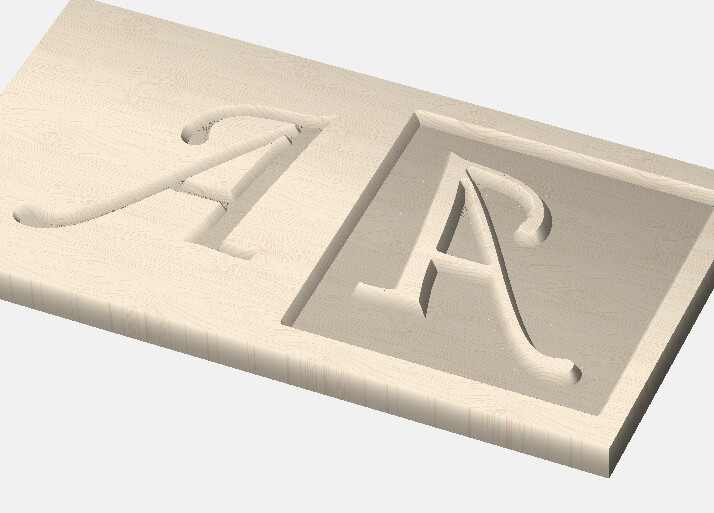
Iampretty new to using inlays in CC. I was trying to cut a simple Letter A with inlay model. What I see in simulation does not seem right. Can you guys let me know what I am doing wrong? The file is attached.
Answer: everything.
There are two carved "A"s. The cursive item is not part of the project?
For exercise there should be something that is not symmetrical to understand why the mirroring os necessary.
If you cut out two cutouts then gluing these together results in a cave not in an inlay.
You will need one cutout and one inlay that can be glued into that cutout.
One trick might be to cut out the area between the structure itself and the square around it to establich a plug “island”.
Suggestion: Letter A inlay suggestion.c2d (192 KB)
Thanks.
I am confused. Iput the 6mm offset around the letter and dont have a border that has tool path. I did an exact thying with a Letter V and it worked. Is it to do with the actual letter because it has a pocket within? My other file is attached. DO yo umind sharing the file you had to create the image you sent?
Thank you so much. I will need to spend a bit more time to figure out why mine did not work. The letter V I did worked. I am sure I am missing something obvious.
If anything still isn’t clear or doesn’t work in a small test, please post all the specifics (files, photos showing how the cut turned out, tooling specifics if not using Carbide 3D tooling, &c.) and we’ll do our best to look into it with you.
Pocket & V-carve look at the outermost boundary & machine within it. If there is another boundary inside that one, it stops machining that area. If there is a 3rd boundary inside the 2nd, it machines within that one, etc…