I’m trying to bring files into CC from where I downloaded them to by either the “import” or the “open” options and they are not there. I download jpg’s to a folder I created called “to do files” on my desktop. The jpg file or files appear in this folder when I open it from my desktop. Then when I attempt to bring one of the files into CC from either the open or import options in CC from the same “to do files” folder this folder has nothing in it. The same thing happens if I attempt to use the downloads folder as well. According to what I’ve read and videos I’ve watched both on and off the Carbide 3D site I should be able to grab a file from any folder on my laptop and drop them in CC to trace / use. Any assistance would be greatly appreciated.
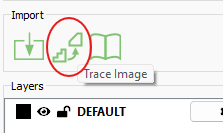
Pixel images may be either imported for tracing:
or to be placed on a background layer for reference:
If you’re still stuck, please upload the file and we will look into this with you.
Thank you, William.
Just fyi, I’m still using build 836 and I was able to bring in the files via the trace feature straight from the download folder. The files do appear in the download folder when I use trace however if I use import the same files do not appear in the download folder. So, apparently I still can’t use import when I’ve downloaded a file. That is weird but at least I can trace and save them.
Does the 842 build have the trace as well? It seems to me I remember there being a note on a recent update that there were significant updates and if you didn’t need or want to have to learn all of the new things not to update. I don’t see 520 on the software page for CC
Open / Import only opens .c2d, .dxf or .svg. Trace & Backround open raster images. (.jpg, .png, .bmp).
Gotcha. Thank you sir.
This topic was automatically closed after 30 days. New replies are no longer allowed.