Hey Group does any one have a link or file I can download for a tool changing custom post processor. I made a post many months ago about custom post processor, with me using Carbide and my onefinity with Redline HMI. I was having issues with it wanting a tool change and spindle wait at the start of a project, that was sorted out but now I’m looking to edit or use a different post which will add in tool changes. If I use Basic G-code Or GRBL it will bring me back to my original issue with the M0 tool change at the start. Ive read the section on editing the “on Section” but I’m unaware of how to properly doing this with out messing it up. Any advice would be appreciated!
1 Like
The Carbide 3D Shapeoko post-processor should work, since the BitSetter is set up as a tool changer.
If you need the order of the tool # and M command swapped for a Masso, see the attached file.
masso.zip (1.7 KB)
and for installation/documentation see:
2 Likes
Does the redline hmi use MASSO compatible commands these days?
Going to be interesting to see how that hmi works out, hopefully it’s another good option for the market.
Hey I’m not really sure on this one
Which controller do you have?
What firmware does it use?
Hey Will I’m not having much luck with that masso file its showing syntax errors
Does your machine have a Masso controller?
Sorry didn’t see this question, Its the Redline HMI the latest version installed 1.6.3
What errors are you getting?
Do you have an example G-code file which is formatted as this controller expects?
Have you tried the Shapeoko post processor? It’s very generic and uses M6 for tool changes, which is the standard way to do them. I would be surprised if it didn’t work as-is. If not, send over the error messages, and we can probably figure it out.
3 Likes
SHAPEOKO TEST TWO BITS.nc.zip (2.1 KB)
This is the Shapeoko file simple two tool letter and a pocket. Im getting a stoppage at line 15 and it saying its not a movement line.
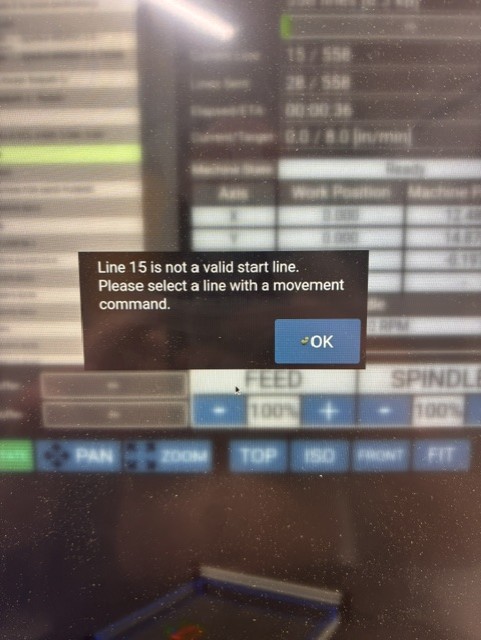
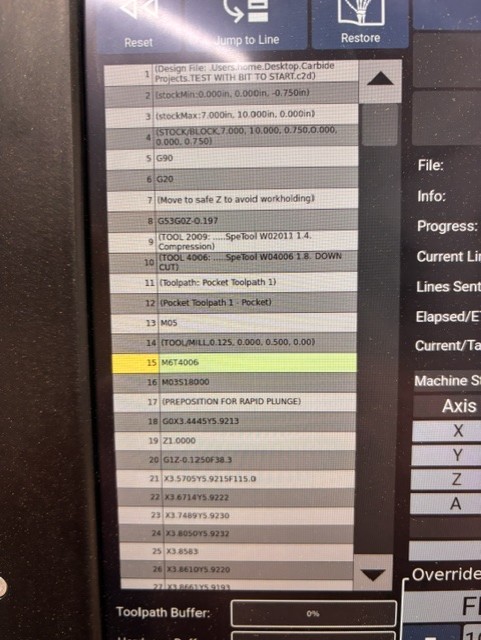
Line 15 is:
M6T4006
and I believe that matches Carbide 3D Shapeoko.
What happens when you try the Masso post?
I get the same pause. The only way I have gotten the tool change with no issues when I want the tool change it with this Post, but I don’t care for the tool change at the start after I have already set my X,Y,Z so was curious if someone would have the means of writing that out?
RTCNC-RTSX-Draft1.post 2.zip (2.3 KB)
Okay, this is a quick first hack:
Add the line:
toolstateinitialized = false
at the top — this allows us to know that a toolchange has not yet been requested.
Then we add an additional if statement in the portion of onSection which processes tool changes:
	    if(toolstateinitialized == true){
            ...
        }
        toolstateinitialized = true
I’ll test this when I get a chance to see if it works as expected.
Seems to work:
(Design File: )
(stockMin:0.00mm, -152.40mm, -12.70mm)
(stockMax:304.80mm, 152.40mm, 0.00mm)
(STOCK/BLOCK,304.80, 304.80, 12.70,0.00, 152.40, 12.70)
G90
G21
(Move to safe Z to avoid workholding)
G53G0Z0.000
(TOOL 102: .102 1.8. DEFAULT)
(Toolpath: Drilling Toolpath 1)
(Drilling Toolpath 1)
M3S10000
(PREPOSITION FOR RAPID PLUNGE)
G0X0.000Y0.000
Z3.175
Z0.250
G1Z-6.172F203.2
G0Z3.175
(Toolpath: Drilling Toolpath 2)
(Drilling Toolpath 2)
M5
(Move to safe Z to avoid workholding)
G53G0Z0.000
(TOOL/MILL,0.10, 0.05, 6.35, 45.00)
T301
M6
M3S18000
(PREPOSITION FOR RAPID PLUNGE)
G0X0.000Y0.000
Z3.175
Z0.250
G1Z-6.172F304.8
G0Z3.175
M5
M2
Attached.
RTCNC-RTSX-Draft1.zip (1.7 KB)
The way I read that error message, it seems like you’re trying to restart the program on that line, and starting on a non-movement line is not allowed.
If that’s the case, can you run it from the start of the program?
1 Like
I tried multiple times to run it from the start it jumps to line 15 then waits, restarting it doesn’t make a difference
Will I will have to try this out tomorrow, tonight was too busy. Im hoping this will be the one. I did end up doing some more testing with the current version I have, when I set the XYZ then start the file it asks for a tool change I can click through it and then goes to the tool setter, I ran the file in the air not on a work piece and it seemed to know the XYZ from where I zeroed all at the start. Ill let you know how I make out and thank you!
If you have any reference G-code that works, send it over so we can take a look.
1 Like