Tool Definition

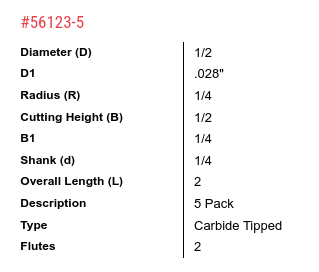
Could someone run through the process of defining a tool for use with Carbide Create. I know how to add tools but I’m looking to add an Amana Tool #56123 ( 56123-5 5 Pack Carbide Tipped Point Cutting Roundover 1/4 Radius x 1/2 Dia x 1/2 x 1/4 Shank Router Bit ) - I’m just not clear on what fields I should be using from the documentation in which fields in the New Tool panel.

amana-56123

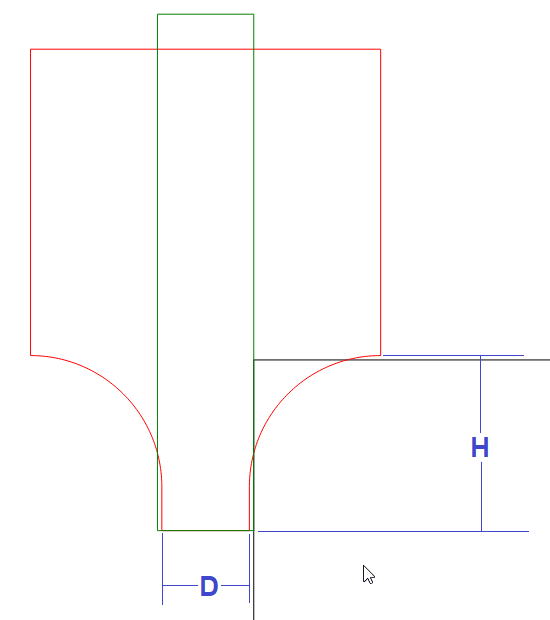
I would probably enter this as a 0.030" - 0.032" diameter endmill. Just slightly larger than the point/tip radius (D1). And program my depth to 0.248"
This leaves
a few thousandths so the sharp edges of the tool are not leaving a line in the stock.

It won’t look right in the simulation. That’s another topic. But it will produce a usable toolpath.

2 Likes

Ahh ok, I was struggling with how I’d represent that curve. Your diagram explains it all very well thanks @Tod1d - again :smiley:

Please see:

1 Like

Yikes! Presumably you’d have a toolpath for the actual tool and just disable the multipath stepped paths for production. I’ll try with the tool and if I’m happy with not seeing the visualisation, because I know the expected result, then I’ll skip this process - although it is very interesting.

Is there any expectation that CC will support these types of bit, directly,in the future?
This topic was automatically closed 30 days after the last reply. New replies are no longer allowed.