So, I run Zorin OS because it’s designed to make things easy. Under Zorin the install went out and automatically installed the dependencies one by one. When I did testing on it 3 years ago it worked so well I bought the pro license to support them. It is a pretty nice distro in my opinion.
1 Like
Since I don’t have CD drives on pretty much anything anymore, what I generally do is download an iso of the install disk, then write it to a USB drive and make it bootable using Balena Etcher. Etcher is available for Windows and Macs. You can then use that to boot the PC from the installer drive.
Instructions to boot from the eternal drive vary by motherboard vendor, but generally on startup you’ll see a message to press a function key to enter the BIOS or EFI interface. The startup disk should then be able to be selected from there. If you write to a bootable DVD most PCs I’ve used will boot from that automatically.
2 Likes
I got it running! (Haven’t tested it on the shapeoko yet, but the program starts and I get the GUI).
flatpak remote-add --if-not-exists flathub https://dl.flathub.org/repo/flathub.flatpakrepo
flatpak install flathub org.kde.Platform/x86_64/5.15-23.08
flatpak install CarbideMotion.flatpak
It then runs as expected with flatpak run com.carbide3d.CarbideMotion
Why it needed the KDE platform on the same version to be installed a second time from a different repo is unclear, could be that there was some missing dependency of it. Linux fails in mysterious ways. It seems a bit odd that Ubuntu didn’t have flathub installed by default as an available option.
This is the first I’ve run into problems with a flatpak (surprised it took this long given the long history of problems I had supporting desktop Linux at work which eventually led to us switching to Macs). It might be worth it to try building it as an appimage as well to see if one system is more reliable than the other.
2 Likes
I used Linux for a long time from the early days and like it but it can sometimes be a labor of love. Sometimes you just want things to work and not have to spend hours debugging.
I know that once set up it should remain stable. I have been using my Pi with touch screen for 2+ years without having to do any additional configuration but I am willing to try Linux. I need a touch screen solution though and the one I am using is integrated with the PI.
Does anyone have recommendations on a touch screen solution and compatible distro?
1 Like
Wacom stuff is usually well-supported under Linux, and they have a couple of displays which have touch — seriously considering a Wacom Movink 13 or MovinkPad Pro 14 — bonus, you get an excellent quality stylus.
Lastly, I will note that I often use Carbide Create w/ touch (left hand) and stylus (right hand), which may have contributed to why it took so long to get keyboard shortcuts for basic drawing functionality (I never felt the need to ask/suggest).
2 Likes
I just switched office environment to Linux. With Wine installed I do not have any issues installing widows software so far. Considered that? Possibly some distros have Wine pre-activated, hence these machines run Win SW?
Thank you for the reply, @brbonline. Long story short, I’m also not allowed to use removable storage (kind of a security thing). But that does bring up the thought of maybe trying a network boot. I have a couple of Linux iso’s on my main PC hard drive, which mount as virtual CD-roms. I might be able to use one of those to do a Linux install on the CNC PC. But that retains the issue of installingCM itself… It is an interesting challenge to be operating without sneakernet… I needed to install a DHCP-server program onto the CNC PC and run as a service so that I could print through the Ethernet to my Neptune 4 Pro printer.
Hi All
My system is also custom with everything built in, The Pi is inside the torsion box deck with all the wiring and other bits. Which I love. Nice and clear looking and tucked safely away. I like that it is a simple dedicated appliance for a very low cost and simple to maintain.
I dread the idea of putting a PC in my shop. My shop is quite multidiscipline. It is just not a good environment for a PC. When I was looking to buy a machine, the Pi capability was a big pro selling feature for me.
My initial reaction to this, is it is going to be quite the tear apart and rebuild for me as my layout is all enclosed and built in with every inch of space used under and around it.
I personally only use CM as a gcode sender. I push the file to it over the LAN, quickly look to see I have the right file selected, do a quick look at the home position then start the job. So for me and my workflow, at this time, I don’t seem to appreciate or understand the need for the higher graphics. Maybe I am missing something, To me it is cool but I am wondering how useful it will be and is it worth it for pretty  But that seems to be what everyone wants now adays, I get it, I however like simple and it just works
I seem to remember a couple of years ago I tried several other Gcode senders on the Pi and I know some of them had a reduced graphic setting you could turn on.
It will be a sad day for me as many of my machines use a dedicated Pi. That is just the setup I like and that works for me
The good news is it looks like Linux will still be an option. Last thing I need is a Windows machine in my shop It is bad enough that when I turn on my wife’s machine, (she doesn’t use it much), I have to go for coffee while every programs start updates and inventory, and ads, news and widgets popping up, Holly crap Don’t get me wrong, I use Windows 11 as my main machine but you need to have it on and use it every day. Windows was meant to be a general purpose every day machine, not an occasional appliance. So thank you for understanding the need for a simple platform and that one size does not fit all.
I guess options will have to be weighed and decisions will be made
Thanks
3 Likes
Same here for me… until I discovered miniPC’s. Some are such a small form factor and actually cheaper than a Pi5 with all its attendant accessories… and have sufficient ram and storage for any/all gcode senders or other programs you’ll ever likely need. A “super-Pi” in effect… but without GPIO, which is often not needed.
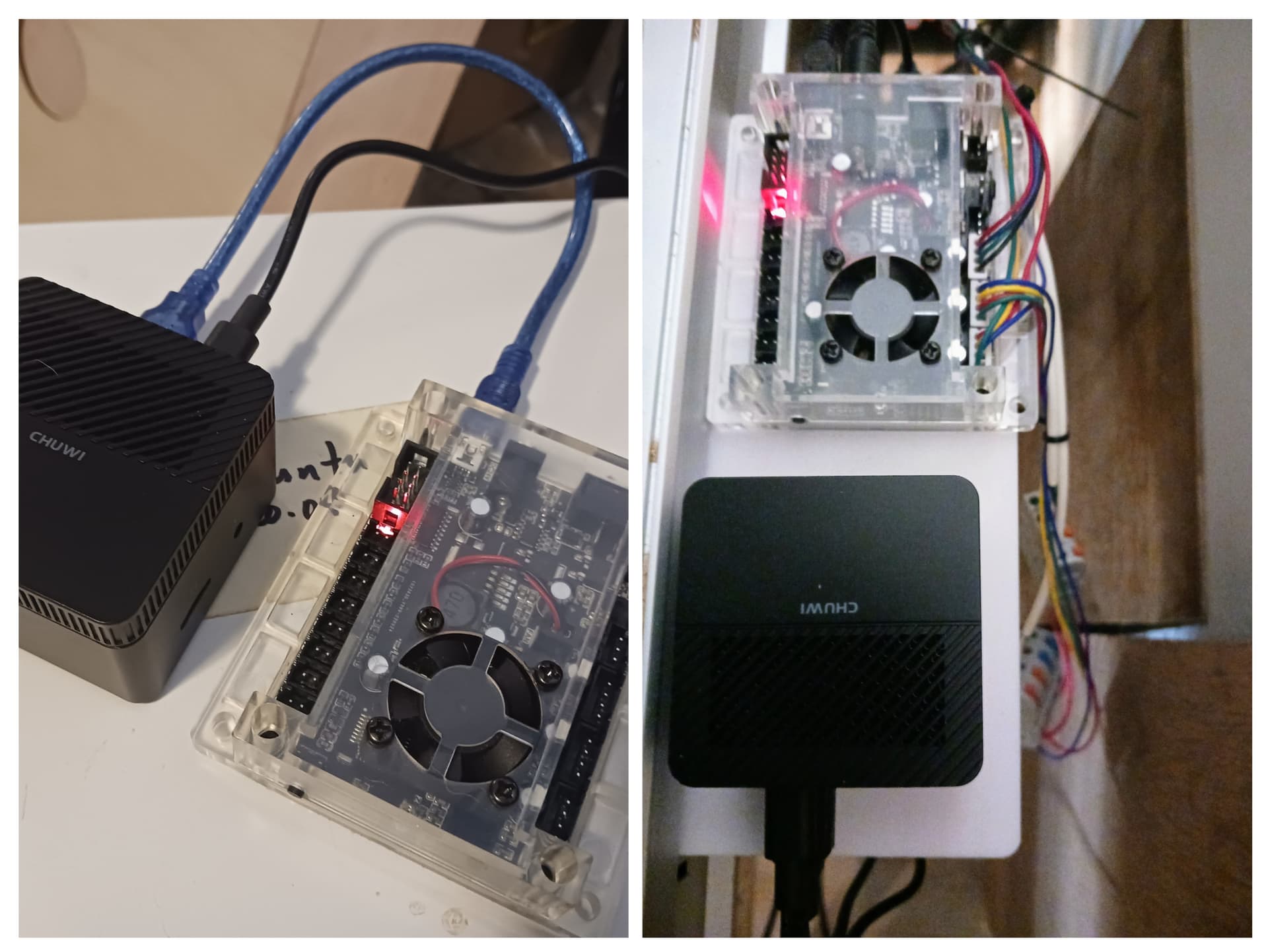
I purchased several tiny brand new miniPC’s shown for about the same $$$ as a bare Pi5 without its essential accessories. I then blow away the installed OS and install LinuxMiint-DebianEdition (LMDE6/7) and set them up for headless operation through Xrdp over wifi. I add any/all gcode senders and programs (Lightburn, CarbideMotion for Linux?, etc) I use with my various machines… and it’s easily moved between machines if needed. Senders such as gSender and UGS also provide pendant functionality for cellphone. Set up the job remotely, snapshot the QR code with your phone, while still on your good PC… and then just carry the phone into the shop to jog into position and start your jobs.
I love my Pi’s’ but they simply are not as versatile and do not perform as well as even a modest miniPC for USB output to a cnc controller.
2 Likes
I am a new user, and very enthusiastic for a linux build of software.
As a data point, I’ve tried the flatpak on a fresh Debian Trixie installation:
- encountered the “org.kde.platform” missing dependency
- satisfied the dependency with brbonline’s solution
- observed the GUI start for 652. Encouraging!
I will test drive the software with the Nomad3 this week
1 Like
Glad to see an openness to support Linux. Personally I haven’t used it since studying for my tech degree back in 2007. With Windows 10 support essentially dead, I’m about ready to migrate our 3 systems to an open source OS. Will probably give it a try after the holidays when things settle down. Glad I came across this thread, and thanks all who’ve shared info on the process.
1 Like
Just created an account to add one more data point. I have been looking around for a solid hobby CNC machine and have not purchased one only because I don’t want to have to buy a Windows computer. I am ready to give my money to any company that can give me a Linux-only experience.
2 Likes
@craigim ‘linux only’ is a thorny requirement. This defines the tools used, and the work that may be done. That said, I’m also interested in a low friction “just works” linux first workflow
today:
- motion commands to hardware
- carbide motion sends motion commands to the hardware (works on linux, per this thread)
- generation of motion commands
- carbide create is able to generate motion commands for some shapes (works on macos/windows) no linux build
- meshcam is able to generate motion commands from 3d stl files. builds available for windows/macos, and is reported to work under linux with wine
- alibre workshop bundles meshcam, and is available for windows
- generation of 3d models
- solidworks is popular but windows only
- alibre is windows only
- freecad, blender, others are available on linux
Carbide3d Free CNC Software introduces LinuxCNC & GRBL, but does not mention compatibility (or not) with carbide3d hardware
1 Like
Pretty much all of the software which makes G-code will work with Carbide Motion, or some unsupported 3rd party communication/control program for Grbl — see the discussion at:
1 Like
Hmmm for some reason this just popped into my head.
First off, I am all for trying a Linux vs Pi platform.
-
The Pi has free built in free Real VNC server to remote desktop to and send files to. Not sure what options Mint or … has to upload files to the desktop. Real VNC is free on the Pi but I believe it pay for another platform. So maybe an extra cost. Please correct me if I am wrong
My Linux OS knowledge is getting a little dated
VNC works awesome for me. I would be lost without it I use it on many of my other devices / appliances. -
On another note. I am interested and started looking into what it would take to get a fanless Linux box setup on my system. People said it was not much more $$$. In my looking around I found it, when all said and done, more then I believe people think “for me anyways”. Now several people said find a used box or AliExpress or some other alternative buying method. Which is Ok I guess, I have no problem slapping together a small Linux box but it seems that we might be going from a good officially supported in North American product to hunting the internet for a cheaper … and potentially opening up a can of …
I hope if this is the direction that we head , that C3D and us look at an “unofficially supported” suggested recommendation for HW and SW, locally available and officially supported by the manufacture and user community. IE The Pi HW and OS has great support vs some other SBC.
The Pi, which I get the need to move on, was a pretty contained solution. Buy one, load the default, put the CM file on it and run it. Easy Easy Easy and Easy to support in the chats here. It just simple and works vs any random Linux box. Just something to think about.
Looking forward to what we come up with.
One of the limiting factors with all “small” computers for the future is the supply and demand situation with all these planned data centers and “AI” mumbo-jumbo centers. They’re planning on sucking up everything in site!
For Linux only I’d look at System 76. They make the hardware and roll an OS. I have not tested the Linux CM on Pop OS yet. But should be possible.
@ Tex A few solar Cells and you can power your own PC. I’ve worked on some 5V only systems just for that purpose.
1 Like
I would be interested in carbide motion for Linux.
I re-imaged a NUC yesterday with Linux Mint 22.2 and installed the flatpak.
No issue, machine configuration went fine and everything seems to work as expected.
Thanks a LOT for this… no more Windows… you can’t imagine how good this feel…
I’ll probably run a few cuts this week (I have some astronomy equipment holding plate to cut in acetal so that’s a perfect test).
4 Likes
This came up in my feed:
and looks like an interesting option for running this.
(if it meets the system requirements, and if CM runs well on it — no idea)