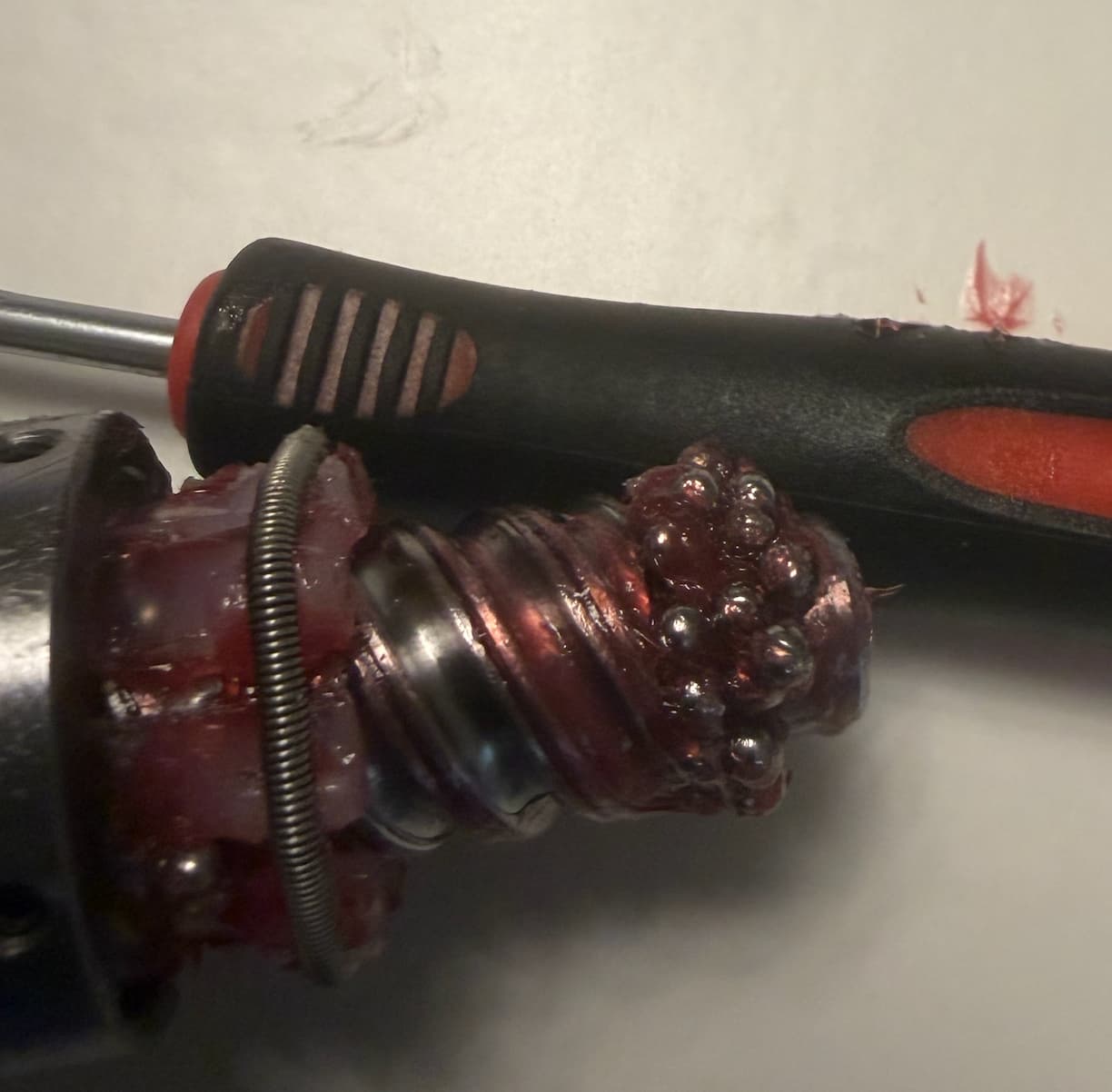
About 95 boards cut so far (or a 180 board project), and I’m already learning skills I had absolutely no intention of learning. First, I have shut the machine off and reset it 279 times with 284 zero’s. Yes, I kept tabs. On Average I cut 1 board about every 5 hours of actual labor. Yeah, Im new to all of this but thats tons of work. I mean if I didn’t have a Phd and I wasn’t a Paintless Dent Repair Technician who takes stuff apart for a living… I wouldn’t have cut anything. In all honestly, I need at least one more machine exactly like this so I can steal parts from just to keep her up and running.
Left Y axis started rattling, then buzzing, then jamming, followed by HM009 errors and what appears to be a pretty catastrophic failure. After replacing the stepper motor and homing sensor with no improvement, I tore into it and found ball bearings coming out of the ball nut.
I don’t know yet if the ball nut caused the original problem or became collateral damage from something else. I’m currently attempting to repack it and find out. Apparently owning a Shapeoko 5 Pro means that by Week 2 you’re expected to be a CNC operator, machinist, electrician, diagnostician, and master of repacking tiny ball bearings into places human fingers were clearly never intended to reach.
Machine: Shapeoko 5.1 Pro 4x4.
Boards cut: FML
Return on investment thus far: I have acquired several new job skills.
You mean call the number and talk to the message machine? Yeah, Ive done that and had no luck. Im 99.9% sure that this isnt the actual cause of the “real” problem. Either way, Im seriously thinking about disputing the charge on the American Express card and just sending it back. Too many problems this soon. I may try my luck with a different brand. Im open to suggestions.
It isn’t clear from your message if you already contacted support. If you’re packing bearings then something went wrong somewhere. Maybe you got a faulty machine or maybe it’s user error, but either way, C3D support is generally responsive - especially so given that your machine is under “no-fault” replacement warranty. They also have free 1x1 video training sessions for new users.
I know the frustration of failed cuts and I hope you get things resolved soon.
I’m on my second machine in 8 years and have used support more than I want to admit. They’ve always been extremely helpful and proactive. If calling doesn’t work I typically send an email.
Bearings don’t just fall out of the ballscrew or the linear motion hardware on their own. The system doesn’t generate enough force to make that happen. When we’ve looked into similar reports, what we usually find is that the ballnut was removed from the screw, and once that happens, there’s nothing retaining the balls so they will come out every time. That’s the nature of a ballscrew, not a defect.
I don’t know what that red grease is, but Mobil Vactra is the recommended oil. If you prefer grease, Mobil EP1 or EP2 works. For the ballscrew itself, I’d stick to oil.
Our support team has seen more of these machines than anyone, and they know the patterns and what to look for to get you running. Reach out to them directly at support@carbide3d.com and they’ll get you sorted. They work from a single queue of phone messages (which are automatically transcribed and added to the queue) and emails to fairly handle everyone in the order they contacted us.
I did figure out how to pack them myself. That was the solution. I had to take everything apart and clean everything. Then painstakinly push them into place…she purrs like a kitten now…Still…like a kitten made of paper on a rainy day.
Be sure to use dust collection and remove as much of that grease as possible. (Which looks like it’s begging to trap a bunch of sawdust and carry it into the ballnut.)
If you have stops on your spoil board to position the work piece. In CM go to run, rapid actions, then user. There you can save the x, y ,and z . After initialization, go to user menu and run what you saved, I then do a tool change from run menu (without changing tool) to set the z. Really quick and easy
Thanks, Rob. Just to clarify, I’m not suggesting that the bearings spontaneously fell out of the ballnut. What happened was that sand, sawdust, grit, and general shop debris had gotten into the assembly and the bearings had begun binding and seizing internally. There was already substantial friction before I ever removed the screw. I pulled the screw because I was trying to diagnose and correct that problem, and because everything was already bound up, getting it apart was difficult. Once the screw finally came out, then, of course, the bearings came out with it.
The red grease in the photo was something I picked up at AutoZone after trying to find the closest appropriate lubricant I could get locally. I cleaned everything thoroughly, repacked the ballnut, and was ultimately able to get the entire assembly back together and operating again. The mechanical work itself really was not that difficult. The difficult part was that I could not find a guide, diagram, video, or other documentation showing how Carbide intended the ballnut to be repacked and reassembled. So I was basically figuring it out as I went.
At this point, I actually think I can keep the machine running and finish my project. What I am realizing, though, is that I probably need to keep a small inventory of spare parts on hand. If I had a couple of additional sensors, a supply of the correct replacement ball bearings, and perhaps a couple of spare stepper motors, I think I could handle most of these problems myself and keep moving rather than losing days whenever something fails.
That is really where my frustration is coming from. I bought the machine assuming it would simply operate for reasonably long periods without requiring this much troubleshooting, disassembly, cleaning, replacement parts, and improvisation. That assumption may have been my own ignorance about what ownership of this type of CNC machine involves. I’m learning very quickly that keeping one running can involve a fair amount of maintenance and MacGyvering. I can deal with that. I just did not understand going into it that this was going to be part of the ownership cost and experience.
“Left Y axis started rattling, then buzzing, then jamming, followed by HM009 errors and what appears to be a pretty catastrophic. What happened was that sand, sawdust, grit, and general shop debris had gotten into the assembly and the bearings had begun binding and seizing internally.”
I’m not sure how sand got into the assembly? I would expect that if I let sand get in there I would have exactly the issues you had. That being said, any mechanical machine will need maintenance, I have the S5 Pro 4x4 and have to maintain it if I expect it to perform as I intend it to.
Not sure why you’re having such an issue with yours other than lack of maintenance as you described yourself?
Any machines with a ballscrew requires dust collection to keep the machine in good operating condition. If you don’t use dust collection, it’s only a matter of time before you have trouble. At this point, we’ve seen photos of every brand of machine packed so full of dust it won’t function.
The good news is that the included Sweepy dust boot is all that most people need since it will pick up the vast majority of the chips and dust created, and the wipers that we added do a good job of keeping the remaining dust from getting in there. (We can usually look at a photo of a machine and immediately know if the user has not been using Sweepy)
Yes, this is exactly my problem. I did purchase the Sweepy and installed it, but you’re right, I haven’t really been running it. Mostly that’s because I’m completely new to CNC, and with Anthropic creating the Artifacts in the project, every once in a while she just randomly decides to do something crazy. So right now I’m basically glued to every movement, running everything in slow motion and watching her like a hawk. Again, I’m totally new to all of this. The bigger issue is that the ball bearings seem to be having problems across the machine. Last night I took everything apart around the Z axis and spindle and cleaned everything thoroughly with WD 40, and that one was actually worse than the other one. Regardless, at least now I know how to clean and repack the bearings myself. At this point, if I keep a few spare stepper motors, sensors, and ball bearings around, I think I can keep her running and handle most of these problems myself as they come up.
Sorry, I should have explained that better. Anthropic is the company that makes Claude, the AI I’ve been using to help me create some of my designs and toolpaths. “Artifacts” is Claude’s term for the files, code, and interactive things it generates, so it isn’t a Carbide 3D product or term at all. (Anthropic Help Center)
As far as the Hello guides, yes, I have gone through the basic process and I can operate the machine normally through Carbide Motion. (Carbide 3D Guides) My problem isn’t really understanding how to initialize, jog, zero, and run the machine. I’m just brand new to CNC and I’ve also been experimenting with AI generated designs, so I watch the machine extremely closely because I don’t yet trust myself or the generated toolpaths enough to walk away from it. The mechanical problems with the bearings, sensors, and stepper motors are a separate issue. I’m learning a lot very quickly, though, and after taking the machine apart and repacking the bearings myself, I’m becoming much more comfortable diagnosing and repairing it…when dealing with real world use…
You should never trust a toolpath to the point where you “walk away from it”:
Never leave the machine running unattended/unsupervised.
Before we get started I’d like to take a moment to talk about shop safety. Be sure to read, understand and follow all the safety rules that come with your power tools. Knowing how to use your power tools PROPERLY will greatly reduce the risk of personal injury. And remember this. There is no other more important safety rule…
[Norm points to his glasses.]
Norm Abram:
…than to wear THESE… safety glasses…
[He holds up ear protectors]
Norm Abram:
…and also HEARING protection when necessary.
Yes, I’m aware that you should never leave a CNC machine running unattended. When I said I don’t “trust” the toolpath enough to walk away, I wasn’t announcing my intention to eventually leave a running CNC machine alone. I was explaining why, as a brand new user working with AI generated files, I am currently watching every movement exceptionally closely and often running things in slow motion. I appreciate the links, though. I’ll be sure to wear my safety glasses too, and if Norm Abram has any guidance on repacking Shapeoko ball nuts, definitely send that one my way.